

Bandwidth Limiting on Huawei and Cisco Switches
Switch Commands:
Huawei Switch:
[LinkIDC-LF-J5]di cu // Display current configuration
[LinkIDC-LF-J5]int e1/0/2 // Enter interface view
[LinkIDC-LF-J5-Ethernet1/0/2]int e1/0/3 // Switch to interface 3
[LinkIDC-LF-J5-Ethernet1/0/3]line i 5120 // Inbound bandwidth limit 5120 Kbps
[LinkIDC-LF-J5-Ethernet1/0/3]line o 5120 // Outbound bandwidth limit 5120 Kbps
[LinkIDC-LF-J5-Ethernet1/0/3]q // Quit
[LinkIDC-LF-J5]q // Quit
Note: These examples use abbreviated commands. Use the Tab key to auto-complete and view the full command syntax.
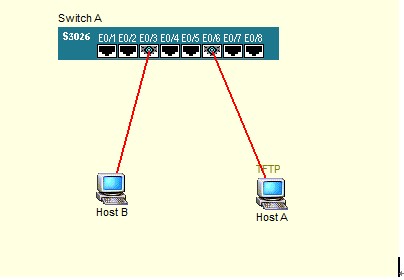
——————————————————————————————————-
Cisco Switch:
s1#show run // Display running configuration
s1#conf t // Enter global configuration mode
[s1-config]? // Use ? for help on available commands
Switch#conf t // Enter global configuration mode
Switch(config)#interface fastEthernet 0/22 // Enter interface configuration mode
Switch(config-if)#storm-control unicast level 2 // Limit unicast storm to 2%; on a 100 Mb interface, this equals 2 Mb
Switch(config-if)#exit // Exit interface configuration mode
Switch(config)#exit // Exit global configuration mode
Switch#write // Save configuration
——————————————————————————————————
Cisco Switch Practical Example:
PC>telnet 10.0.0.60
Trying 10.0.0.60 …Open
User Access Verification
Password:
Switch>en
Password:
Switch#sh ru
Building configuration…
Current configuration : 1157 bytes
!
version 12.1
no service timestamps log datetime msec
no service timestamps debug datetime msec
no service password-encryption
!
hostname Switch
!
enable password 123321
!
!
!
interface FastEthernet0/1
storm-control broadcast level 1
!
interface FastEthernet0/2
storm-control broadcast level 1
!
interface FastEthernet0/3
!
interface FastEthernet0/4
!
interface FastEthernet0/5
!
interface FastEthernet0/6
!
interface FastEthernet0/7
!
interface FastEthernet0/8
!
interface FastEthernet0/9
!
interface FastEthernet0/10
!
interface FastEthernet0/11
!
interface FastEthernet0/12
!
interface FastEthernet0/13
!
interface FastEthernet0/14
!
interface FastEthernet0/15
!
interface FastEthernet0/16
!
interface FastEthernet0/17
!
interface FastEthernet0/18
!
interface FastEthernet0/19
!
interface FastEthernet0/20
!
interface FastEthernet0/21
!
interface FastEthernet0/22
!
interface FastEthernet0/23
!
interface FastEthernet0/24
!
interface GigabitEthernet1/1
!
interface GigabitEthernet1/2
!
interface Vlan1
ip address 10.0.0.60 255.255.0.0
!
ip default-gateway 10.0.0.60
!
!
line con 0
!
line vty 0 4
password 123321
login
line vty 5 15
login
!
!
end
Switch#conf t
Enter configuration commands, one per line. End with CNTL/Z.
Switch(config)#inter
Switch(config)#interface fa
Switch(config)#interface fastEthernet0/1
Switch(config-if)#sto
Switch(config-if)#storm-control unicast level 2
Switch(config-if)#exit
Switch(config)#exit
Switch#write
Building configuration…
[OK]
Switch#