

I happened to notice that Hadoop’s system CPU usage was very high, and a quick search revealed this is actually a known issue.
RHEL6 optimized memory allocation efficiency, and in certain scenarios it provides a significant improvement for KVM performance: http://www.linux-kvm.org/wiki/images/9/9e/2010-forum-thp.pdf.
However, Hadoop is a memory-intensive computational system, and this change appears to have caused side effects. In theory, computational Java programs should spend more time in user-mode CPU. Cloudera officially recommends disabling THP. So I referred to some articles and made the following adjustments:
- # for hadoop , disable thp
- echo never > /sys/kernel/mm/redhat_transparent_hugepage/enabled
- echo never > /sys/kernel/mm/redhat_transparent_hugepage/defrag
The effect was very obvious:
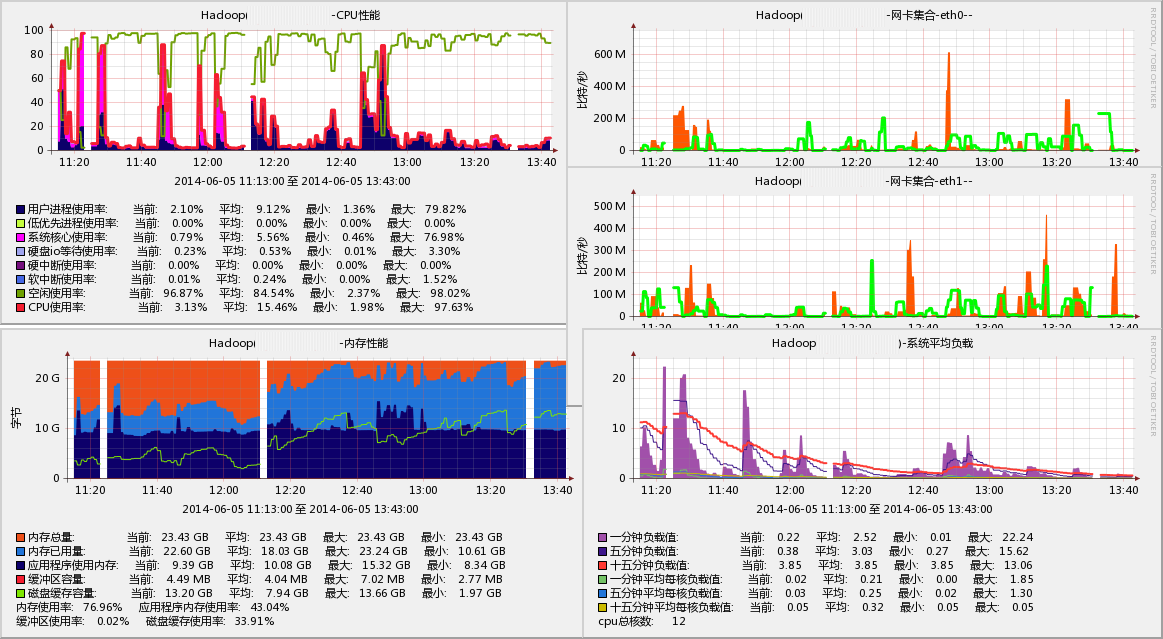
The effect was very noticeable. The operation was performed around 12:05, and the system CPU usage basically disappeared. The Cache usage increased, and the machine load decreased.
In addition to manually modifying runtime parameters, you can also modify the kernel boot parameters in /etc/grub.conf by appending “transparent_hugepage=never” (this option only affects /sys/kernel/mm/redhat_transparent_hugepage/enabled).
Originally, the transparent_hugepage feature was introduced after kernel 2.6.38. Red Hat merged this feature into RHEL6, and the details still require further investigation.
via: http://hi.baidu.com/higkoo/item/eb5e69c17c6b300a0ad93a00