

It’s time to write some Python code. I love automating things, and today I’ll show you how to use Python to connect to your machine via SSH and run commands on it. It’s not particularly hard, but doing it with Python isn’t trivial either, as it requires several modules and libraries to accomplish the task. Are you curious about which module this tutorial will use?
We’ll use the pxssh class from Python’s pexpect module, which is designed to handle automation needs such as SSH and FTP. Want to make your system administration life as easy as possible? Then follow this tutorial and try to learn as much as you can. Alright, look here—I’ll give a brief description of pxssh below. You can also type help(pxssh) after importing pxssh in the Python interactive shell to get more information about it.
Introducing pxssh
pxssh is based on pexpect. It’s an extension class of pexpect.spawn, specifically built for establishing SSH connections. I frequently use Python’s pxssh for SSH connections. pxssh uses the shell prompt to synchronize output from the remote host. To make it more robust, it sets the shell prompt to something more unique than just $ or #. This should work on most Borne/bash or csh shells.
You can read more about pxssh here.
Now let’s get started.
First, we import everything we need and assign variables for the machine details, as shown in Screenshot 1.
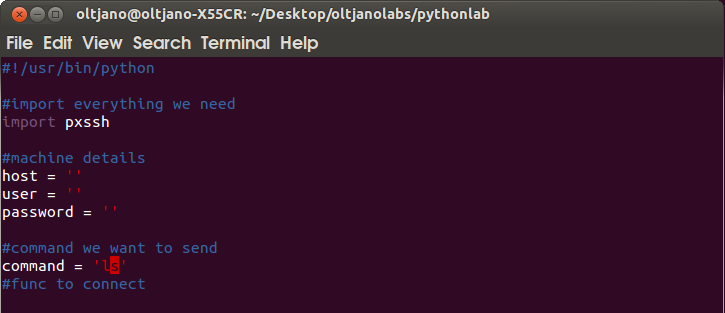
Screenshot 1
After that, we create a function that uses pxssh to create and start a connection to the SSH server.
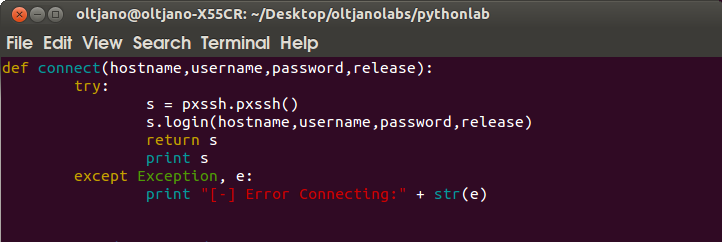
Screenshot 2
Please study carefully how we handle errors using try and except. You can read more about Python error handling here.
What’s next?
The next step is to create a function to send commands to the machine once the SSH connection between the two machines is established.
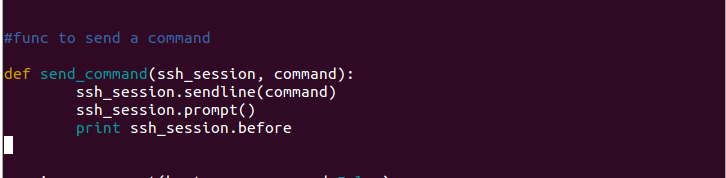
Screenshot 3
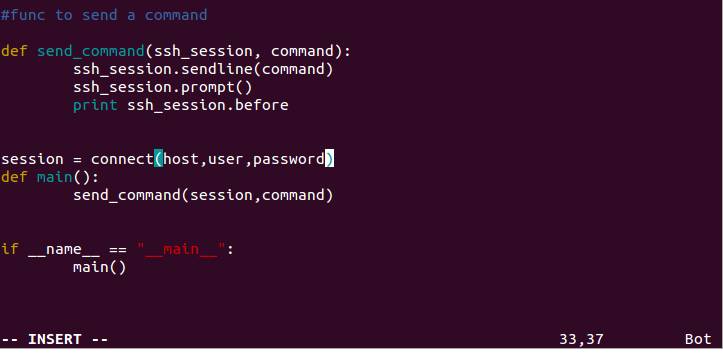
Screenshot 4
Close the file and save it. Now it’s ready to run.
via: http://www.unixmen.com/use-python-ssh-machine/