

For Web 2.0 sites, data content grows exponentially, especially those small files ranging from a few KB to a few hundred KB, with massive quantities. Traditional file systems struggle to handle them. Many websites have encountered these issues during scaling: excessive disk IO; backup difficulties; single point of failure, inability to scale capacity and read/write horizontally, and the risk of outages.
YouTube faced this problem too. Each video has four thumbnails, meaning the number of thumbnails is four times the number of videos. Just imagine how many videos YouTube has, and look at the issues they encountered:
- Massive disk seeks, causing inode cache and page cache issues at the OS level.
- Single directory file count limits, especially with the Ext3 filesystem. While using directory hierarchies helps, and the latest Linux Kernel 2.6 optimized Ext3 to increase single-directory file storage by 100x, storing all files in one directory is still not a good approach.
- High RPS (requests per second) because a single page might display 60 thumbnails.
- Poor Apache performance under high load.
- Adding a Squid layer in front of Apache helped for a while, but as load increased, performance dropped sharply from 300 RPS to 20 RPS.
- They tried lighttpd, but lighttpd is single-threaded. Multi-threading also had issues, as caches could not be shared between threads.
- Adding a new server took 24 hours because the file count was too high.
- There was a “cool-down” problem: after restarting a server, it took 6 to 10 hours to warm up the cache.
YouTube’s solution was Google’s BigTable, which is out of reach for most people. (See the original article: http://www.hfadeel.com/Blog/?p=127)
Facebook encountered the same problem. Their solution is detailed here: http://www.dbanotes.net/arch/facebook_photos_arch.html. They went through three stages:
- NFS sharing: Mount a disk array, with app servers reading and writing via NFS.
- Add a middle caching layer: eventHttp + memcached (lighttpd + mod_memcache achieves the same functionality), with the backend still connecting to the disk array via NFS.
- Haystacks. Read the details here (in English).
So, what are the practical solutions for average websites?
1. NFS Sharing
Yes, this has many problems, but it has low implementation costs and is used by many companies (including us). It works quite well when the file count isn’t huge and concurrency isn’t that high. Set up hash directories to prevent too many files in a single folder. It’s sufficient for most general websites.
Backup is indeed a problem. If the data isn’t massive, daily incremental backups based on file update time, combined with periodic full backups, should work.
2. Storing Files in a Database
Some people actually do this. Imobile created 256 tables in MySQL to store over 1TB of files. They added a multi-level cache in front (the specifics are unknown; maybe memcached, maybe files), and used the database for data backup. They seem quite happy with the setup.
or if you find MySQL too heavyweight, try a key->value database like BDB, Tokyo Cabinet, etc.
3. Distributed File Systems
There are many open-source options. Haokanbu uses MogileFS, which comes from the same creators as memcached. Maxthon uses MFS to store users’ bookmark files. For detailed articles, see: Distributed File System MFS (moosefs) for Storage Sharing (Part 1) , (Part 2). It’s said to handle millions of files with ease.
The benefits of a distributed file system include balanced read/write load and significantly increased data reliability — it doesn’t matter if a single data node goes down.
Still not enough? DIY your own. That’s exactly what Douban did, using TokyoCabinet as the underlying storage, wrapping a memcached protocol interface around it (how is that different from Tokyo Tyrant?), with consistent hashing, allowing applications to read/write data across nodes based on hash rules:
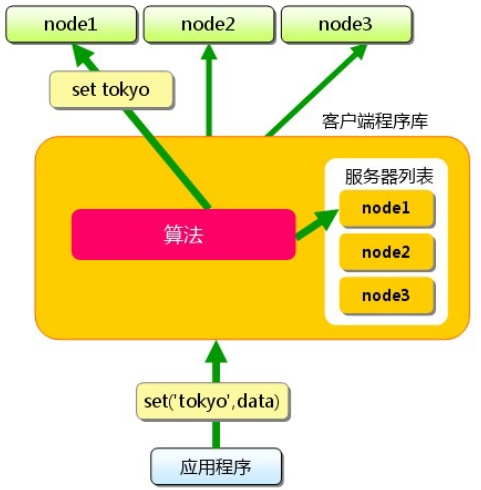 http://www.fuchaoqun.com/2009/04/deal-with-tons-of-small-files/
DoubanFS Architecture Diagram, copyright by charlee