
MySQL Master-Slave Replication (Async), Semi-Synchronous Replication, and SSL-Based Replication (Part 1)

Overview

    Replication is commonly used to create copies of the master node, ensuring high availability by adding redundant nodes. Of course, replication can also serve other purposes, such as performing data reads and analysis on slave nodes. In horizontally scaling businesses, replication is easy to implement, primarily by using the master node for write operations and multiple slave nodes for read operations. In MySQL 5.5, the default replication mode is asynchronous.

    The asynchronous nature of MySQL replication means that transactions are first committed on the master node, then copied to and applied on the slave nodes. This implies that data on the master and slave may be inconsistent at the same point in time. The advantage of asynchronous replication is that it is faster than synchronous replication. If high data consistency is required, synchronous replication is still a better choice.

    Starting from MySQL 5.5, semi-synchronous replication is supported, which aims to maintain master-slave consistency within transactional environments.

    Starting from MySQL 5.6, delayed replication is supported.

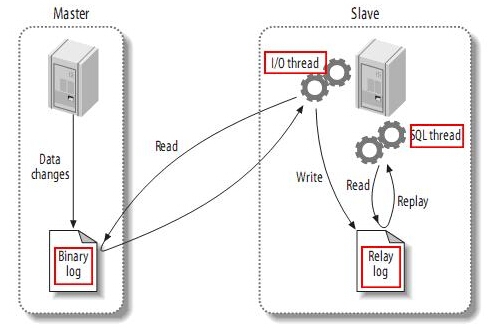
    The principle of MySQL replication is currently the same across versions: the master records operations in the bin-log. A thread on the slave connects to the master to read the bin-log, saves them to the relay-log, and another thread on the slave replays the operations in the relay-log to synchronize data with the master.


    wKioL1OWgmrSKROTAAEnELMIXRI329.jpg

    The first part of this process is the master recording binary logs. Before each transaction finishes updating data, the master records these changes in the binary log. MySQL writes transactions to the binary log serially, even if the statements within the transactions are interleaved. After the events are written to the binary log, the master notifies the storage engine to commit the transaction.
    The next step is for the slave to copy the master’s binary log to its own relay log. First, the slave starts a worker thread—the I/O thread. The I/O thread opens a normal connection on the master and then starts the binlog dump process. The Binlog dump process reads events from the master’s binary log. If it has caught up with the master, it sleeps and waits for the master to generate new events. The I/O thread writes these events to the relay log.
    The SQL slave thread handles the final step of this process. The SQL thread reads events from the relay log and replays them to update the slave’s data, making it consistent with the master’s data. As long as this thread keeps pace with the I/O thread, the relay log usually resides in the OS cache, so the overhead of the relay log is minimal.
    Additionally, there is a worker thread on the master as well: just like any other MySQL connection, the slave opening a connection on the master also causes the master to start a thread. The replication process has one very important limitation—replication is serialized on the slave, meaning that parallel update operations on the master cannot be performed in parallel on the slave.


Asynchronous Master-Slave Replication Configuration

Preparation:

    OS: rhel5.8_i386

    SoftWare: mysql-5.5.28-linux2.6-i686.tar.gz


1. Install MySQL on Master and Slave

1
2
3
4
5
6
7
8
9
10
11
12
13
14
15
16
   tar xf mysql-5.5.28-linux2.6-i686.tar.gz -C /usr/local/
   # cd /usr/local/
   # ln -s mysql-5.5.28-linux2.6-i686/ mysql
   # groupadd -r mysql
   # useradd -r -g mysql -s /sbin/nologin mysql
   # mkdir /mydata/data -p
   # chown -R mysql.mysql /mydata/data/
   # chown -R root.mysql /usr/local/mysql/*
   # cp support-files/my-large.cnf /etc/my.cnf
   # cp support-files/mysql.server  /etc/init.d/mysqld
       [mysqld]
       innodb_file_per_table = 1
       datadir = /mydata/data # Since this is a binary installation of MySQL, the data directory must be specified
   # vim /etc/profile.d/mysqld.sh
       export PAHT=$PATH:/usr/local/mysql/bin
   # . /etc/profile.d/mysqld.sh

2. Master Server Configuration

1
2
3
4
5
6
7
8
9
10
11
12
13
14
15
16
17
18
19
20
21
22
    # vim /etc/my.cnf
        [mysqld]
        log-bin = master-bin
        log-bin-index = master-bin.index
        
        server-id = 1
    # scripts/mysql_install_db --user=mysql --datadir=/mydata/data/
    # service mysqld start
    # mysql
    mysql> grant replication slave on *.* to repl@'192.168.100.12' identified by 'asdasd';
    mysql> flush privileges;
    mysql> flush logs;
    mysql> show master logs;
    +-------------------+-----------+
    | Log_name          | File_size |
    +-------------------+-----------+
    | master-bin.000001 |     27326 |
    | master-bin.000002 |   1038693 |
    | master-bin.000003 |       379 |
    | master-bin.000004 |       107 |
    +-------------------+-----------+
    mysql> purge binary logs to 'master-bin.000004';

3. Slave Configuration

1
2
3
4
5
6
7
8
9
10
11
12
13
14
15
16
17
18
19
20
21
22
23
24
25
26
27
28
29
30
31
32
33
34
35
36
37
38
39
40
41
42
43
44
45
46
47
48
49
50
51
52
53
54
55
56
57
58
59
    # vim /etc/my.cnf
        [mysqld]
        relay-log = relay-log
        relay-log-index = relay-log.index
        read-only = 1
        #innodb_file_per_table = 1
        #binlog_format=mixed
        server-id = 10
    # scripts/mysql_install_db --user=mysql --datadir=/mydata/data/
    # service mysqld start
    mysql> change master to master_host='192.168.100.11',master_user='repl',master_password='asdasd',master_log_file='master-bin.000004',master_log_pos=107;
    mysql> show slave status/G
    *************************** 1. row ***************************
                   Slave_IO_State: 
                      Master_Host: 192.168.100.11
                      Master_User: repl
                      Master_Port: 3306
                    Connect_Retry: 60
                  Master_Log_File: master-bin.000004
              Read_Master_Log_Pos: 107
                   Relay_Log_File: relay-log.000001
                    Relay_Log_Pos: 4
            Relay_Master_Log_File: master-bin.000004
                 Slave_IO_Running: No
                Slave_SQL_Running: No
                  Replicate_Do_DB: 
              Replicate_Ignore_DB: 
               Replicate_Do_Table: 
           Replicate_Ignore_Table: 
          Replicate_Wild_Do_Table: 
      Replicate_Wild_Ignore_Table: 
                       Last_Errno: 0
                       Last_Error: 
                     Skip_Counter: 0
              Exec_Master_Log_Pos: 107
                  Relay_Log_Space: 107
                  Until_Condition: None
                   Until_Log_File: 
                    Until_Log_Pos: 0
               Master_SSL_Allowed: No
               Master_SSL_CA_File: 
               Master_SSL_CA_Path: 
                  Master_SSL_Cert: 
                Master_SSL_Cipher: 
                   Master_SSL_Key: 
            Seconds_Behind_Master: NULL
    Master_SSL_Verify_Server_Cert: No
                    Last_IO_Errno: 0
                    Last_IO_Error: 
                   Last_SQL_Errno: 0
                   Last_SQL_Error: 
      Replicate_Ignore_Server_Ids: 
                 Master_Server_Id: 0
    1 row in set (0.00 sec)
    mysql> start slave;
    mysql> show slave status/G
             Slave_IO_Running: Yes
            Slave_SQL_Running: Yes
            ..............

    At this point, the master-slave asynchronous replication is complete.

    Notes:

        slave_id must be unique.

        The slave does not necessarily need binary logging enabled, but it must be configured in certain scenarios, such as MySQL cascading replication. If the slave acts as the master for other slaves, then bin_log must be set. It defaults to the hostname, but problems can arise if the hostname changes.

        Some users may enable binary logging on the slave without setting log_slave_updates, and then check whether the slave data changes. This is an incorrect configuration. Therefore, it is best to use read_only = 1 to prevent data changes (except by the SQL_Thread process).

        start slave : Starts the IO_Thread and SQL_Thread threads on the slave server. You can also start them individually.

        On the master server, you need to set sync-binlog = 1 for transaction safety.

        To reset change master parameters:

1
2
3
            mysql> slave stop;
            mysql> reset slave;
            mysql> change master to master_host='192.168.100.11',master_user='repl',master_password='asdasd',master_log_file='master-bin.000005',master_log_pos=107;

        Since the slave automatically connects to the master, when manual adjustment is sometimes needed, you can move the master.info and relay-log.info files in the slave data directory before starting, or check if the “skip-slave-start” variable exists in the variables and set it to ON if so.


Semi-Synchronous Replication

    /usr/local/mysql/lib/plugin/semisync_master.so
    /usr/local/mysql/lib/plugin/semisync_slave.so

    1. Master Server Configuration

1
2
3
4
5
6
7
8
9
10
11
12
    mysql> install plugin rpl_semi_sync_master soname 'semisync_master.so';
    mysql> show variables like '%semi%';
    +------------------------------------+-------+
    | Variable_name                      | Value |
    +------------------------------------+-------+
    | rpl_semi_sync_master_enabled       | OFF   |
    | rpl_semi_sync_master_timeout       | 10000 |
    | rpl_semi_sync_master_trace_level   | 32    |
    | rpl_semi_sync_master_wait_no_slave | ON    |
    +------------------------------------+-------+
    mysql> set global rpl_semi_sync_master_enabled=1;
    mysql> set global rpl_semi_sync_master_timeout=1000;

    2. Configuration on the Slave

1
2
3
4
5
6
7
8
9
    mysql> install plugin rpl_semi_sync_slave soname 'semisync_slave.so';
    mysql> show variables like '%semi%';
    +---------------------------------+-------+
    | Variable_name                   | Value |
    +---------------------------------+-------+
    | rpl_semi_sync_slave_enabled     | OFF   |
    | rpl_semi_sync_slave_trace_level | 32    |
    +---------------------------------+-------+
    mysql> set global rpl_semi_sync_slave_enabled=1;

    To make the changes permanent, add the above variables to the [mysqld] section in the configuration files on both the master and the slave respectively.


MySQL Replication Filtering

    MySQL replication filtering can be performed on either the Master or the Slave.
    Since filtering operations on the Master will affect the integrity of the binary logs and can impact point-in-time recovery later, it is generally not recommended to apply replication filters on the Master.

    1. Database-Based

1
2
    binlog-do-db           //binlog-do-db specifies which database's write and modify operations will be logged
    binlog-ignore-db        //binlog-ignore-db specifies a blacklist to ignore these databases


    2. Table-Based Filtering
    replicate-do-table=
    replicate-ignore-table=


    3. Wildcard-Based Table Filtering
    replicate-wild-do-table=
    replicate-wild-ignore-table=

Leave a Comment

Your email address will not be published.