

It’s common to forget the MySQL password when using MySQL databases. I’ve encountered this myself, and while searching online for solutions, many of them didn’t work (most were just reposts…). Eventually, I summarized my own approach and successfully resolved the MySQL forgotten password issue.
Solution 1
1: Locate the main configuration file at /etc/my.cnf (on Windows, it should be inside MySQL’s bin folder; the directory varies by system).
2: Find the word [mysqld] in the main configuration file, then add skip-grant-tables below it. This line is for skipping authentication checks. Save, exit, and then restart MySQL (/etc/init.d/mysqld restart). Make sure to restart the MySQL service.
3: Once inside, first type use mysql; // Switch to the mysql database.
4: Then run the command mysql> update user set password=password('new password') where user='root';
5: Since we added the skip-grant-tables line in the config file during step 2, you must remove this line after making the change. Otherwise, everything you did will be ineffective. Then restart MySQL again.
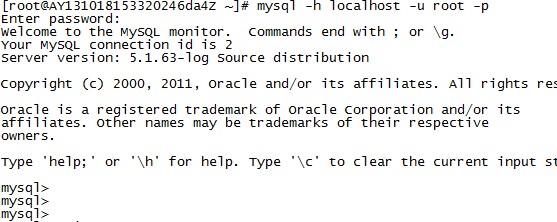
6: After this step, you can start MySQL. If you just type mysql, you won’t be able to get in. You need to type mysql -u root -p, which means you are using the root user and a password is required.
Solution 2
1. Send a kill command to shut down the mysqld server (not kill -9). The file storing the process ID is usually located in the MySQL database directory.
kill `cat /mysql-data-directory/hostname.pid`
You must be the UNIX root user or an equivalent user on the server you are running to perform this operation.
2. Use the `–skip-grant-tables` parameter to start mysqld.
3. Use the `mysql -h hostname mysql` command to log into the mysqld server, then use the grant command to change the password. Alternatively, you can do this: `mysqladmin -h hostname -u user password 'new password'`.
(You can also use use mysql; update user set password =password('yourpass') where user='root'; to achieve this.)
4. Load the grant tables: `mysqladmin -h hostname flush-privileges` , or use the SQL command `FLUSH PRIVILEGES`. (Of course, you can also just restart mysqld here.)
kill `cat /mysql-data-directory/hostname.pid`
You must be the UNIX root user or an equivalent user on the server you are running to perform this operation.
2. Use the `–skip-grant-tables` parameter to start mysqld.
3. Use the `mysql -h hostname mysql` command to log into the mysqld server, then use the grant command to change the password. Alternatively, you can do this: `mysqladmin -h hostname -u user password 'new password'`.
(You can also use use mysql; update user set password =password('yourpass') where user='root'; to achieve this.)
4. Load the grant tables: `mysqladmin -h hostname flush-privileges` , or use the SQL command `FLUSH PRIVILEGES`. (Of course, you can also just restart mysqld here.)
Solution 3
1. Install the same version of MySQL on another computer.
2. Delete all contents of the /data/mysql directory inside the MySQL installation directory on the computer with the forgotten password (stop the MySQL service first).
3. Copy all contents of the /data/mysql directory from the newly installed MySQL on the other computer to the directory you just emptied.
4. Start the MySQL service.