

1. Checking Log Files
On Linux, check /var/log/wtmp to view suspicious IP logins
last -f /var/log/wtmp
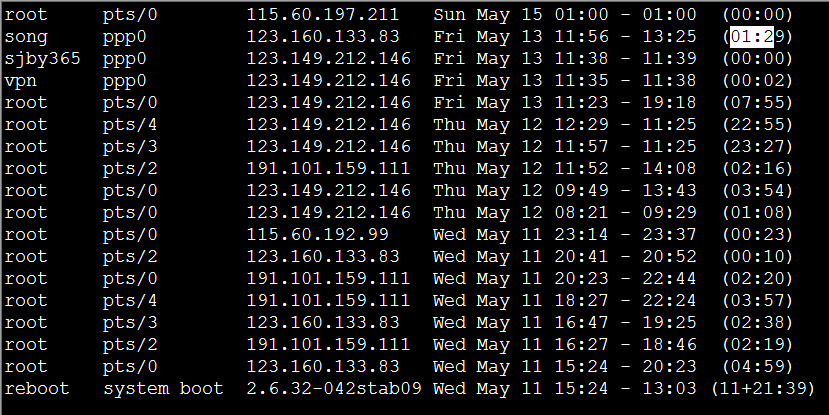
This log file permanently records every user login, logout, and system startup/shutdown event. Therefore, as system uptime increases, this file grows larger over time,
and the growth rate depends on how often users log into the system. This log file can be used to view user login records.
The last command retrieves this information by accessing the file and displays user login records in reverse chronological order. last can also display matching records filtered by user, tty terminal, or time.
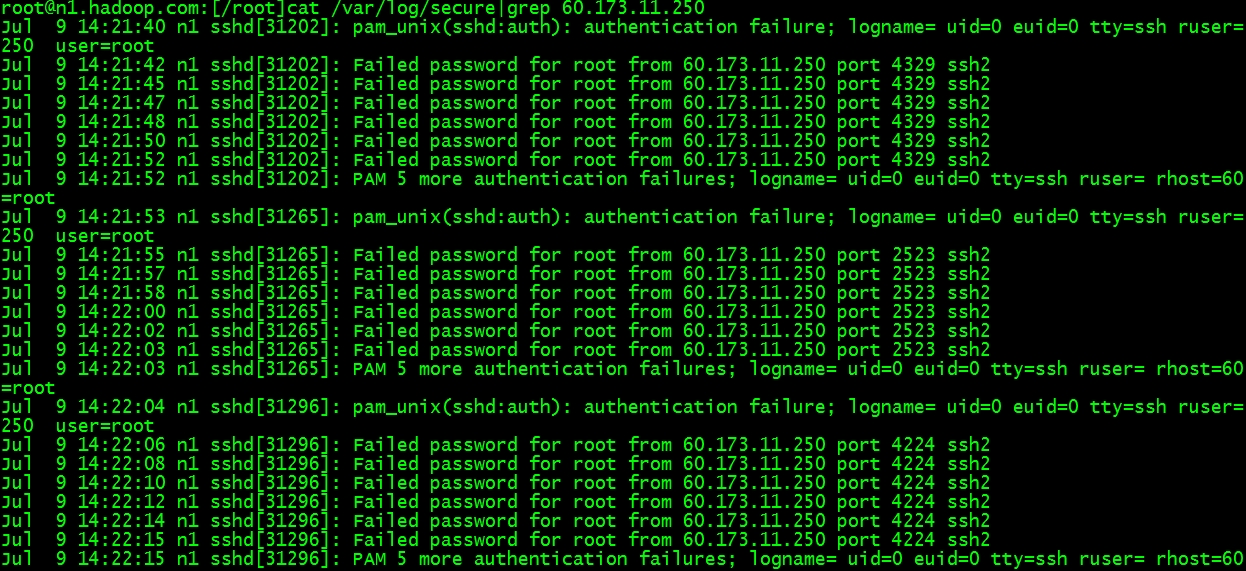
2. Check /var/log/secure to find the number of suspicious IP login attempts
3. Generating operation history for all logged-in users via a script
In a Linux environment, whether it is the root user or other users, once they log in and perform operations, we can use the history command to view the history. However, if multiple people log into a server and one day someone accidentally deletes important data, checking the history (using the command history) becomes meaningless at that point (because history is only effective for the currently logged-in user; even the root user cannot access another user’s history). Is there a way to record the IP address and the operation history of a specific username after login? The answer is yes.
You can achieve this by adding the following code into /etc/profile:
PS1="`whoami`@`hostname`:"'[$PWD]'
history
USER_IP=`who -u am i 2>/dev/null| awk '{print $NF}'|sed -e 's/[()]//g'`
if [ "$USER_IP" = "" ]
then
USER_IP=`hostname`
fi
if [ ! -d /tmp/dbasky ]
then
mkdir /tmp/dbasky
chmod 777 /tmp/dbasky
fi
if [ ! -d /tmp/dbasky/${LOGNAME} ]
then
mkdir /tmp/dbasky/${LOGNAME}
chmod 300 /tmp/dbasky/${LOGNAME}
fi
export HISTSIZE=4096
DT=`date "+%Y-%m-%d_%H:%M:%S"`
export HISTFILE="/tmp/dbasky/${LOGNAME}/${USER_IP} dbasky.$DT"
chmod 600 /tmp/dbasky/${LOGNAME}/*dbasky* 2>/dev/null
鈥婣pply the script
source /etc/profile
Log out and log back in.
The script above creates a new dbasky directory under /tmp on the system, recording all users and IP addresses that have logged into the system (as filenames). Every time a user logs in/out, a corresponding file is created. This file stores the operation history during that user’s login session. You can use this method to monitor system security.
Original article: http://www.centoscn.com/CentosSecurity/CentosSafe/2015/0711/5830.html
<<<