

Applicable Environment for This Script:
Supported Systems: CentOS, Debian, Ubuntu
Memory Requirements: ≥128M
Date: March 09, 2015
About This Script: A one-click installer for the latest Go version of shadowsocks 1.1.3. It is said that the Go version has buff, but I haven’t noticed it. Unlike the Python version, its client program can use multiple server configurations, but this script installs the server side. The author recommends aes-128-cfb encryption by default; for consistency, the script uses aes-256-cfb encryption instead.
Friendly Reminder: If you have issues, please read this “Shadowsocks Troubleshooting” article first before asking.
Default Configuration:
Server Port: 8989
Client Port: 1080
Password: Set your own (defaults to teddysun.com if not set)
Client Download:
http://sourceforge.net/projects/shadowsocksgui/files/dist/
Usage:
Log in as root and run the following commands:
wget –no-check-certificate https://raw.githubusercontent.com/teddysun/shadowsocks_install/master/shadowsocks-go.sh
chmod +x shadowsocks-go.sh
./shadowsocks-go.sh 2>&1 | tee shadowsocks-go.log
After installation, the script prompts as follows:
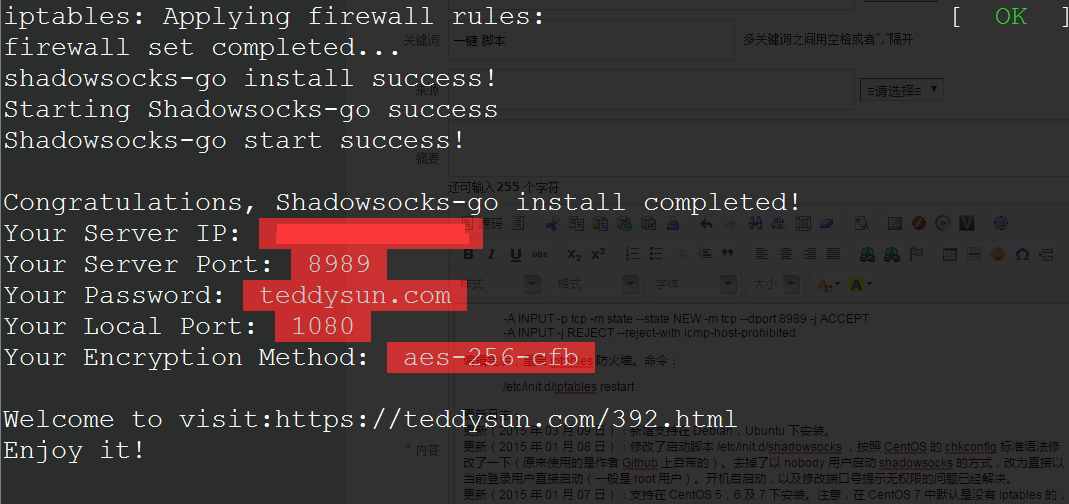
Congratulations, shadowsocks-go install completed!
Your Server IP:your_server_ip
Your Server Port:8989
Your Password:your_password
Your Local Port:1080
Your Encryption Method:aes-256-cfbWelcome to visit:http://teddysun.com/392.html
Enjoy it!
Uninstall Method:
Log in as root and run the following command:
./shadowsocks-go.sh uninstall
Other Notes:
Reference link for client configuration: http://teddysun.com/339.html
shadowsocks-go starts in the background immediately after installation. Run:
/etc/init.d/shadowsocks status
to check if the shadowsocks-go process is running.
After this script completes installation, shadowsocks-go has been added to start on boot.
Use commands:
Start: /etc/init.d/shadowsocks start
Stop: /etc/init.d/shadowsocks stop
Restart: /etc/init.d/shadowsocks restart
Status: /etc/init.d/shadowsocks status
Multi-User Multi-Port Configuration Sample (January 08, 2015):
Configuration file path:
vi /etc/shadowsocks/config.json
{
"port_password":{
"8989":"password0",
"9001":"password1",
"9002":"password2",
"9003":"password3",
"9004":"password4"
},
"method":"aes-256-cfb",
"timeout":600
}
For the official version’s sample, see here.
More versions of shadowsocks installation:
Shadowsocks Python Edition One-Click Install Script (CentOS, Debian, Ubuntu)
CentOS shadowsocks-libev One-Click Install Script
Debian shadowsocks-libev One-Click Install Script
Special Notes:
1. Regarding CentOS default iptables firewall rule icmp-host-prohibited: If after installation shadowsocks is running but the local client cannot connect, check if iptables has the following rule:
REJECT all — 0.0.0.0/0 0.0.0.0/0 reject-with icmp-host-prohibited
Run command:
/etc/init.d/iptables status
to check. If this rule exists, the added port 8989 needs to be manually adjusted and placed on the line before this rule. Edit the /etc/sysconfig/iptables file, place:
-A INPUT -p tcp -m state –state NEW -m tcp –dport 8989 -j ACCEPT
before:
-A INPUT -j REJECT –reject-with icmp-host-prohibited
The final result should look like:
-A INPUT -p tcp -m state –state NEW -m tcp –dport 8989 -j ACCEPT
-A INPUT -j REJECT –reject-with icmp-host-prohibited
After editing, restart the iptables firewall. Command:
/etc/init.d/iptables restart
Changelog:
Update (March 09, 2015): Added support for installation on Debian, Ubuntu.
Update (January 08, 2015): Modified the init script /etc/init.d/shadowsocks according to CentOS chkconfig standard syntax (originally used the one from the author’s Github). Removed the method of running shadowsocks as the nobody user; it now starts directly with the current logged-in user (usually root). The no-permission issues for start-on-boot and port number modification prompts have been resolved.
Update (January 07, 2015): Added support for installation on CentOS 5, 6, and 7. Note: CentOS 7 does not have iptables by default; if you have firewalld enabled, please manually allow the port.
Reference Links:
https://github.com/shadowsocks/shadowsocks-go This is a repost, link: http://teddysun.com/392.html (Thanks to the script author: 秋水逸冰)
Original article at https://www.crazycen.com/linux/2178.html