

1. Installing JDK
add-apt-repository ppa:openjdk-r/ppa
apt-get update
apt-get install -y openjdk-8-jdk unzip
java -version # Check version

vi /etc/security/limits.conf # Add at the bottom; if existing value is 65535, change it to 65536
* soft nofile 65536
* hard nofile 131072
* soft nproc 65535
* hard nproc 65535
Set max_map_count for the system:
echo "vm.max_map_count = 655360" >>/etc/sysctl.conf
Apply immediately:
sysctl -p
Reboot the system or reconnect to the server.
2. Installing and Configuring Elasticsearch
wget http://mirror.xrk.org/elk/elasticsearch-6.3.2.tar.gz
tar zxvf elasticsearch-6.3.2.tar.gz && mkdir /data
mv elasticsearch-6.3.2 elasticsearch && mv elasticsearch /data/
useradd elastic && mkdir /home/elastic
passwd elastic

vi /data/elasticsearch/config/elasticsearch.yml # Modify the following configuration
path.data: /path/to/data # Data storage path, defaults to data directory under the software directory
path.logs: /path/to/logs # Log storage path, defaults to logs directory under the software directory
network.host: 0.0.0.0
http.port: 9200
vi /data/elasticsearch/config/jvm.options # Configure heap memory; it is recommended to set both values the same (default is 1G if unchanged)
-Xms3g
-Xmx3g
Set permissions
chown -R elastic:elastic /data/elasticsearch/
Start:
su – elastic -c "/data/elasticsearch/bin/elasticsearch -d"
View logs:
tail -f /data/elasticsearch/logs/elasticsearch.log
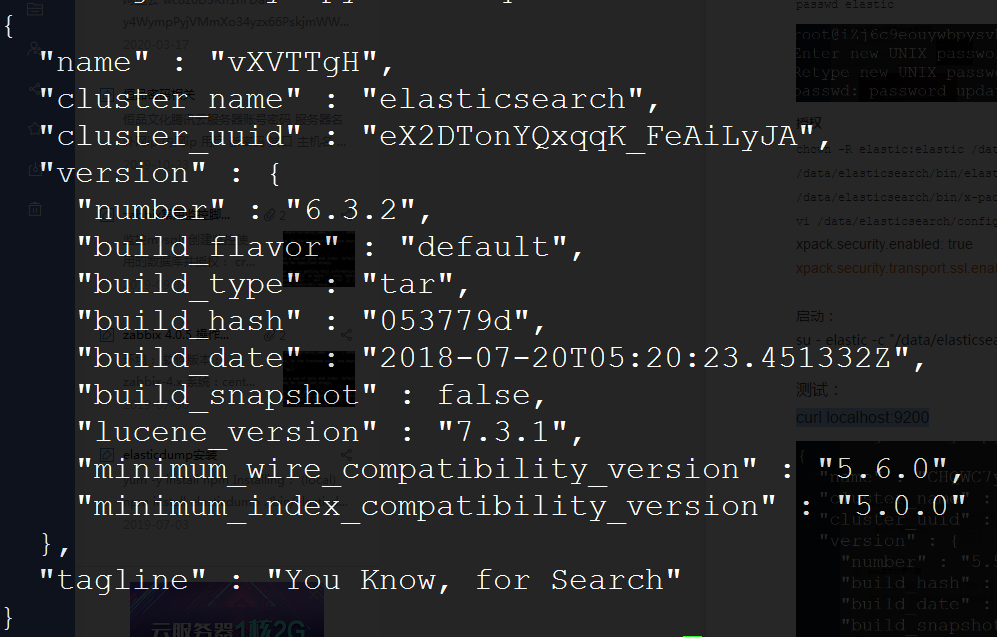
Test:
curl localhost:9200
3. Kibana Management Tool
wget http://mirror.cnop.net/elk/kibana-6.3.2-linux-x86_64.tar.gz
tar zxvf kibana-6.3.2-linux-x86_64.tar.gz
mv kibana-6.3.2-linux-x86_64 /data/kibana
vi /data/kibana/config/kibana.yml # Uncomment the following lines
server.port: 5601 # Listening port
server.host: "0.0.0.0" # Listening address
elasticsearch.url: "http://localhost:9200" # Elasticsearch access URL
Start:
chown -R elastic:elastic /data/kibana
su – elastic -c " /data/kibana/bin/kibana &"
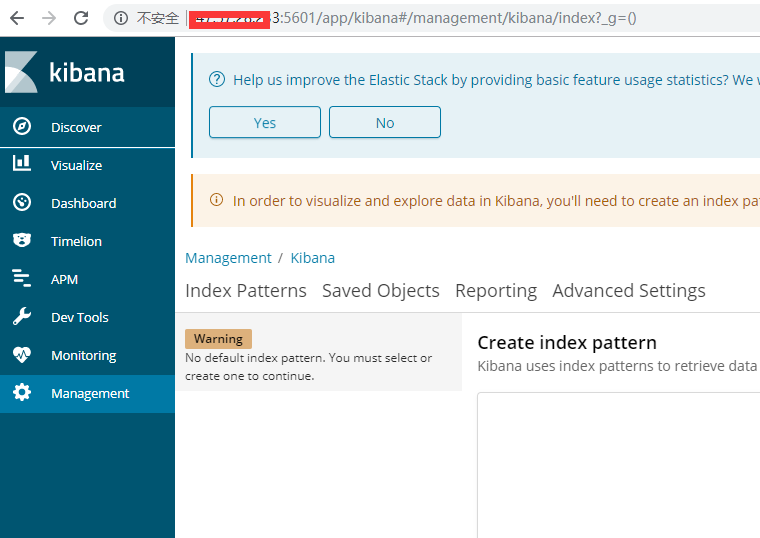
Access
http://ip:5601
4. Adding Password Authentication
X-Pack is installed by default in Elasticsearch versions after 6.3
vi /data/elasticsearch/config/elasticsearch.yml # Add the following at the end
xpack.security.enabled: false # Disable x-pack
cd /data/elasticsearch/modules/x-pack/x-pack-core/
rm -rf x-pack-core-6.3.2.jar # Delete the original jar and replace it with our cracked jar
wget http://mirror.xrk.org/elk/x-pack-core-6.3.2.jar
vi license.json # Create a new JSON file
{"license":{"uid":"72ee62fb-865a-4887-9c87-168fe12a1265","type":"platinum","issue_date_in_millis":1530230400000,"expiry_date_in_millis":4102329600000,"max_nodes":100,"issued_to":"jin king (ccn)","issuer":"Web Form","signature":"AAAAAwAAAA02Dgj8/hUDfzKEQ2nrAAABmC9ZN0hjZDBGYnVyRXpCOW5Bb3FjZDAxOWpSbTVoMVZwUzRxVk1PSmkxaktJRVl5MUYvUWh3bHZVUTllbXNPbzBUemtnbWpBbmlWRmRZb25KNFlBR2x0TXc2K2p1Y1VtMG1UQU9TRGZVSGRwaEJGUjE3bXd3LzRqZ05iLzRteWFNekdxRGpIYlFwYkJiNUs0U1hTVlJKNVlXekMrSlVUdFIvV0FNeWdOYnlESDc3MWhlY3hSQmdKSjJ2ZTcvYlBFOHhPQlV3ZHdDQ0tHcG5uOElCaDJ4K1hob29xSG85N0kvTWV3THhlQk9NL01VMFRjNDZpZEVXeUtUMXIyMlIveFpJUkk2WUdveEZaME9XWitGUi9WNTZVQW1FMG1DenhZU0ZmeXlZakVEMjZFT2NvOWxpZGlqVmlHNC8rWVVUYzMwRGVySHpIdURzKzFiRDl4TmM1TUp2VTBOUlJZUlAyV0ZVL2kvVk10L0NsbXNFYVZwT3NSU082dFNNa2prQ0ZsclZ4NTltbU1CVE5lR09Bck93V2J1Y3c9PQAAAQAXQpVbyDECAris6ObPj0P88cyrfD5sCQjMTLn0Jm1Yr0+qPXmqlk2F8KiOU8XoEtk0hAtTRvD9e/aFVGliOJYxF6d5YOIuG3gbMsz1/jhj5boQkczr/fhTcLDC+3myoEswo9QhZmsLqgqfAeXr/Uj0T09/TUHQCi/GfhIg7jEvthlQeMyzvYoSFIe6/gmCib01Mwb2UyaWnTkgCnE3v3ZvwEV5nW884esGOJ6dAmrqCnaqddDKa4N0CfNq49yPQVlJktAcuVViZF3eaIzA2+XhKLVvvvtdrxPvWeUNUxvJf9vbfaThbhleK9aR4Ym9QSNDwfhVww9nt21+UW2xESHw","start_date_in_millis":1534809600000}}
Restart Elasticsearch:
su – elastic -c "/data/elasticsearch/bin/elasticsearch -d"
Upload to the server, command as follows (password change):
curl -XPUT -u elastic 'http://localhost:9200/_xpack/license' -H "Content-Type: application/json" -d @license.json

vi /data/elasticsearch/config/elasticsearch.yml # End
#xpack.security.enabled: false
xpack.security.transport.ssl.enabled: true
Restart:
su – elastic -c "/data/elasticsearch/bin/elasticsearch -d"
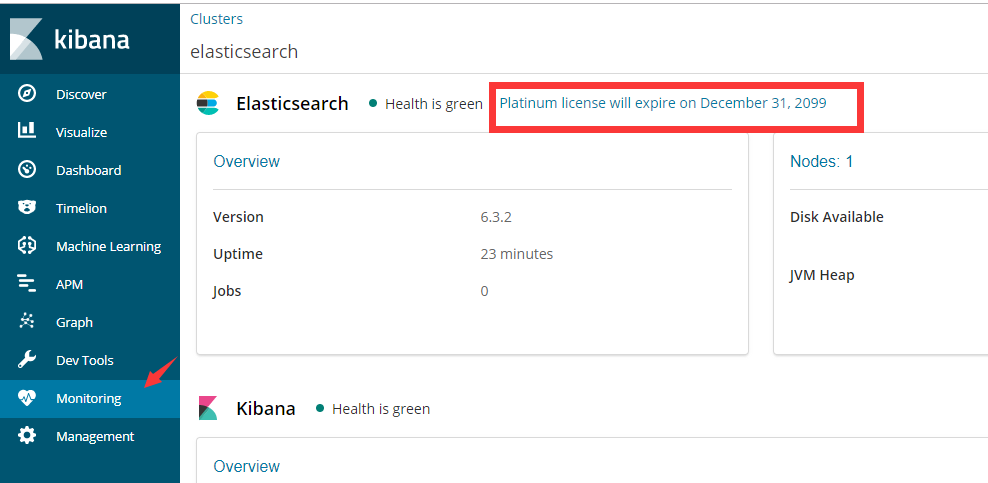
Access Kibana at http://ip:5601, check the license; the expiry time should now be extended:
/data/elasticsearch/bin/elasticsearch-setup-passwords auto # Generate passwords
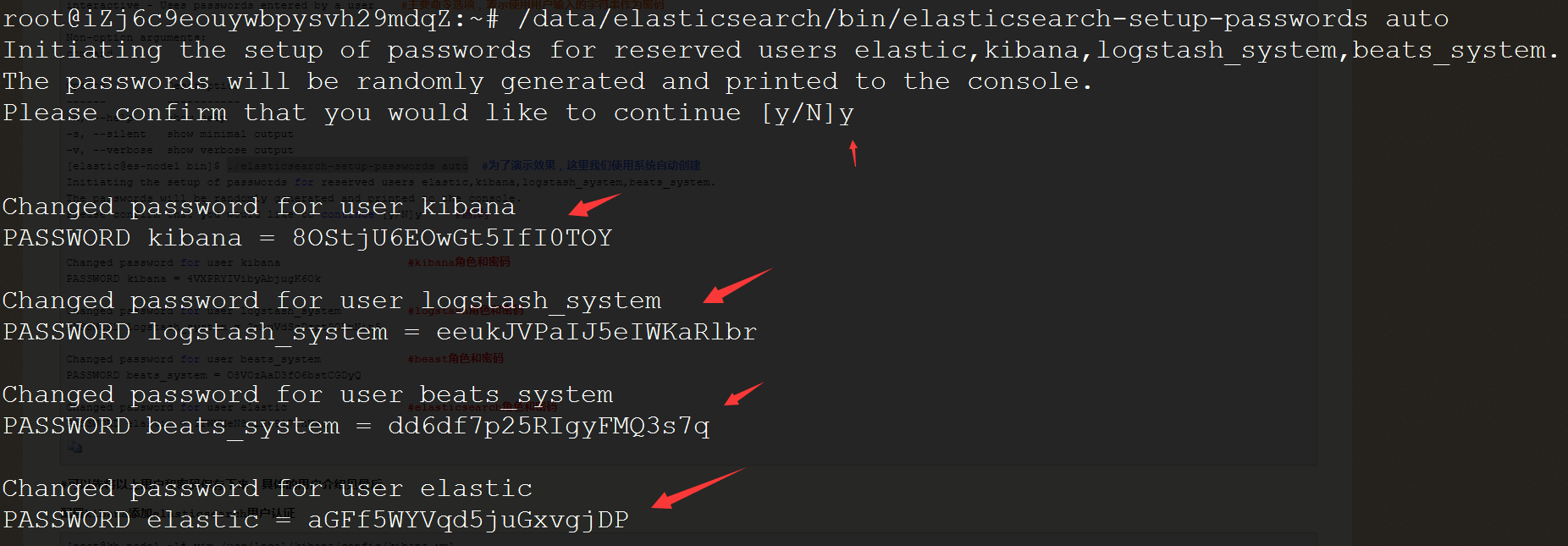
Changed password for user kibana
PASSWORD kibana = 8OStjU6EOwGt5IfI0TOYChanged password for user logstash_system
PASSWORD logstash_system = eeukJVPaIJ5eIWKaRlbrChanged password for user beats_system
PASSWORD beats_system = dd6df7p25RIgyFMQ3s7qChanged password for user elastic
PASSWORD elastic = aGFf5WYVqd5juGxvgjDP
vi /data/kibana/config/kibana.yml # Add the password aGFf5WYVqd5juGxvgjDP above into kibana.yml
Find:
#elasticsearch.username: "user"
#elasticsearch.password: "pass"
Replace with:
elasticsearch.username: "elastic"
elasticsearch.password: "aGFf5WYVqd5juGxvgjDP" # This is the elastic username and password generated in the previous step
Restart:
su – elastic -c " /data/kibana/bin/kibana &"
Access http://ip:5601 and enter the password.

Misc:
GET _cat/indices # View all indices
Create a default index and add data:
POST /indextest/_doc
{
"field1": "indextest this test field1",
"field2": "indextest this test field2"
}
yellow
GET /_cat/shards?h=index,shard,prirep,state,unassigned.reason| grep UNASSIGNEDPUT _settings
{
"number_of_replicas":0
}
Note: X-Pack built-in users
5. Start on Boot
Ubuntu 18.04 cannot directly use the /etc/rc.local file like 16.04; configuration is required.
vi /etc/systemd/system/rc-local.service
[Unit]
Description=/etc/rc.local Compatibility
ConditionPathExists=/etc/rc.local[Service]
Type=forking
ExecStart=/etc/rc.local start
TimeoutSec=0
StandardOutput=tty
RemainAfterExit=yes
SysVStartPriority=99[Install]
WantedBy=multi-user.target
vi /etc/rc.local
#!/bin/sh -e
#
# rc.local
#
# This script is executed at the end of each multiuser runlevel.
# Make sure that the script will "exit 0" on success or any other
# value on error.
#
# In order to enable or disable this script just change the execution
# bits.
#
# By default this script does nothing.
su – elastic -c "/data/elasticsearch/bin/elasticsearch -d"
su – elastic -c "/data/kibana/bin/kibana &"
exit 0
chmod 755 /etc/rc.local && systemctl enable rc-local && systemctl start rc-local.service
reboot # Reboot the system to check if services start on boot.
Attachment Download: https://www.cnop.net/uploadfile/2020/0611/20200611052432281.pdf