

How to Fix MySQL Import Error 40101 SET @OLD_CHARACTER_SET_CLIENT=@@CHARACTER_SET
A friend applied for a free MySQL database hosting space for testing and tried importing a database this morning. The import failed several times with the error: 40101 SET @OLD_CHARACTER_SET_CLIENT=@@CHARACTER_SET
Error message:
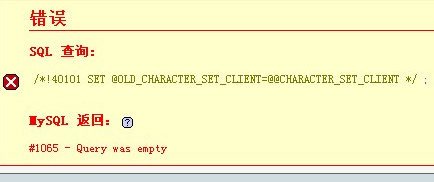
| Code | Copy code |
| /*!40101 SET @OLD_CHARACTER_SET_CLIENT=@@CHARACTER_SET_CLIENT */; | |
Found a solution from “Crazy Little Donkey” on Baidu Hi as follows:
——————————-
Unable to import MySQL database
Notes on handling Chinese garbled characters when converting from MySQL 5n to 4n
Issue: The 4n version database encoding is latin1, while the 5n version database encoding is utf8, causing the problem.
Remove the following code
| Code | Copy code |
| /*!40101 SET @OLD_CHARACTER_SET_CLIENT=@@CHARACTER_SET_CLIENT */; /*!40101 SET @OLD_CHARACTER_SET_RESULTS=@@CHARACTER_SET_RESULTS */; /*!40101 SET @OLD_COLLATION_CONNECTION=@@COLLATION_CONNECTION */; /*!40101 SET NAMES utf8 */; |
|
Import using phpmyadmin, select latin1 as the file character set, and everything works fine.
Tip: Export with phpMyadmin using default settings, then use Notepad to save the utf8 encoded file as ANSI encoding.
Open the text file and replace all instances of gbk with latin1
Actually, I simply removed that block
| Code | Copy code |
/*!40101 SET @OLD_CHARACTER_SET_CLIENT=@@CHARACTER_SET_CLIENT */; /*!40101 SET @OLD_CHARACTER_SET_RESULTS=@@CHARACTER_SET_RESULTS */; /*!40101 SET @OLD_COLLATION_CONNECTION=@@COLLATION_CONNECTION */; /*!40101 SET NAMES utf8 */; |
|
and the execution succeeded.