

1. The current website image server architecture is as follows: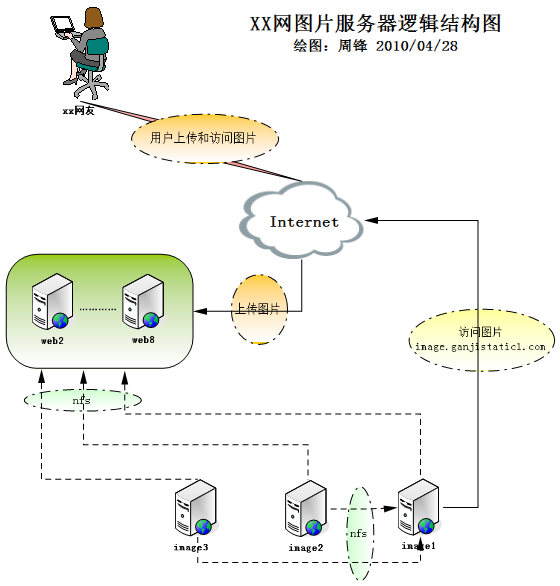
2. Current Architecture Description
2.1 Mount Directory Explanation
All front-end web servers mount directories exported by the three image servers via NFS to receive images written by the PHP processes on the web servers. Then, image1 mounts the exported directories of the other two image servers locally to provide external access through Nginx.
2.2 User Image Upload Process
Users access pages via the Internet and submit upload requests, which are posted to the web servers. After the web servers process the images, PHP copies them to the corresponding local mount directories.
2.3 User Image Access Process
When users access images, they do so through the image1 server, accessing the images in the corresponding directories as explained in section 2.1.
3. Problems with the Current Architecture
3.1 The current architecture relies excessively on NFS. If the NFS service on an image server encounters problems, it may affect the front-end web servers.
3.2 There is only one image server providing external services, creating a single point of failure.
3.3 There are too many dependencies between servers, and insufficient room for horizontal scaling.
3.4 Upload hotspots on web servers are uncontrollable, leading to unbalanced disk space usage across existing image servers.
3.5 The NFS approach means that anyone with the password for a web server can arbitrarily modify the contents within NFS, resulting in a low security level.
4. New Website Image Server Architecture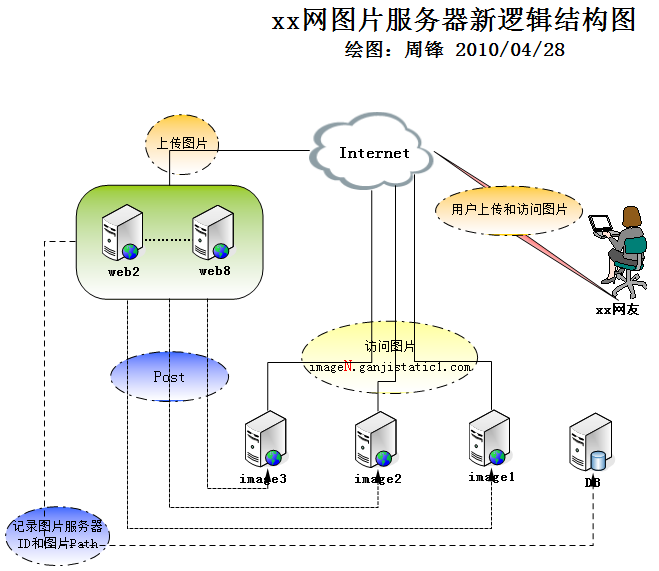
5. New Architecture Description
5.1 User Upload Flow
After a user uploads an image to a web server, the web server processes the image, and then the front-end web server posts the image to an image server identified by a configured ID. The PHP process on the image server receives the posted image, writes it to the local disk, and returns a corresponding success status code. The front-end web server determines the next operation based on the returned status code; if successful, it writes the corresponding image server ID and the image path to the DB database.
5.2 User Access Flow
When a user accesses a page, the system reads the image server ID and the image URL from the database based on the request, concatenates them into the corresponding URL, and accesses the image from the designated image server.
5.3 Upload Control
To adjust the upload target, we only need to modify the destination image server ID that the web server posts to, thereby controlling which image server receives the upload.
6. Advantages of the New Architecture
6.1 There is no NFS dependency in the entire structure, and a failure on an image server will not affect the web servers.
6.2 The image server providing external services is no longer a single point of failure, and a single image server failure will not affect all images.
6.3 There are no dependencies between image servers, allowing significant room for horizontal scaling.
6.4 Upload hotspots can be adjusted at any time to balance disk space across image servers.
6.5 Faulty servers can be bypassed at any time, thus not affecting front-end uploads.
6.6 After the modification, files on the image servers are completely invisible to the web servers, improving the security level.