

I’ve been searching for an effective website stress testing tool, and after trying Webbench today, I’m very satisfied with it. I’d like to share it with everyone.
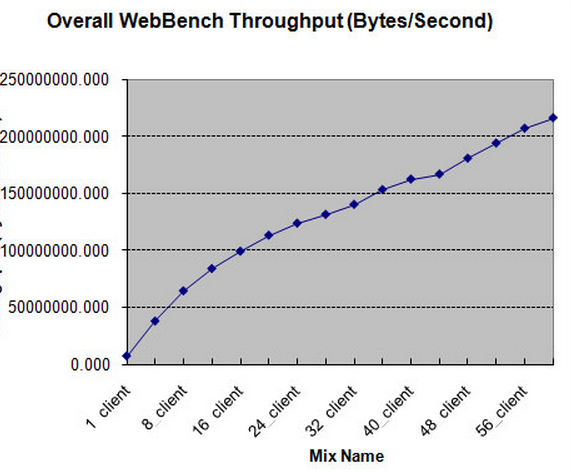
1. Introduction to Webbench
Webbench is a well-known website stress testing tool developed by Lionbridge Corporation (http://www.lionbridge.com). Its help files and documentation can be found at: www.webbench.com.
Webbench can test the performance of different services on the same hardware and the operation status of the same service on different hardware. Webbench’s standard test can show us two key metrics of the server: the number of requests per second and the amount of data transferred per second. Webbench not only has the ability to test standard static pages but can also test dynamic pages (ASP, PHP, JAVA, CGI). Additionally, it supports static or dynamic performance testing of websites with SSL, such as e-commerce sites.
2. Installing Webbench
(1) Installation via Ports on FreeBSD:
cd /usr/ports/benchmarks/webbenchmake install clean
Remember to run the rehash command after a successful installation to refresh the system commands.
rehash
(2) Compilation and Installation on RedHat/CentOS
Download the installation package:
wget http://blog.s135.com/soft/linux/webbench/webbench-1.5.tar.gz
tar zxf webbench-1.5.tar.gzcd webbench-1.5make && make install
Or refer to: http://blog.haohtml.com/index.php/archives/3234
3. Using Webbench
webbench –help (View command help)
Common parameter descriptions: -c indicates the number of clients, -t indicates the duration.
Test example:
webbench -c 500 -t 30 http://192.168.0.99/phpionfo.php
Testing a static image:
webbench -c 500 -t 30 http://192.168.0.99/test.jpg
4. Webbench Test Results
webbench -c 500 -t 30 http://192.168.0.99/phpionfo.phpWebbench – Simple Web Benchmark 1.5Copyright (c) Radim Kolar 1997-2004, GPL Open Source Software.Benchmarking: GET http://192.168.0.99/phpionfo.php500 clients, running 30 sec.Speed=53726 pages/min, 160866 bytes/sec.Requests: 26863 susceed, 0 failed.
5. Webbench Command
6. Live Demo (Nginx+PHP vs. Apache+PHP)
Note: When using webbench for stress testing, the software itself consumes CPU and memory resources. For accurate testing, please install webbench on a separate server.
Test Results: ##### Nginx + PHP #####
[root@localhost webbench-1.5]# webbench -c 100 -t 30 http://192.168.1.21/phpinfo.phpWebbench – Simple Web Benchmark 1.5Copyright (c) Radim Kolar 1997-2004, GPL Open Source Software.Benchmarking: GET http://192.168.1.21/phpinfo.php100 clients, running 30 sec.Speed=102450 pages/min, 16490596 bytes/sec.Requests: 51225 susceed, 0 failed.top – 14:06:13 up 27 days, 2:25, 2 users, load average: 14.57, 9.89, 6.51Tasks: 287 total, 4 running, 283 sleeping, 0 stopped, 0 zombieCpu(s): 49.9% us, 6.7% sy, 0.0% ni, 41.4% id, 1.1% wa, 0.1% hi, 0.8% siMem: 6230016k total, 2959468k used, 3270548k free, 635992k buffersSwap: 2031608k total, 3696k used, 2027912k free, 1231444k cached
Test Results: ##### Apache + PHP #####
[root@localhost webbench-1.5]# webbench -c 100 -t 30 http://192.168.1.27/phpinfo.phpWebbench – Simple Web Benchmark 1.5Copyright (c) Radim Kolar 1997-2004, GPL Open Source Software.Benchmarking: GET http://192.168.1.27/phpinfo.php100 clients, running 30 sec.Speed=42184 pages/min, 31512914 bytes/sec.Requests: 21092 susceed, 0 failed.top – 14:06:20 up 27 days, 2:13, 2 users, load average: 62.15, 26.36, 13.42Tasks: 318 total, 7 running, 310 sleeping, 0 stopped, 1 zombieCpu(s): 80.4% us, 10.6% sy, 0.0% ni, 7.9% id, 0.1% wa, 0.1% hi, 0.9% siMem: 6230016k total, 3075948k used, 3154068k free, 379896k buffersSwap: 2031608k total, 12592k used, 2019016k free, 1117868k cached
It can be seen that the concurrency of the Nginx+PHP platform (51225) is much higher than that of the Apache+PHP platform (21092).
Why is Nginx’s performance so much higher than Apache’s? This is thanks to Nginx’s use of the latest epoll (Linux 2.6 kernel) and kqueue (FreeBSD) network I/O models, whereas Apache uses the traditional select model. Currently, Squid and Memcached, which can handle high concurrency access under Linux, both use the epoll network I/O model.
For handling reads and writes of a large number of connections, the select network I/O model used by Apache is very inefficient. Here’s an analogy to analyze the difference between Apache’s select model and Nginx’s epoll model:
Suppose you are studying at a university and living in a dormitory building with many rooms. Your friend comes to find you. The select-version dorm manager would lead your friend to search room by room until finding you. The epoll-version dorm manager, however, would first record each student’s room number. When your friend arrives, she just tells your friend which room you are in, without personally taking your friend around the entire building. If 10,000 people come looking for their classmates living in this building, whose efficiency is higher, the select-version or the epoll-version dorm manager? It’s self-evident. Similarly, in high-concurrency servers, polling I/O is one of the most time-consuming operations. The performance difference between select and epoll is equally clear.
from http://deephell.72pines.com/2011/07/20/%E7%BD%91%E7%AB%99%E5%8E%8B%E5%8A%9B%E6%B5%8B