

Test Environment Description
rsync, remote synchronize is implement function , in file simultaneously , can file Permission, , information . rsyncis “rsync ”provide a and file server file Sync , and can via sshmethod file , very , is .
:server and all need Installationrsync
1: system (system already ,method , system )yum install rsync2:tar zxvf rsync-3.0.7.tar.gzcd rsync-3.0.7./configure –prefix=/usr/local/rsync&make &&make install
: server configuration (configuration file )1: configuration file . /etcno rsyncd.confthis file , not we canVim /etc/rsyncd.conf
[global] #configurationuid = nobodygid = nobodyuse chroot = notimeout = 300port = 873 #is 873, can notmax connections = 30 #pid file = /var/log/rsyncd.pid # IDin , can not to
lock file = /var/run/rsyncd.lock #this can not tolog file = /var/log/rsyncd.log #file in , this tolog format = %t %a %m %f %b #Log %t %a IPAddress %m %f file %b %uuser[backup] # to Sync
path = /data/test # to Sync directorycomment =test #thisread only = no # nocan file ,yeswrite only = no # nocan file ,yesnot can Downloadlist = no #is provideignore errors #some IOError
hosts allow = 192.168.1.0/24 #via IPAddress
hosts deny = * #IP
auth users = www #system use user , no .
secrets file=/etc//rsyncd.secret #file
2. setting rsyncserver and directory Permission;
vi /etc//rsyncd.secretwww:123456 #user www: Password123456)chmod 600 /etc/rsyncd.secret #,chmod 777 /data/test -R #directory Permission,
3: Start andA:daemonmethod Start/usr/bin/rsync –daemon –config=/etc/rsyncd.conf: kill pid or pkill rsyncB:xinetdrsyncvim /etc/xinetd.d/rsync (will yesno)

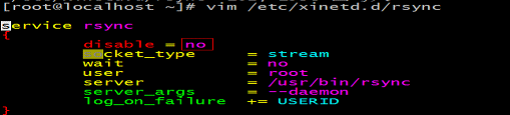
/etc/init.d/xinetd start
:linuxconfiguration and Test1: Environment ConfigurationA:need rsync, configuration file/usr/bin/rsync –daemon or /etc/init.d/xinetd startB:a file , need and server Password
echo 123456 > /etc/rsyncd.secretchmod 600 /etc/rsyncd.secret
2:commandrsync –vzrtopg –delete /data/test/ www@192.168.1.147::backup –password-file=/etc/rsyncd.secret
–vzrtopg -v -zfor file in -r for directory -tfile -p -o -g–delete server in no data
/data/test/ need Sync directorywww server backup userbackup server to
3: not , in
cat /root/rsync.sh
nohup sh /root/rsync.sh &
1: to Issues
in configuration rsync, for Client and server not . to is data to server , is server data to Client. is to server , is in command server data to . commandrsync –vzrtopg –delete www@192.168.1.147::backup /data/test/ –password-file=/etc/rsyncd.secretmethod is :rsync –vzrtopg –delete /data/test/ www@192.168.1.147::backup –password-file=/etc/rsyncd.secret
. rsync and scp method , , server , can data to , can directory data to . configuration (need configuration file ) server
server , need will data to server for directory , , server server , need in rsync, file ,/data/test/ to server backupfor directory
rsync –vzrtopg –delete /data/test/ www@192.168.1.147::backup –password-file=/etc/rsyncd.secret
has server (svnserver ) need data to not for server . can svnserver server . from server for data .
Inotifyis , , file system , Linuxfrom 2.6.13, for Inotify support , via Inotifycan file system , , ,
rsyncconfiguration 1.0#cd /usr/local/src/#wget http://cloud.github.com/downloads/rvoicilas/inotify-tools/inotify-tools-3.14.tar.gz#tar xzvf inotify-tools-3.14.tar.gz#cd inotify-tools-3.14#./configure#make#make install
this “/usr/local/bin/inotifywait: error while loading shared libraries: libinotifytools.so.0”can the following :ln -sv /usr/local/lib/libinotify* /usr/lib/ln -s /usr/local/lib/libinotifytools.so.0 /usr/lib64/libinotifytools.so.0
#!/bin/bash
src=/data/test/
des=backup
ip=192.168.1.147
/usr/local/bin/inotifywait -mrq –timefmt '%d/%m/%y %H:%M' –format '%T %w%f' -e modify,delete,create,attrib $src | while read file
do
rsync -vzrtopg –delete –progress $src www@$ip::$des –password-file=/etc/rsyncd.secret && echo "$src was rsyncd"
done
: SersyncIntroduction
Sersync inotify and rsyncfor server perform , inotifyfile system , rsyncis use , is for file not part perform operation , use file system method perform . , is use file tool . tool and tool has :· sersyncis use c++, file , tool , ;· , configuration ;· use perform Sync, can server status ;· , via for file , if , 10for file ;· crontabfunction , in xmlconfiguration file , can you to , ;· socket and http, can perform ;
<?xml version="1.0" encoding="ISO-8859-1"?><head version="2.5"><host hostip="localhost" port="8008"></host> #for , can .<debug start="true"/> #in sersyncin Run , inotify, rsynccommand .<fileSystem xfs="false"/> #for xfsfile system user , need will this .<filter start="false"> #system file , file not<exclude expression="(.*)/.svn"></exclude><exclude expression="(.*)/.gz"></exclude><exclude expression="^info/*"></exclude><exclude expression="^static/*"></exclude></filter><inotify> #inotifyfile ,<delete start="true"/><createFolder start="true"/><createFile start="false"/><closeWrite start="true"/>
<moveFrom start="true"/><moveTo start="true"/><attrib start="false"/><modify start="false"/></inotify><sersync> #perform data Sync<localpath watch="/data/test"> # directory<remote ip="192.168.1.147" name="backup"/> # IP and rsync<!–<remote ip="192.168.8.39" name="tongbu"/>–><!–<remote ip="192.168.8.40" name="tongbu"/>–></localpath><rsync><commonParams params="-artuz"/><auth start="true" users="www" passwordfile="/etc/rsyncd.secret"/>#user , user<userDefinedPort start="false" port="874"/><!– port=874 –><timeout start="false" time="100"/><!– timeout=100 –><ssh start="false"/></rsync><failLog path="/tmp/rsync_fail_log.sh" timeToExecute="60"/><!–default every 60mins execute once–><crontab start="true" schedule="600"><!–600mins–> #600s<crontabfilter start="false"><exclude expression="*.php"></exclude><exclude expression="info/*"></exclude></crontabfilter></crontab><plugin start="false" name="command"/> #name .</sersync><plugin name="command"> ##<param prefix="/bin/sh" suffix="" ignoreError="true"/> <!–prefix /opt/tongbu/mmm.sh suffix–><filter start="false"><include expression="(.*)/.php"/><include expression="(.*)/.sh"/></filter></plugin>
</head>
SERSYNC="/usr/local/sersync/sersync2"CONF_FILE="/usr/local/sersync/confxml.xml"STATUS=$(ps aux |grep 'sersync2'|grep -v'grep'|wc -l)if [ $STATUS -eq 0 ];then$SERSYNC -d -r -o $CONF_FILEelseexit 0;fi
This article is from “in ” Blog, http://4888761.blog.51cto.com/4878761/1086724