

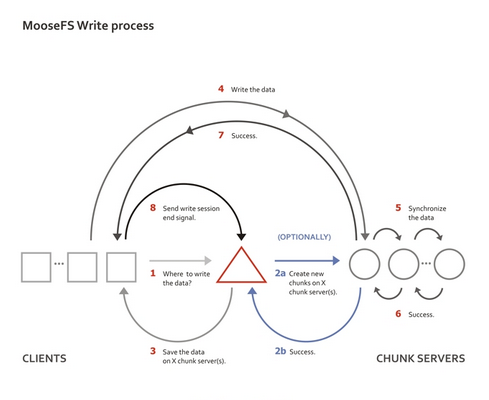
Recently, I got to know a distributed file system——MooseFS. Previously, I knew very little about distributed systems, and I kept my distance from distributed file systems and distributed databases, thinking they were too complex and far beyond my reach. Encouraged by my mentors, I set up a MooseFS cluster using six machines. The deployment process is actually quite straightforward, much like configuring NFS, except it introduces two additional server roles. It is precisely these roles that make MooseFS far superior to NFS in both scalability and stability. In terms of read and write performance, simple tests using dd show that MooseFS offers only slightly better write speeds than NFS, with no noticeable difference in read performance. Below is a summary of some key points about MFS.
The MFS system consists of four components: master, metalogger, chunkserver, and client.
Master —— The brain of MFS, which records management information such as file size, storage location, and number of copies, similar to the information stored in the InnoDB shared tablespace (ibdata). This information is recorded in metadata.mfs. Once this file is loaded into memory, it is renamed to metadata.mfs.back. When updates occur on a chunkserver, the master periodically writes the newly acquired information back into metadata.mfs.back to ensure the reliability of the metadata.
Hardware recommendation: Large memory capacity, as metadata.mfs needs to be loaded into memory. The size of this file depends on the amount of data stored on your chunkservers, so memory capacity can become a bottleneck later on. ECC memory is recommended for error checking; when the amount of data in memory reaches a certain level, lacking a fault-tolerant mechanism can be disastrous. A redundant battery and disk configurations like RAID1/RAID5/RAID10 are all meant to ensure high reliability.
Metalogger —— The backup for MFS, analogous to the Master-Slave structure in MySQL. The metalogger regularly downloads and synchronizes metadata, changelog, and session type files from the master to a local directory, renaming them with the suffix ”_ml”.
Hardware recommendation: Identical to the master machine’s configuration. The metalogger is essentially a standby machine for the master; when the master goes down, you can directly promote the metalogger to become the new master.
Chunkserver —— The data storage location. Files are stored in chunks, with each chunk having a maximum size of 64MB. For files smaller than 64MB, the chunk size equals the file size. Files larger than 64MB are split evenly, with each chunk adhering to the principle of not exceeding 64MB. Files can have multiple copies, meaning the number of replicas stored in addition to the original file. When the goal is set to 1, there is only one copy, which is randomly stored on one chunkserver. When the goal is greater than 1, each copy is saved on a different chunkserver. The goal value should not exceed the number of chunkservers; otherwise, the extra copies will have no chunkserver to be stored on, making a higher goal setting meaningless. The number of copies is generally recommended to be greater than 1. This way, if one chunkserver fails, at least one other copy exists. When that failed server is added back, the missing copy will be replenished, always maintaining the original number of copies. However, if the goal is set to 1 copy, and the chunkserver storing that copy fails and later rejoins, the copy count will remain at 0 and will not recover to the previous 1 copy.
The remaining free space on a chunkserver must be greater than 1GB (as mentioned in the Reference Guide) for new data to be written. Otherwise, you will see a “No space left on device” error. In practice, tests found that when disk usage reached about 95%, writes were already failing, with the available space at that time being 1.9GB.
Hardware recommendation: Ordinary machines are