

When using Tomcat, you may encounter the issue of the catalina.out log file growing too large. Below, we’ll use the system’s built-in logrotate (using CentOS as an example) to split the file, achieving automatic daily log rotation.
The logrotate program, by default, processes files defined under /etc/logrotate.d/. Please perform the following steps as the root user, otherwise you may encounter permission errors.
Create the file:
#vi /etc/logrotate.d/tomcat
Fill in the following information (replace the catalina.out path with your actual path):
/usr/local/tomee/logs/catalina.out {
daily
rotate 10
missingok
dateext
notifempty
copytruncate
}
#chown jjzb.jjzb /etc/logrotate.d/tomcat
#chmod +x /etc/logrotate.d/tomcat
Force an immediate rotation to check the result:
#logrotate –force /etc/logrotate.d/tomcat
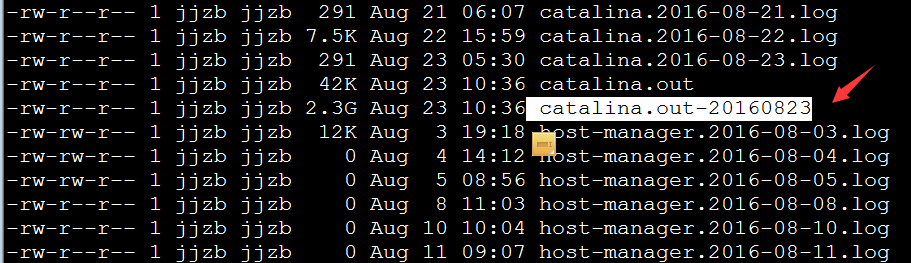
If there are no errors, the information above will be displayed, and a file ending with the date will be generated.
Parameter descriptions. The following parameters can be added or removed based on your desired effect:
daily Specifies the rotation cycle as daily.
銆€銆€rotate 15 Specifies the number of rotations before a log file is deleted. 0 means no backups, 15 means keep 15 backups.
銆€銆€missingok If the log file does not exist, ignore this warning message.
銆€銆€dateext Append a date format suffix to files, meaning the rotated file will be: xxx.log-20150828.gz
銆€銆€compress Compress the rotated log files via gzip (use gzip -d xxx.gz to decompress).
銆€銆€notifempty Do not rotate the log if it is empty.
銆€銆€copytr