

1. Problem Description
1. During testing today, I noticed that Tomcat was extremely slow to start up. This wasn’t the usual random number entropy issue; instead, it kept hanging for a long time at “At least one JAR was scanned for TLDs yet contained no TLDs,” and this happened even with only a single project deployed!
2. Other articles suggest editing the logging.properties file, appending org.apache.jasper.servlet.TldScanner.level = FINE at the end, starting the server, and then looking for “No” output prompts in the console to save into a file. Then, you add the JAR files listed in that file to the tomcat.util.scan.StandardJarScanFilter.jarsToSkip property in catalina.properties. This temporarily solves the issue, but you’ll then encounter the following problems:
It works, but as soon as you add a new JAR that doesn’t comply with the specification, the annoying prompts start again.
This approach only works if the projects on the server are already fixed and finalized. The problem reappears when you create a new project of a different type.
3. I considered disabling TLD checking entirely by adding processTlds="false" to the in conf/context.xml, but that also didn’t work.
2. Cause of the Problem
1. The reason for this issue is that Tomcat scans a large number of JAR files during startup. If any of them contain content that does not comply with TLD specifications, this problem occurs.
2. Since JSP is unlikely to be used as the view layer in the future, we probably don’t need TLDs at all. Not having them won’t really matter.
3. Pay attention to two types of startup: one is launching from Tomcat’s bin directory, and the other is launching from Eclipse or other IDEs. Make sure to read the section regarding Eclipse startup.
3. Solution
1. In the Tomcat installation directory, you can find the following line of code in apache-tomcat-9.0.1/conf/catalina.properties. It represents the JAR files that Tomcat should skip scanning during startup.
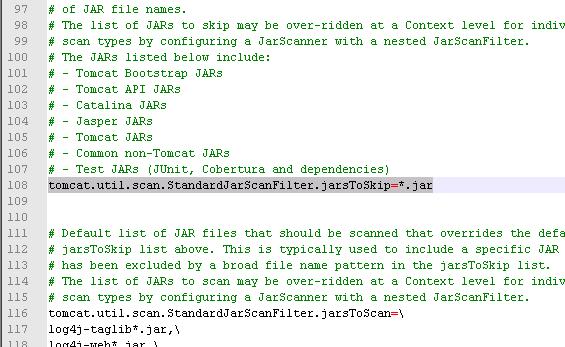
2. The solution, therefore, is to skip TLD scanning for all JAR files. Delete all the .jar entries connected by backslashes (\) following tomcat.util.scan.StandardJarScanFilter.jarsToSkip= (back up the original file before making changes). Directly set tomcat.util.scan.StandardJarScanFilter.jarsToSkip to "*.jar". The "*.jar" value tells Tomcat to skip all files ending in .jar. Example below:
# – Test JARs (JUnit, Cobertura and dependencies)
tomcat.util.scan.StandardJarScanFilter.jarsToSkip=*.jar# Default list of JAR files that should be scanned that overrides the default
3. Delete all files in Tomcat’s work directory to avoid cache interference; clear all log files in the logs directory to make it easier to review log files.
4. Restart.
Author: 情醉梦中魂
Reference original: https://blog.csdn.net/sinat_34104446/article/details/82721250
Copyright statement: This article is an original blog post. Please include a link to the blog post when reprinting!