

Previously, I noticed many users trying to set up redirects using web.config, but encountering various issues. Here, I’ll share a personal tip, using a 301 redirect from cnop.net to www.cnop.net as an example.
Copy the following code and paste it in:
<?xml version="1.0" encoding="UTF-8"?><configuration><system.webServer><rewrite><rules><rule name="Canonical Host Name" stopProcessing="true"><match url="(.*)" /><conditions><add input="{HTTP_HOST}" pattern="^cnop/.net$" /></conditions><action type="Redirect" url="http://www.cnop.net/{R:1}" redirectType="Permanent" /></rule></rules></rewrite></system.webServer></configuration>
When saving, set the file name to “web.config”, place it in the root directory of your website, and then restart the site.
Test URL: http://tool.chinaz.com/pagestatus/default.aspx
If the following result appears, it means success: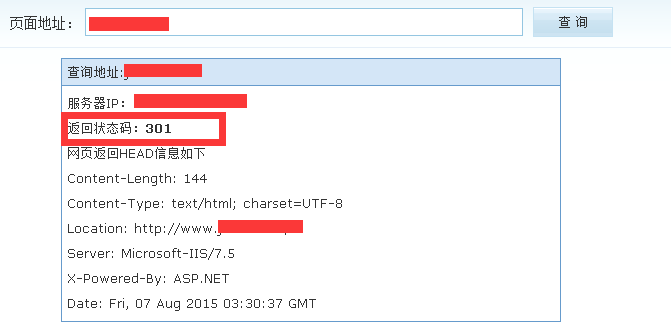
Attachment download:
https://www.cnop.net/uploadfile/2015/0807/20150807124243538.zip