

By checking Nginx’s concurrent connections, we can gain a clearer understanding of a website’s load. There are two methods to view Nginx concurrency (I only know of two, at least), one via a web interface and the other via commands. The web view tends to show more precise results than the command line. Below is an introduction to both methods.
No1. Viewing via Browser
When viewing via the web interface, Nginx requires the status module to be enabled. That means adding –with-http_stub_status_module when installing Nginx. Then, configure Nginx.conf by adding the following content inside the server block:
|
1
2
3
4
|
location /status {stub_status on;access_log /usr/local/nginx/logs/status.log;auth_basic "NginxStatus"; } |
After configuring and restarting Nginx, we can view the status by visiting http://localhost/status in the browser, as shown below:
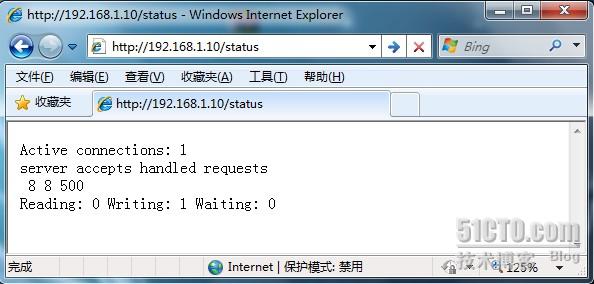
Explanation:
|
1
2
3
4
5
|
Active connections //The current number of active connections Nginx is handling.server accepts handled requests //Handled 8 connections in total, successfully created 8 handshakes, handled 500 requests in total.Reading //The number of client Header information Nginx has read.Writing //The number of Header information Nginx has returned to clients.Waiting //With keep-alive enabled, this value equals active - (reading + writing), meaning the number of idle persistent connections Nginx has finished processing and is waiting for the next request instruction. |
No2. Viewing via Command
#netstat -n | awk '/^tcp/ {++S[$NF]} END {for(a in S) print a, S[a]}'
|
1
2
3
4
5
6
7
|
TIME_WAIT 17ESTABLISHED 3254LAST_ACK 236FIN_WAIT_1 648FIN_WAIT_2 581CLOSING 7CLOSE_WAIT 4916 |
Explanation:
|
1
2
3
4
5
6
7
8
9
10
11
|
CLOSED //No connection is active or ongoing.LISTEN //<a href="http://tech.ddvip.com/server/index.html" target="_blank">Server</a> is waiting for incoming calls.SYN_RECV //A connection request has arrived, awaiting confirmation.SYN_SENT //The application has started, opening a connection.ESTABLISHED //Normal data transmission state / current concurrent connection count.FIN_WAIT1 //The application says it is finished.FIN_WAIT2 //The other side has agreed to release.ITMED_WAIT //Waiting for all packets to die.CLOSING //Both sides tried to close simultaneously.TIME_WAIT //The other side has initiated a release.LAST_ACK //Waiting for all packets to die. |