

First, let’s briefly understand what load balancing is. Literally, it means N servers share the load evenly, preventing situations where one server crashes due to high load while another sits idle. The prerequisite for load balancing is having multiple servers — at least two or more.

Test Environment
Three CentOS instances installed in VMware.
Test Domain (IP) :192.168.20.150
Server A IP :192.168.20.150 (Primary)
Server B IP :192.168.20.151
Server C IP :192.168.20.152
Deployment Plan:
Server A acts as the primary server. The domain is resolved directly to Server A (192.168.20.150), which load-balances requests to Server B (192.168.20.151) and Server C (192.168.20.152).
Server A nginx.conf Configuration
Open nginx.conf, located in the conf directory of the nginx installation path.
Add the following code inside the http block
upstream a.com {
server 192.168.20.151:80;
server 192.168.20.152:80;
}
server{
listen 80;
server_name 192.168.20.150;
location / {
proxy_pass http://192.168.20.150;
proxy_set_header Host $host;
proxy_set_header X-Real-IP $remote_addr;
proxy_set_header X-Forwarded-For $proxy_add_x_forwarded_for;
}
}
As shown below: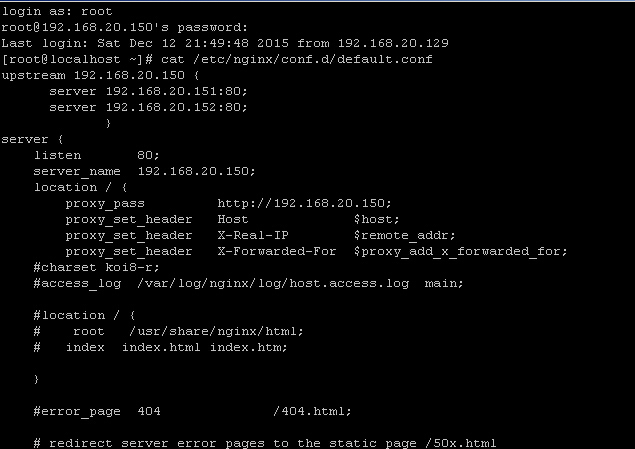
Save and restart nginx
Server B and C nginx.conf Configuration
Open nginx.conf, add the following code inside the http block
server{
listen 80;
server_name 192.168.20.150;
index index.html;
root /data0/htdocs/www;
}
As shown below: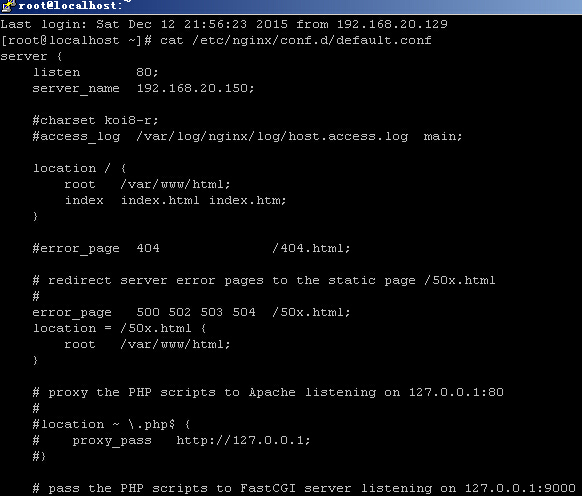
Save and restart nginx
Testing:
When accessing 192.168.20.150, to distinguish which server handles the request, I created different index.html files on Servers B and C to tell them apart.
Opening a browser and visiting 192.168.20.150, you’ll see that upon refreshing, all requests are distributed by the primary server (192.168.20.150) to Server B (192.168.20.151) and Server C (192.168.20.152), achieving the load balancing effect.
Refreshing the page alternates between the content from servers 151 and 152. The page served by Server B looks like this:

If one server goes down, requests are automatically routed only to the remaining healthy server. Once the downed server recovers, it’s automatically added back.
The IPs in the upstream block don’t have to be internal; external IPs work too. A classic use case is when one server in the LAN is exposed to the public internet, the domain resolves to this IP, and then this primary server forwards requests to internal LAN server IPs.
If a server goes down, it won’t affect normal website operation. Nginx will not forward requests to the downed IP.