

1. Overview
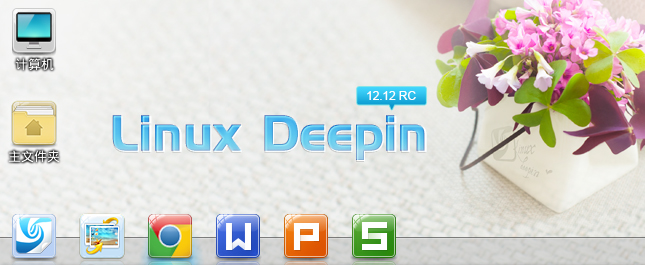
LinuxDeepin 12.12 RC Version Is Coming!
Following the Beta version on March 28, the Linux Deepin 12.12 RC version is now released!
The Linux Deepin 12.12 RC version is a feature-enhanced and improved version of the Beta, and it is the release candidate for the final version. Work on this version has focused on bug fixes, and it has resolved over 700 bugs (including improvement suggestions) reported since the Beta version, including those from the bug tracking system. The RC version far surpasses previous historical versions in stability and usability.
2. Deepin Desktop Environment
Below are the major changes to the Deepin Desktop Environment in the RC version.
1. Application Launcher
In the RC version, a “Hide Application Icon” feature has been added. Right-click on a program icon in the launcher to see the hide icon option. Select “Hide this icon” to directly hide the desired icon. Right-click on an empty space in the launcher, and you can select “Show Hidden Icons” to display the icons that have been hidden.
2. System Tray
In addition to detail improvements for the sound and network tray displays, the power tray now also supports a “Custom” mode. The “Custom” power mode can be configured in the “System Settings – Power” module, such as customizing the display off time and system suspend time. Meanwhile, when playing video files with Deepin Media Player, the system automatically activates the “High Performance” power mode to prevent the screen from going black during video playback, and automatically switches back to the previously set power mode upon exiting the player.
3. Program Launch Groups
A feature to delete a program launch group has been added, which can directly remove all icons within the group from the desktop. Choosing “Ungroup” will restore the icons back to the desktop.
4. Desktop File Compression Feature
Right-clicking on a file on the desktop now shows a new “Compress” function option, allowing you to select single or multiple files and compress them into an archive.
5. System Settings: Detail Refinements
- Display: Added dual-monitor display support;
- Desktop: The hot corner for displaying “Open Windows” has been changed from the top-right corner to the bottom-right corner; the top-left corner remains the hot corner for showing the application launcher;
- Sound
** Added mouse wheel support for adjusting input and output volume;
** Added an “Input Level” indicator for the microphone; - Date and Time: Added support for “East/West 12 time zones”;
- Power: Added a “Power Plan” option, supporting custom power mode settings;
- Mouse: Added mouse wheel support for adjusting pointer speed, precision, and double-click frequency;
- Network: Added support for “Mobile Network”.
Another noteworthy small detail is the addition of a “magnetic snap” feature to the progress bars in System Settings. For example, when adjusting the output volume to 100% using the mouse in the “System Settings – Sound” module, if the first click actually lands on 96%, the system will automatically snap it to 100%. For output volume, if the actual click range is within 0~5%, it automatically snaps to 0; within the 95%~105% range, it automatically snaps to 100%. The same logic applies to other progress bar settings.
3. Deepin Software Center 3.0 RC
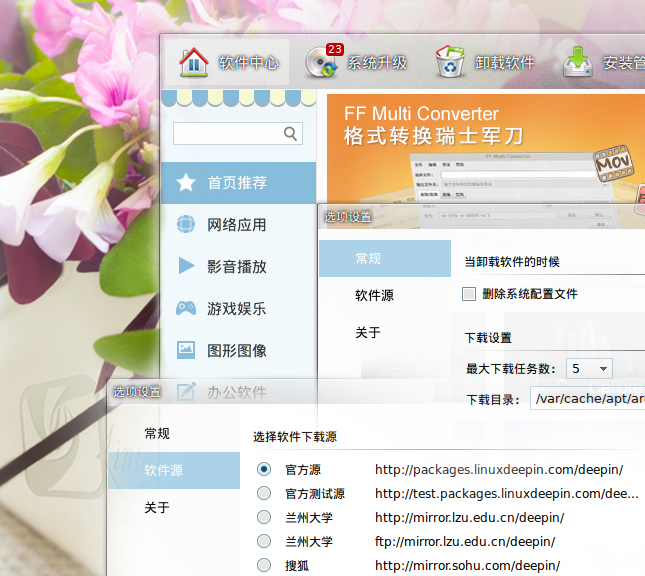
LinuxDeepin 12.12 Software Center Preferences Display
Compared to the Beta version, major changes in Deepin Software Center 3.0 RC:
- Removed the “Install Deb file” function, switching to using the Gdebi tool to install .deb format software packages directly;
- Added a “Update Software List” function: clicking this button updates the software list online (network dependent);
- Added support for mirror site selection: supports manually selecting a software source mirror site, or clicking the “Select Fastest Source” button to let the system automatically choose a faster mirror site for you;
- Refined the “Show New Features” option. Clicking this option displays an introductory demo;
- Updated some software descriptions, resolving garbled text issues in descriptions;
- Adjusted some software categories to make software classification clearer;
- Accelerated Software Center startup speed and resolved software installation stuttering issues.
4. Featured Applications
The main changes in this version for other featured applications shipped with Linux Deepin, such as Deepin Music Player and Deepin Media Player, are as follows.
1. Deepin Music Player 2.0 RC
Compared to the Beta version, the main changes in the RC version are:
- Added a behavior dialog for the close button: you can choose to minimize to the tray or directly exit the player;
- Adjusted the “Previous/Next” shortcut key combinations: “Alt+Left” for Previous, “Alt+Right” for Next;
- Removed the “Karaoke Mode” plugin; the “Media Player Control Interface v2” plugin is enabled by default, allowing easy control of playback volume, previous/next track, and pause/play through the sound tray at the bottom of the screen.
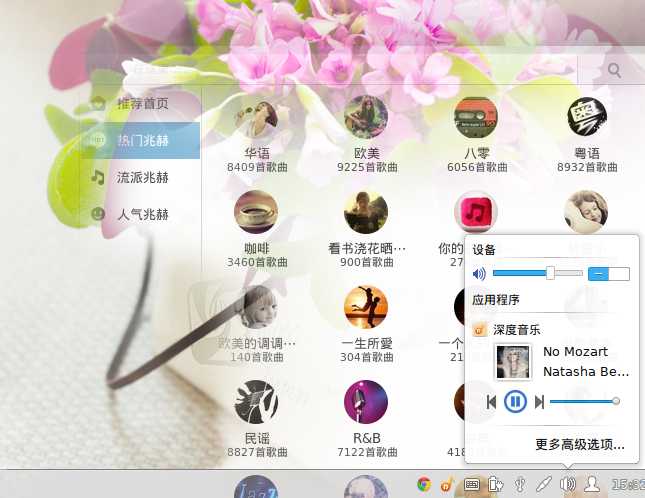
Deepin Music Player: Control Music Playback via Sound Tray
2. Deepin Media Player 2.0 RC
Compared to the Beta version, the main changes in the RC version are:
- Fixed the popping sound issue when dragging the progress bar during playback;
- Fixed the issue where the screen would easily go black during video playback;
- Added playback support for VCDs and DVDs with playback menu options;
- Added media playback control functionality to the bottom sound tray.
The Deepin Screenshot tool had no issues requiring fixes in this version.
5. Selected Software Change Log
- Pre-installed Google Chrome web browser. The system now provides both Firefox web browser and Google Chrome web browser by default.
- Pidgin becomes the new instant messaging tool, replacing the original Empathy. Also, Pidgin now includes WebQQ protocol support by default (implemented via the pidgin-lwqq plugin, thanks to the plugin developer). Note: Instability may occur when using WebQQ; if you encounter problems, you can report them to the project homepage.
- Pre-installed WPS for Linux Beta version. Any problems encountered during use can be reported to our bug tracking system. We will organize the reported issues and submit them to the WPS official team, or you can personally submit problem reports directly to the WPS Official Forum. When opening WPS for the first time, if you encounter a prompt about missing fonts, you can visit the WPS Official Wiki for solutions.
- Removed the “Network Tools” application.
- Pre-installed Skype.
6. Miscellaneous Updates
- The RC version’s base software repository has been upgraded to Ubuntu Raring, and the system kernel version has been upgraded to the 3.8 series. Other major components like Nautilus have been upgraded to version 3.8.1, and the Gnome terminal has been upgraded to version 3.8.2.
Note: Because the base software repository has been upgraded, Beta version users cannot smoothly upgrade directly to the RC version. It is recommended to download the latest system ISO and reinstall the system.
For instructions on how to install the Linux Deepin system, refer to the following tutorials:
Tutorial A: Create a Linux Deepin Bootable USB Drive on Windows
Tutorial B: Create a Linux Deepin Bootable USB Drive on Linux
Tutorial C: Linux Deepin Installation Steps Demo
- Updated DeepWin. For the usage of DeepWin, refer to
- Updated the RC default wallpaper. The official release default wallpaper is also under discussion and selection.
- Updated the system boot and shutdown theme
- Updated system and some application icon themes
- Updated the system window theme and GTK theme
- Updated the Deepin UI graphical interface library (for developers)
- Updated Deepin Emacs
……
7. Download
Currently, only the Simplified Chinese ISO file is provided. Multi-language versions will be available in the official release.
Simplified Chinese 32-bit: Click to Download
Simplified Chinese 64-bit: Click to Download
MD5 Checksums
MD5 (Simplified Chinese 32-bit): 505e577bfa3bec9655fe9cf84acbbd0d
MD5 (Simplified Chinese 64-bit): 39eea35cafbdbfb34086517a1f947eca
Note: Sync times may vary across mirror sites.
- Sohu Open Source Mirror: http://mirror.sohu.com/deepin-cd/12.12/
- Lanzhou University Mirror:
** ftp://mirror.lzu.edu.cn/deepin-releases/12.12
** http://mirror.lzu.edu.cn/deepin-releases/12.12/ - China Open Source Software Community Mirror: http://mirrors.oss.org.cn/deepin-cd/12.12/
- University of Science and Technology of China Mirror: http://mirrors.ustc.edu.cn/deepin-cd/releases/12.12/
- Beijing Institute of Technology Mirror: http://mirror.bit.edu.cn/deepin-cd/12.12/
- Tianjin University Open Source Mirror: http://mirror.tju.edu.cn/deepin-cdimage/12.12/
- Tsinghua University Open Source Mirror: http://mirrors.tuna.tsinghua.edu.cn/deepin-releases/12.12/
- Beijing Jiaotong University Mirror: http://mirror.bjtu.edu.cn/deepin-cd/12.12/
- Xiamen University Open Source Software Mirror: http://mirrors.xmu.edu.cn/deepin/deepin-cd/12.12
- University of Electronic Science and Technology of China: http://mirrors.scie.in/deepin-cd/12.12/
- Zhejiang University Open Source Mirror: http://mirrors.zju.edu.cn/deepin-cd/12.12/
8. Feedback and Communication
If you encounter any issues or have suggestions for improvement, you can submit them to: Mantis: Linux Deepin Project Issue Tracking System. The Linux Deepin operating system is released for general desktop users and is prohibited from commercial use without authorization. If you require commercial support, please contact us.
You are welcome to join the mailing lists to discuss topics of interest with community members (Subscribe here: Click Here to Subscribe):
a: [email protected], Developer Mailing List
b: [email protected], User Mailing List
- Official Forum: http://www.linuxdeepin.com/forum
- Official Blog: http://planet.linuxdeepin.com
- Official Sina Weibo: http://weibo.com/linuxdeepinnew
- Join Us: http://www.linuxdeepin.com/joinus/job
9. Closing Remarks
Since the Beta release, we have received a wealth of valuable improvement suggestions from the community. Everyone can help us make Linux Deepin even better. You can contribute in many ways, such as reporting issues you encounter during use or helping with community promotion. This release would not have been possible without the hard work and selfless dedication of the Linux Deepin team members and the community.
Thank you to everyone who has contributed to the development of Linux Deepin!
Stay tuned for the official release of Linux Deepin 12.12!
Copyright © Linux Deepin, 2011-2013.
These release notes have limited space and cannot showcase every effort we have made.
This work is licensed under the Creative Commons Attribution-ShareAlike 3.0 Unported License.
Reposted from: Linux Deepin Official Blog