

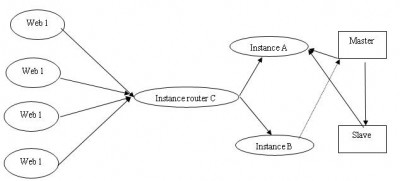
In large-scale web applications, the database often becomes a bottleneck for concurrent access. To effectively address this, a multi-database master-slave model is employed to increase the web application’s capacity for concurrent access.
The master-slave model handles the issue of data synchronization.
SQL Relay solves the connection pooling problem and implements load balancing for read-write separation.
SQL Relay is configured with three instances: A, B, and C. Instance A handles reading data from both the Master and Slave databases. Instance B handles write operations and writes only to the Master. Instance C acts as the router, managing application dispatch.
PHP connects to the database through either Instance A or Instance B.
In the actual configuration, since the Master handles both read and write operations, you can slightly reduce the connection count from the Master in Instance A’s settings and increase the number of connections reading data from the Slave to achieve a better balance.
1. MySQL Master/Slave Configuration
################
# Master/Slave Setup
################
master: 192.168.1.51
slave: 192.168.1.50
1. Master Configuration
Add to /etc/my.cnf
binlog-do-db=book (book is the database name)
Ensure the following are set
server-id=1
log-bin=mysql-bin
Grant the ‘rep’ user privileges for replication
GRANT REPLICATION SLAVE ON book.* TO [email protected] IDENTIFIED BY ‘123456’;
Restart the master service
2. Slave Configuration
vi /etc/my.cnf
Set the following 4 lines
server-id = 2
master-host = 192.168.1.51
master-user = rep
master-password = 123456
Restart the slave
3. Import the original data from the master into the slave.
2. SQL Relay Configuration
Almost none of the popular connection pooling solutions currently in the industry support PHP. After much searching, I finally found an open-source connection pooling technology — SQL Relay.
Languages supported by SQL Relay:
C C++ Perl Python PHP Ruby Java TCL Zope
Databases supported by SQL Relay:
Oracle MySQL mSQL PostgreSQL Sybase MS SQL Server IBM DB2 Interbase Sybase SQLite ODBC MS Access
SQL Relay’s website
http://sqlrelay.sourceforge.net/.
Basic Idea:
1. Configure two instances for final business processing
clubs-read
clubi-write
The read instance is configured with two connections, each starting with an equal number of connections.
2. Configure an instance to schedule read and write operations, named clubr
Use the router to distinguish between read and write connections to different MySQL databases.
<?xml version="1.0"?>
<!DOCTYPE instances SYSTEM "sqlrelay.dtd">
<instances>
<!– club Instance –>
<instance id="clubs" port="9002" socket="/tmp/clubs.socket" dbase="mysql" connections="10" maxconnections="20" maxqueuelength="5" growby="1" ttl="60" endofsession="commit" sessiontimeout="600" runasuser="nobody" runasgroup="nobody" cursors="5" authtier="listener" handoff="pass" deniedips="" allowedips="" debug="none" maxquerysize="65536" maxstringbindvaluelength="4000" maxlobbindvaluelength="71680" idleclienttimeout="-1" maxlisteners="-1" listenertimeout="0">
<users>
<user user="club" password="edb:club"/>
</users>
<connections>
<connection connectionid="master51" string="host=192.168.1.51;port=3306;db=book;user=club;password=club;" metric="1" behindloadbalancer="no"/>
<connection connectionid="slave50" string="host=192.168.1.50;port=3306;db=book;user=club;password=club;" metric="1" behindloadbalancer="no"/>
</connections>
</instance>
<instance id="clubi" port="9003" socket="/tmp/clubi.socket" dbase="mysql" connections="10" maxconnections="40" maxqueuelength="5" growby="1" ttl="60" endofsession="commit" sessiontimeout="600" runasuser="nobody" runasgroup="nobody" cursors="5" authtier="listener" handoff="pass" deniedips="" allowedips="" debug="none" maxquerysize="65536" maxstringbindvaluelength="4000" maxlobbindvaluelength="71680" idleclienttimeout="-1" maxlisteners="-1" listenertimeout="0">
<users>
<user user="club" password="edb:club"/>
</users>
<connections>
<connection connectionid="master51" string="host=192.168.1.51;port=3306;db=book;user=club;password=club;" metric="1" behindloadbalancer="no"/>
</connections>
</instance>