

How to Fix “connect: Network is unreachable”
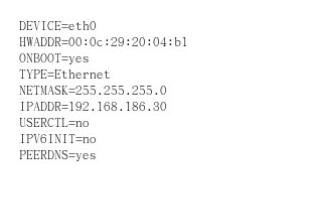
Solution: Locate the ifcfg-eth0 file under etc/sysconfig/network/
Configure as follows:
vi /etc/sysconfig/network-scripts/ifcfg-eth0
After opening the file, add any missing entries yourself:
DEVICE=eth0
BOOTPROTO=static
BROADCAST=192.168.1.255
IPADDR=192.168.1.25
NETMASK=255.255.255.0
GATEWAY=192.168.1.254
ONBOOT=yes
The command to restart the network card is:
service network restart