

Xfce (XForms Common Environment), created in July 2007, is a lightweight desktop environment for various Unix systems, similar to the commercial graphical environment CDE. The original author, Olivier Fourdan, initially designed XFce based on the XForms 3D graphics library. Xfce is designed to improve system efficiency, loading and executing applications quickly while conserving system resources.
yum install epel-release -y
yum grouplist # Available Groups indicates uninstalled groups
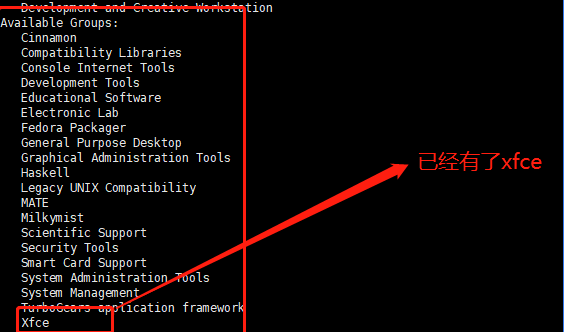
If the system already has them installed, they will appear under Installed Groups:
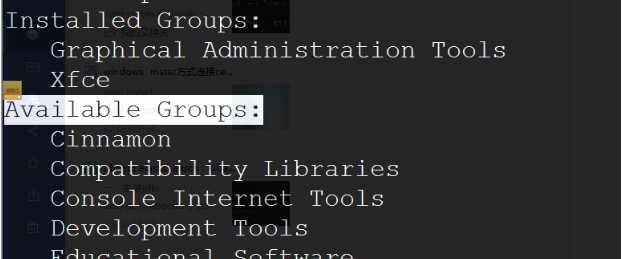
Install the software:
yum groupinstall "X Window system"
yum groupinstall xfce
systemctl isolate graphical.target
Install the VNC server:
yum install vnc-server tigervnc-server tigervnc-server-module -y
cp /lib/systemd/system/[email protected] /etc/systemd/system/vncserver@:1.service
Modify the ExecStart and PIDFile information for your own user (using root as an example here):
vi /etc/systemd/system/vncserver@:1.service # After changes, it looks like this
ExecStart=/usr/sbin/runuser -l root -c "/usr/bin/vncserver %i"
PIDFile=/root/.vnc/%H%i.pid

Set the VNC password:
vncpasswd
Start the service:
systemctl daemon-reload
systemctl enable vncserver@:1.service && systemctl start vncserver@:1.service
vi /root/.vnc/xstartup # The content is as follows
#!/bin/sh
# Uncomment the following two lines for normal desktop:
unset SESSION_MANAGER
#exec /etc/X11/xinit/xinitrc
[ -x /etc/vnc/xstartup ] && exec /etc/vnc/xstartup
[ -r $HOME/.Xresources ] && xrdb $HOME/.Xresources
xsetroot -solid grey
vncconfig -iconic &
startxfce4 &
Restart the service:
systemctl restart vncserver@:1.service
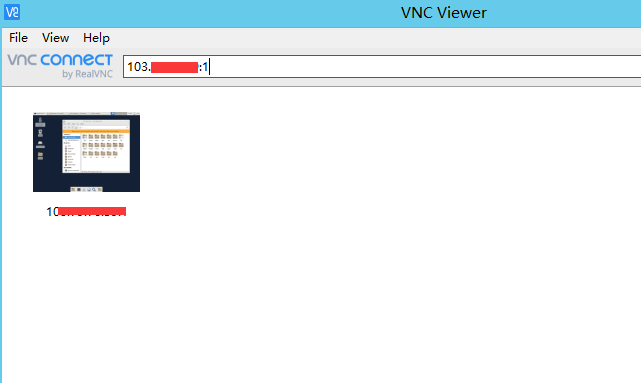
Remote connection from the client:
http://mirror.xrk.org/vnc/VNC-Viewer-6.20.113-Windows.exe
Enter ip:1 to connect:
192.168.1.100:1
Attachment Download https://www.cnop.net/uploadfile/2020/0328/20200328014555868.zip
One-click install script:
bash <(curl -s https://gitee.com/cnop/shell/raw/master/Xfce.sh)