

The default Flash carousel styles (homepage main ad) in ECShop come in several varieties. So how do you customize a personalized Flash carousel?
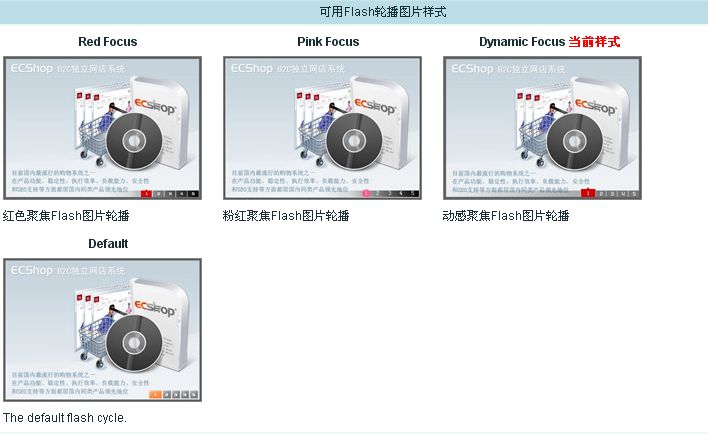
The corresponding locations for the Flash players above are under /data/flashdata: default, dynfocus, prinkfocus, and redfocus.
Open any one of these folders and you will see four files: cycle_image.js, data.js, preview.jpg, and *.swf.
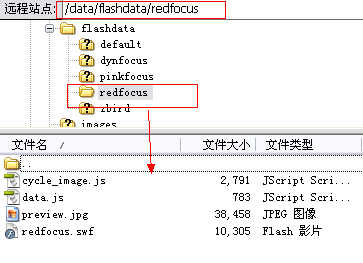
Now let’s start creating your own player. Copy one of the folders, for example redfocus, and rename it to: zbird.
Then start modifying the files inside the zbird folder.
1. Modify cycle_image.js
Change the comment at the beginning of the file to:
/*
Flash Name: zbird
Description: Mimics Zbird image carousel
*/
No need to modify $importjs.
Replace all occurrences of redfocus within the function show_flash() with zbird:
document.getElementById('flash_cycle_image').innerHTML = '
<object classid="clsid:d27cdb6e-ae6d-11cf-96b8-444553540000" codebase="http://fpdownload.macromedia.com/pub/shockwave/cabs/flash/swflash.cab#version=6,0,0,0" width="'+ focus_width +'" height="'+ total_height +'">'+'<param name="allowScriptAccess" value="sameDomain"><param name="movie" value="data/flashdata/zbird/zbird.swf"><param name="quality" value="high"><param name="bgcolor" value="#F0F0F0">'+'<param name="menu" value="false"><param name=wmode value="opaque">'+'<param name="FlashVars" value="pics='+pics+'&links='+links+'&texts='+texts+'&borderwidth='+focus_width+'&borderheight='+focus_height+'&textheight='+text_height+'">'+'<embed src="data/flashdata/zbird/zbird.swf" FlashVars="pics='+pics+'&links='+links+'&texts='+texts+'&borderwidth='+focus_width+'&borderheight='+focus_height+'&textheight='+text_height+'&stop_time=6000" quality="high" width="'+ focus_width +'" height="'+ total_height +'" allowScriptAccess="sameDomain" type="application/x-shockwave-flash" pluginspage="http://www.macromedia.com/go/getflashplayer" wmode="transparent"/>'+'</object>
';
2. data.js does not need modification. When you switch the player style in the ECShop backend, the program will write the uploaded image information into data.js for the player to call.
3. preview.jpg is the player’s preview image, displayed in the backend for users to click and select the player style. You can use the image from the beginning of this article.
4. zbird.swf: Delete the copied redfocus.swf. You need something cooler; I’m using this one (zbird), but of course you don’t have to use this specific one.
Go to the backend, System Settings -> Homepage Ad Management, and you can see the newly added player style has appeared:
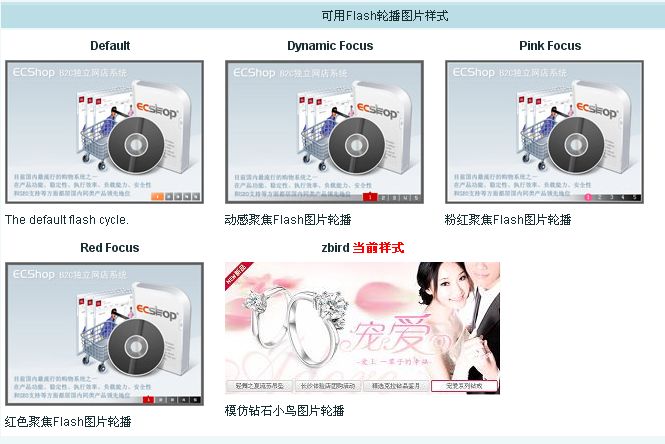
Select the zbird style as the current style. Now refresh the homepage, and the Flash won’t display.
At this point, you need to modify the index_ad.lbi file under library/ in your template. This is the library file that controls the Flash slide display. Keep only the following content:
<meta http-equiv="Content-Type" content="text/html; charset=utf-8">
<script type="text/javascript">
var swf_width=550;
var swf_height=265;
</script>
<script type="text/javascript" src="data/flashdata/{$flash_theme}/cycle_image.js"></script>
Now refresh the homepage to see the new Flash slide style.
Not done yet. After modifying the carousel image URLs and links, refresh the homepage and you will find that the content within the Flash slide hasn’t changed. This is because the Flash slide reads content from data.js, indicating that the content in data.js hasn’t been updated. Analysis reveals that when switching styles (i.e., when clicking the Flash slide style to switch), the program writes new data into data.js. Obviously, when switching to the zbird style, the data.js in the newly created directory zbird was not written with new data. So, let’s trace the program to see what happens during a style switch. The link for “Homepage Main Ad Management” is: /admin/flashplay.php?act=list. Opening flashplay.php reveals that the list action displays the flashplay_list.htm template file. Open flashplay_list.htm under /admin/templates and find line 47:
<td>{if $flashtpl.screenshot}<img src="{$flashtpl.screenshot}" border="0" style="cursor:pointer" onclick="setupFlashTpl('{$flashtpl.code}', this)" />{/if}</td>
It can be seen that when the style snapshot is clicked, the setupFlashTpl() function is triggered. At line 82 of flashplay_list.htm, you can see the implementation of the setupFlashTpl function. The core statement is as follows:
Ajax.call('flashplay.php?is_ajax=1&act=install', 'flashtpl=' + tpl, setupFlashTplResponse, 'GET', 'JSON');
Then check the install implementation process in flashplay.php. Lines 284-314 are the implementation of the install action, the operation executed when the style snapshot is clicked. Note line 296:
if (set_flash_data($flash_theme, $error_msg))
{
make_json_error($error_msg);
}
else
{
make_json_result($flash_theme, $_LANG['install_success']);
}
The function set_flash_data(), as the name suggests, is for setting the Flash data. Trace the implementation of set_flash_data(), starting at line 860 of flashplay.php, and examine the following code:
switch($tplname)
{
case 'uproll':
$msg = set_flash_uproll($tplname, $flashdata);
break;
case 'redfocus':
case 'pinkfocus':
case 'dynfocus':
$msg = set_flash_focus($tplname, $flashdata);
break;
case 'default':
default:
$msg = set_flash_default($tplname, $flashdata);
break;
}
You can see that when switching to the system’s built-in styles like redfocus, pinkfocus, or dynfocus, the set_flash_focus() function is executed. The same logic applies to our newly created zbird. Modify set_flash_data() as follows:
switch($tplname)
{
case 'uproll':
$msg = set_flash_uproll($tplname, $flashdata);
break;
case 'redfocus':
case 'pinkfocus':
// add here for zbird
case 'zbird':
case 'dynfocus':
$msg = set_flash_focus($tplname, $flashdata);
break;
case 'default':
default:
$msg = set_flash_default($tplname, $flashdata);
break;
}
Essentially, this makes the program execute the set_flash_focus() function when switching to the zbird style as well.
Refresh the homepage again, and you will see that the Flash slide now corresponds to the data modified in the backend.
Summary:
1. Create a new directory under /data/flashdata/ (or directly copy from the redfocus folder), for example named zbird, containing four files: cycle_image.js, data.js, preview.jpg, and zbird.swf.
2. Modify the files in the new style directory: edit cycle_image.js (e.g., replace redfocus with zbird wherever it appears in cycle_image.js), replace preview.jpg with a snapshot of the corresponding style, and source a custom Flash style swf file (e.g., zbird.swf).
3. Modify the library file /themes/template_name/library/index_ad.lbi, removing all if conditionals.
4. Modify the flashplay.php file, find the set_flash_data() function, and add: “case ‘zbird’:” around line 878.