

<<
Many webmasters use Phpcms v9 to build their main site, and then use Discuz! X2.5 to build the site’s forum. This results in a website with two user centers: the phpsso of Phpcms v9 and the UCenter of Discuz! X2.5. This requires integrating the two programs to achieve synchronized registration, synchronized login, and synchronized logout.
This tutorial uses UCenter as the server, with phpsso and Discuz! X2.5 acting as UCenter client applications. phpsso and Discuz! X2.5 interact through UCenter; while Phpcms v9 interacts with Discuz! X2.5 through phpsso. The integration steps are as follows:
Step 1: Fully install the latest versions of Phpcms v9 and Discuz! X2.5
The author installed Phpcms v9 in the root directory, then created a “bbs” directory in the root to install Discuz! X2.5. The paths in this tutorial use this installation directory as an example. Webmasters should change the paths according to their actual situation when following along. Also, the author used the latest versions of the programs when testing this tutorial, so there is no guarantee that all versions can be successfully integrated using this tutorial. It is recommended to upgrade the programs to the latest version.
Log in to the Discuz! X2.5 backend, go to “UCenter”, click “Application Management” and then click “Add New Application” to enter the application adding interface. Configure as follows:
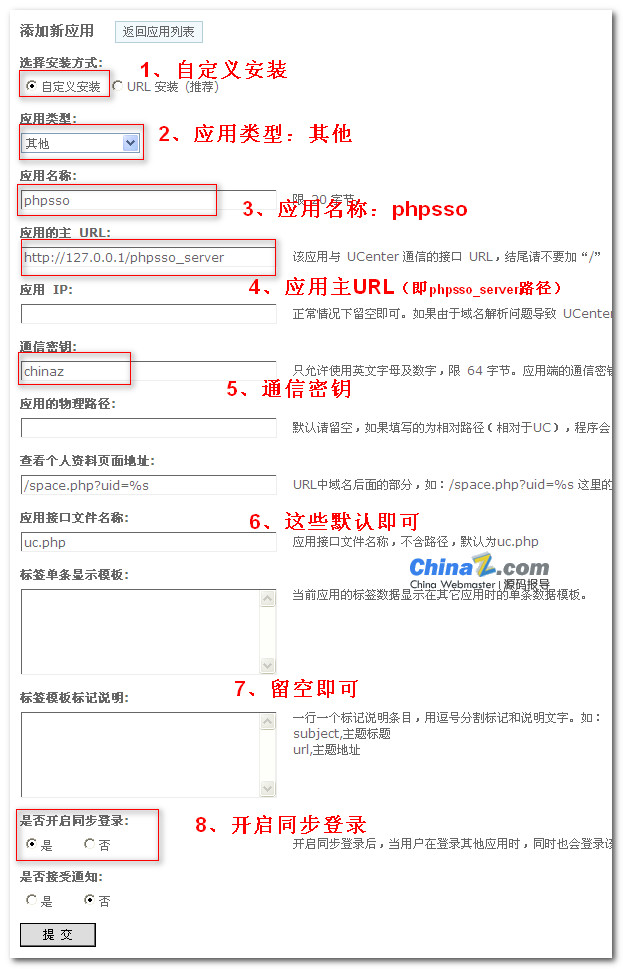
1. Installation method: select “Custom Installation”
2. Application type: select “Other”
3. Application name: fill in “phpsso”
4. Application main URL: This is the path to phpsso_server, determined by your actual situation. Note: do not include a trailing slash. For this tutorial, it is filled in as http://127.0.0.1/phpsso_server
5. Communication key: fill in any combination of English letters and numbers within 64 bytes. However, you must remember it, because the communication key for phpcms must be consistent with this setting, otherwise phpsso will not be able to communicate normally with UCenter. For this tutorial, the communication key is set to: chinaz
6. Application IP, physical path of the application, and profile page URL can be left blank by default. The application interface file name can default to uc.php.
7. The single tag display template and tag template description can be left blank by default.
8. Enable synchronized login: Yes. Only when enabled can the two programs achieve synchronized login.
9. After completion, submit. A new application ID will be generated. (Remember this application ID; it will be used in “Step 3”.)
10. Go to the backend “Admin” -> “UCenter Settings” option. For “Allow direct activation”, select “Yes”.
Next, go to Phpcms v9 to configure phpsso.
Step 3: Configure phpsso
Log in to the Phpcms v9 backend, go to “phpsso”, click “System Settings”, and enter the “UCenter Configuration” settings interface. Configure as follows:
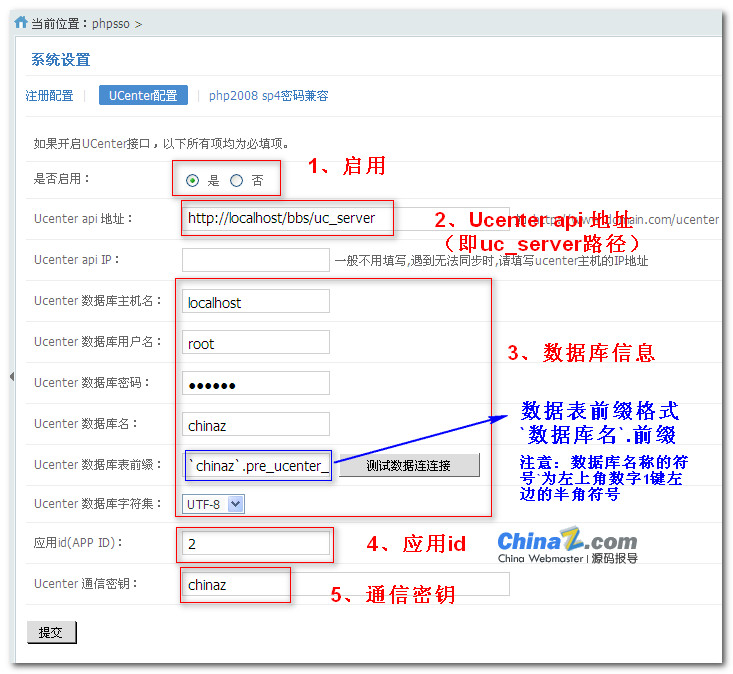
1. Enable: Yes
2. Ucenter API address: This is the path to uc_server, determined by your installation. Note: do not include a trailing slash. For this tutorial, it is filled in as: http://localhost/bbs/uc_server
3. Ucenter database information: Fill in the database information according to your situation. The format for the database table prefix is `database_name`.table_prefix. Note that the quotes around the database name are backticks, not single quotes.
4. Application ID (APP ID): This is the application ID automatically generated when you created the phpsso application in Step 2.
5. Ucenter communication key: This is the “communication key” set in Step 2. These two values must be exactly the same, otherwise communication will fail.
Step 4: Check Communication Status
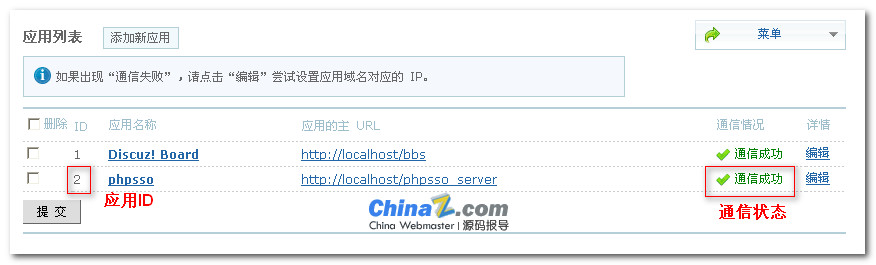
Log in to the Discuz! X2.5 backend, go to “UCenter”, click “Application Management” to check if the communication between the phpsso application created in Step 2 and UCenter is successful. If communication fails, please check if the parameter configurations in “Step 2” and “Step 3” are correct.
Step 5: Modify Discuz!
If this is not modified, logging in on Phpcms v9 will synchronize login to Discuz!
1. Find the file in the discuz directory at template/default/member/login.htm, and delete:
onsubmit="{if $this->setting['pwdsafety']}pwmd5('password3_$loginhash');{/if}pwdclear = 1;ajaxpost('loginform_$loginhash', 'returnmessage_$loginhash', 'returnmessage_$loginhash', 'onerror');return false;"
2. Find the file in the discuz directory at template/default/member/login_simple.htm, and delete:
onsubmit="{if $_G['setting']['pwdsafety']}pwmd5('ls_password');{/if}return lsSubmit();"
3. Find the file in the discuz directory at /source/function/function_message.php, find:
$param['header'] = true;
and replace it with:
$param['header'] = false;
Step 6: Integration Complete
The author made no