MySQL server error report:Array ( [0] => Array ( [message] => MySQL Query Error ) [1] => Array ( [sql] => INSERT INTO `qq45115517`.`ecs_sessions` (sesskey, expiry, ip, data) VALUES ('71d2985457ddabd56a6f12b093b0fcd2', '1370251801', '112.65.182.50', 'a:0:{}') ) [2] => Array ( [error] => INSERT command denied to user for table 'ecs_sessions' ) [3] => Array ( [errno] => 1142 )
Today, a client found this error upon opening their website. After analysis by our ecshop template team, it appears to be a problem with the session table. The session table is used to record ecshop visitor information, and as site traffic grows, this table can become very large. There are two ways to resolve this:
Method 1:
Clear the session table.
You can execute the following statement in the backend under Database Management – SQL Query:
delete from ecs_session
Method 2:
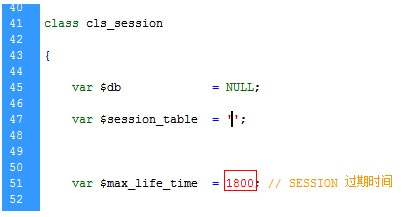
Open cls_session.php under the Includes directory.
Modify the expiration time by reducing the value.