

Pylot ispython written inwebTest. It’s relatively simple to use and produces stable test results.
I have to express my frustration with Apache’s ab testing tool – the results are all over the place with the same URL, making it hard to make sense of anything.
Download
pylot:www.pylot.org/
Address:
http://www.pylot.org/download.html
pylot_1.26.zip – 07/06/2009 ()
Installation
:
。 (⊙﹏⊙b)
,。,, pylot_1.26.zip ,。
():
:
1:Pylot ()
2:Python 2.5 + ()
3:wxPython( – GUI)
:http://www.wxpython.org/download.php
4:numpy( – )
:http://sourceforge.net/projects/numpy
5:matplotlib( – )
:http://sourceforge.net/projects/matplotlib
Ps. mac。 windows,matplotlib,gcc。。
url:
pylot , testcases.xml 。
| <testcases> <!– SAMPLE TEST CASE –> <case> <url>http://www.xxxxx.com/test11.php</url> </case> <!– SAMPLE TEST CASE –> <!– <case> <url>http://search.yahooapis.com/WebSearchService/V1/webSearch</url> <method>POST</method> <body><![CDATA[appid=YahooDemo&query=pylot]]></body> <add_header>Content-type: application/x-www-form-urlencoded</add_header> </case> –> </testcases> |
:
500,20:
python run.py -a 500 -d 20
:
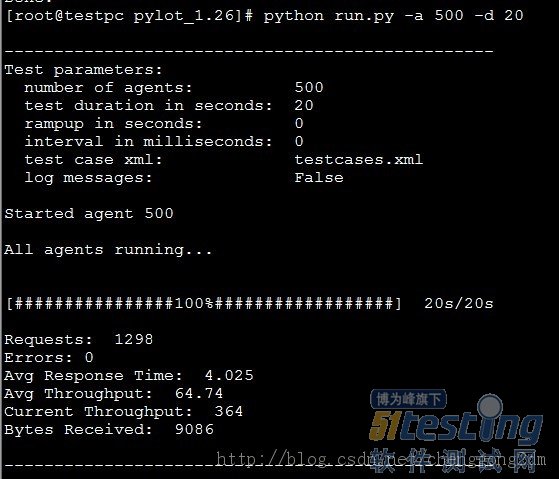
。
,,html,。
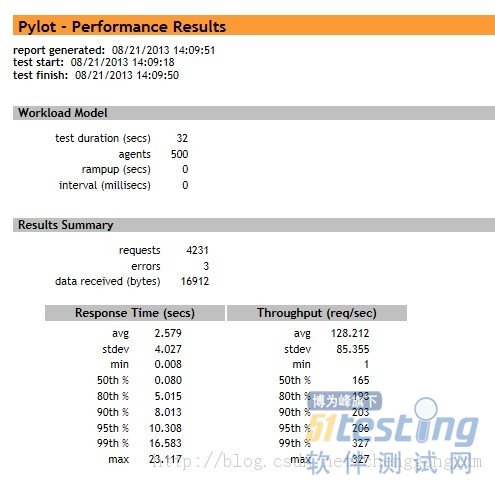
windows,matplotlib,pylot,ceonts,。
,,。