

Nginx web servers in production environmentsRun。,Nagios, Zabbix, and Munin support Nginx monitoring.
If you don’t need comprehensive reports or long-term data statistics, and just need a quick and simple way to monitor Nginx server requests, I recommend a command-line tool called ngxtop 。
ngxtop top。ngxtop Nginx , top 。, ngxtop 。。
, ngxtop Nginx 。
Linux ngxtop
Linux pip(LCTT:ngxtoppython)。
ngxtop。
- $ sudo pip install ngxtop
ngxtop
:
- ngxtop [options]
- ngxtop [options] (print|top|avg|sum) <var>
- ngxtop info
。
- -l : (Nginx Apache2)
- -f :
- –no-follow: ,
- -t :
- -n :
- -o : ()
- -a …, –a …: (: sum, avg, min, max )。
- -v:
- -i :
,。
- bodybytessend
- http_referer
- httpuseragent
- remote_addr
- remote_user
- request
- status
- time_local
ngxtop Nginx
ngxtop (/etc/nginx/nginx.conf) Nginx Address。, Nginx ,:
- $ ngxtop
10 Nginx ,。
20:
- $ ngxtop –n 20
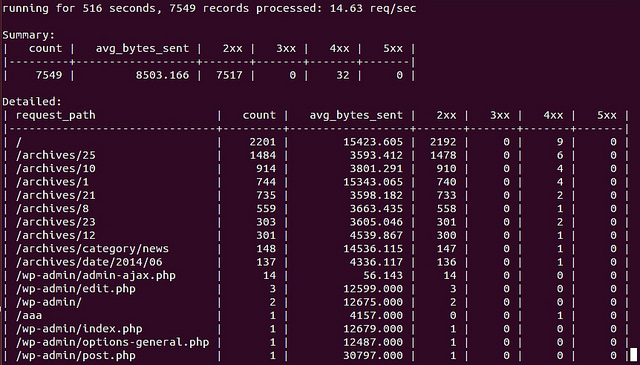
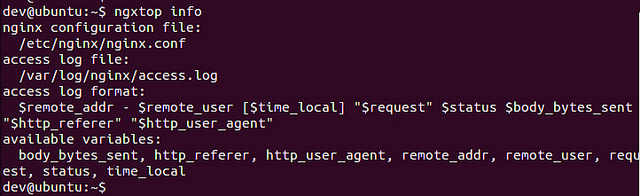
Nginx:
- $ ngxtop info
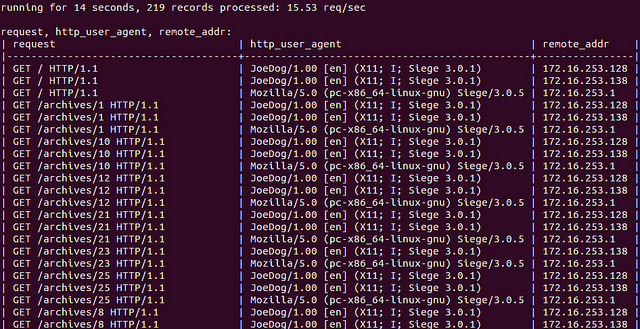
,。 "print" 。
- $ ngxtop print request http_user_agent remote_addr
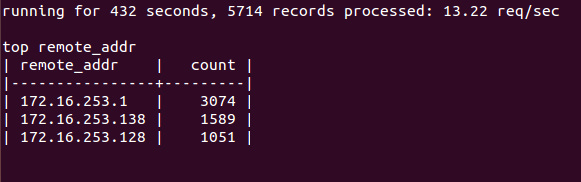
IPAddress
- $ ngxtop top remote_addr
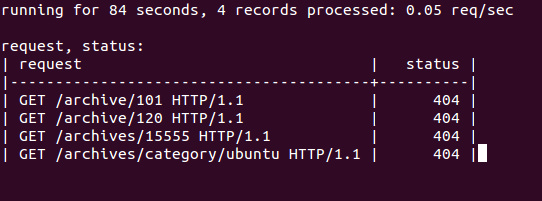
404
- $ ngxtop –i 'status == 404' print request status
Nginx,ngtop , Apache 。 Apache Server:
- $ tail –f /var/log/apache2/access.log | ngxtop –f common
via: http://xmodulo.com/2014/06/monitor-nginx-web-server-command-line-real-time.html