|
QuaggaQuagga is open-source routing software that turns Linux into a router supporting RIP, OSPF, BGP, and IS-IS. It supports IPv4/IPv6 with route/prefix filtering.

In this tutorial, we’ll connect two branch networks (192.168.1.0/24 and 172.17.1.0/24) via a dedicated link.
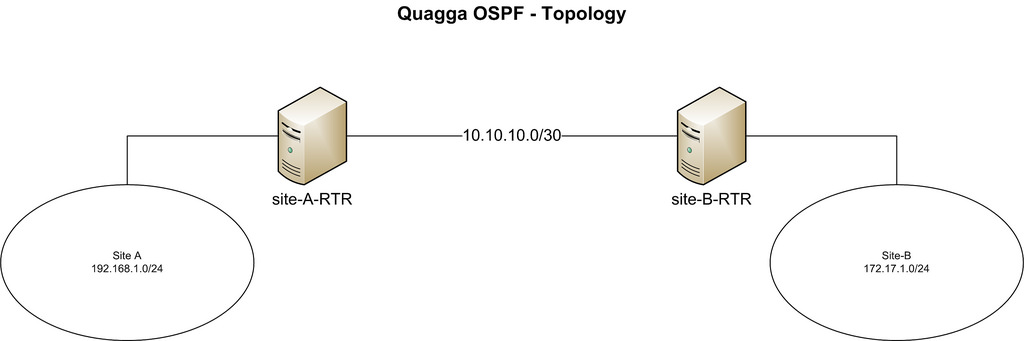
CentOS。Settings“site-A-RTR”“site-B-RTR'。IPAddress。
- Site-A: 192.168.1.0/24
- Site-B: 172.16.1.0/24
- Peer network between two Linux routers: 10.10.10.0/30
Quagga。,。
- Zebra: ,。
- Ospfd: IPv4 OSPF 。
Installing Quagga on CentOS
We install Quagga using yum.
- # yum install quagga
On CentOS 7, SELinux blocks quagga from writing config files. We need to disable this policy.SELinux(),“zebrawriteconfig”。CentOS 6。
- # setsebool -P zebra_write_config 1
Without this change, you’ll see errors when saving Quagga config.
- Can't open configuration file /etc/quagga/zebra.conf.OS1Uu5.
After installing, configure peer IPs and OSPF settings. Quagga includes vtysh, similar to Cisco/Juniper CLI.
Step 1: Configure Zebra
Create Zebra config file and enable the Zebra daemon.
- # cp /usr/share/doc/quagga-XXXXX/zebra.conf.sample /etc/quagga/zebra.conf
- # service zebra start
- # chkconfig zebra on
Start vtysh CLI:
- # vtysh
Configure Zebra log file. Enter vtysh global config mode:
- site–A–RTR# configure terminal
Specify log file location, then exit:
- site–A–RTR(config)# log file /var/log/quagga/quagga.log
- site–A–RTR(config)# exit
Permanently save config:
- site–A–RTR# write
Identify available interfaces and configure IPs.
- site–A–RTR# show interface
- Interface eth0 is up, line protocol detection is disabled
- . . . . .
- Interface eth1 is up, line protocol detection is disabled
- . . . . .
Configure eth0:
- site–A–RTR# configure terminal
- site–A–RTR(config)# interface eth0
- site–A–RTR(config–if)# ip address 10.10.10.1/30
- site–A–RTR(config–if)# description to–site–B
- site–A–RTR(config–if)# no shutdown
Configure eth1:
- site–A–RTR(config)# interface eth1
- site–A–RTR(config–if)# ip address 192.168.1.1/24
- site–A–RTR(config–if)# description to–site–A–LAN
- site–A–RTR(config–if)# no shutdown
Verify config:
- site–A–RTR(config–if)# do show interface
- Interface eth0 is up, line protocol detection is disabled
- . . . . .
- inet 10.10.10.1/30 broadcast 10.10.10.3
- . . . . .
- Interface eth1 is up, line protocol detection is disabled
- . . . . .
- inet 192.168.1.1/24 broadcast 192.168.1.255
- . . . . .
- site–A–RTR(config–if)# do show interface description
- Interface Status Protocol Description
- eth0 up unknown to–site–B
- eth1 up unknown to–site–A–LAN
Permanently save config:
- site–A–RTR(config–if)# do write
Repeat IP configuration on site-B.
If successful, you can ping the peer IP 10.10.10.2 from site-A.
Note: Changes in vtysh take effect immediately once Zebra is running. No restart needed.
|

