

CDN stands for Content Delivery Network, which solves the problem by storing your website content on different servers around the world. Visitors can then fetch your site’s files from the CDN location closest to them, instead of accessing your server every time.
Cloudflare – Free with Security Features
Cloudflare is definitely one of the largest CDN providers. It supports over 10 million websites, with a massive global network (the largest in this article).
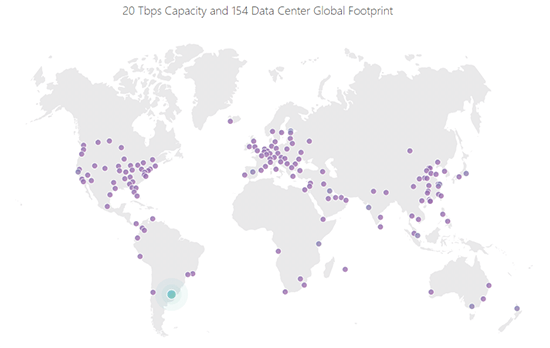
Currently, Cloudflare has 154 data centers:
To get started with Cloudflare, all you need to do is change your site’s nameservers to point to Cloudflare. Cloudflare will then automatically start caching content and serving it from its massive global network.
Cloudflare is also a reverse proxy, which means besides smartly serving content through its CDN, it also provides many security benefits.
For example, you can create special rules with Cloudflare to protect important areas of your site, such as the WordPress dashboard. Or you can implement higher security across the entire site. This is particularly useful if your site encounters a Distributed Denial of Service (DDoS) attack.
Another great benefit of Cloudflare is that it’s free for most websites. While Cloudflare does offer paid plans with more advanced features (like Web Application Firewall and more custom page rules), the free plan addresses what most users need.
Cloudflare Pros
Free plan works for most users
Easy to set up: just point your nameservers to Cloudflare
Massive global network with 154 locations across 6 continents
Many security benefits beyond CDN
Cloudflare Cons
Single point of failure: since you point nameservers to Cloudflare, your site goes down if Cloudflare has issues
Stackpath – All-Round CDN (formerly MaxCDN)
MaxCDN was a popular CDN service, especially for WordPress users. In 2016, Stackpath acquired MaxCDN and incorporated its services under the Stackpath brand.
Like Cloudflare, Stackpath offers CDN and security services. However, Stackpath provides more granular approaches, allowing you to select specific services or use the complete “edge delivery” package including CDN, firewall, managed DNS, etc.
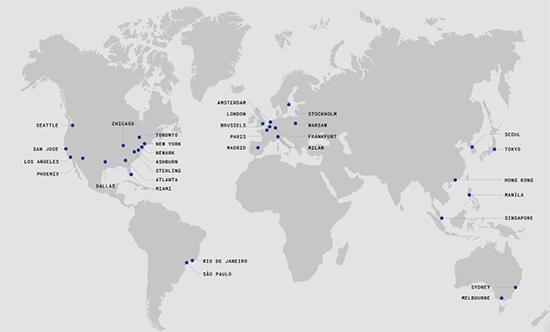
Currently, Stackpath offers 45 points of presence except Africa:
Stackpath Pros
Easy to set up
No need to change nameservers
Easy month-to-month billing
Advanced features like Web Application Firewall and managed DNS
Stackpath Cons
Not as many points of presence as Cloudflare
No free plan (but offers a free month trial)
Sucuri – Rock-Solid Security
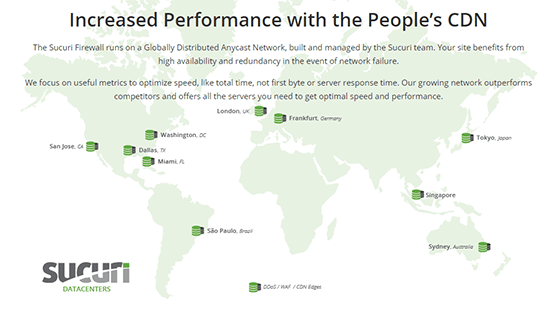
Most people consider Sucuri a security service rather than a CDN, since Sucuri does extensive work in website security. While its edge server network isn’t as large as other CDN providers on this list, it does offer edge servers in the most important regions:
Sucuri Pros
More than just a CDN
Provides malware scanning and malware removal services
Has firewall for active protection
Includes DDoS protection
Can automatically back up sites, including cloud backup storage (extra $5/month)
Sucuri Cons
Fewer edge servers compared to other services
No free plan
Lowest plan doesn’t support SSL
KeyCDN – Affordable and Easy to Use
KeyCDN is CDN-only
It’s especially popular with WordPress websites, partly because KeyCDN is active in the WordPress community with plugins like CDN Enabler and Cache Enabler.
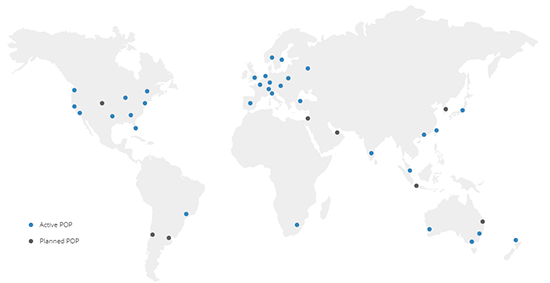
It has 34 points of presence globally, with new locations in Israel, Korea, Indonesia, and other regions:
KeyCDN Pros
Affordable pay-as-you-go pricing
Good server presence in all inhabited regions
Easy to use for non-technical users, with extensive documentation
KeyCDN Cons
No free plan
No detailed security features like firewall and bot filtering
Incapsula – Many Similarities to Cloudflare
Incapsula functions much like Cloudflare. It acts as a reverse proxy providing CDN and security features.
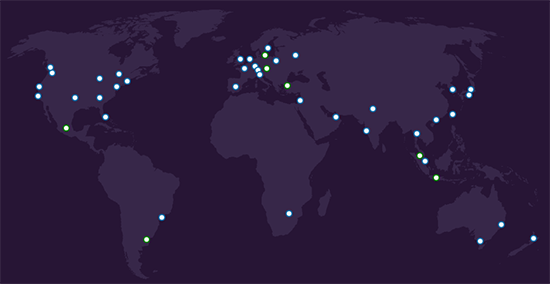
Currently, Incapsula offers 44 points of presence:
Incapsula Pros
Has a free plan
DDoS and bot protection even on free plan
Paid plans offer more advanced security features like Web Application Firewall
Incapsula Cons
Like Cloudflare, Incapsula has a single point of failure
No SSL on free plan like Cloudflare
Jetpack Image CDN – Simple and Free
Jetpack Image CDN (formerly Jetpack Photon) is the most restricted option on this list, as it only serves as a CDN for WordPress site images, while all other CDN services can handle any type of static file.
That said, images account for about half of the average web page file size, so they are one of the highest value assets to serve via CDN.
Jetpack Image CDN is also free, which helps soften the blow of this limitation. And as the name suggests, it’s part of the popular WordPress Jetpack plugin.
Jetpack Image CDN Pros
100% free
No limit on the number of images served via Jetpack Image CDN
Absolutely the simplest setup process, just click a button in the WordPress Jetpack plugin
Jetpack Image CDN Cons
Only works for images, with almost no control
Cannot clear cache, meaning once an image is cached, it stays “forever”. To update an image, you need to change its filename.
Original: https://www.simcf.cc/6692.html