

1. xmrig
XMRig is an open-source, high-performance, cross-platform Monero mining software that can use both CPU and GPU for mining, supporting Windows, Linux, and macOS.
It supports both Nvidia and AMD graphics cards. We’ve covered this tool in previous episodes – its performance is excellent.
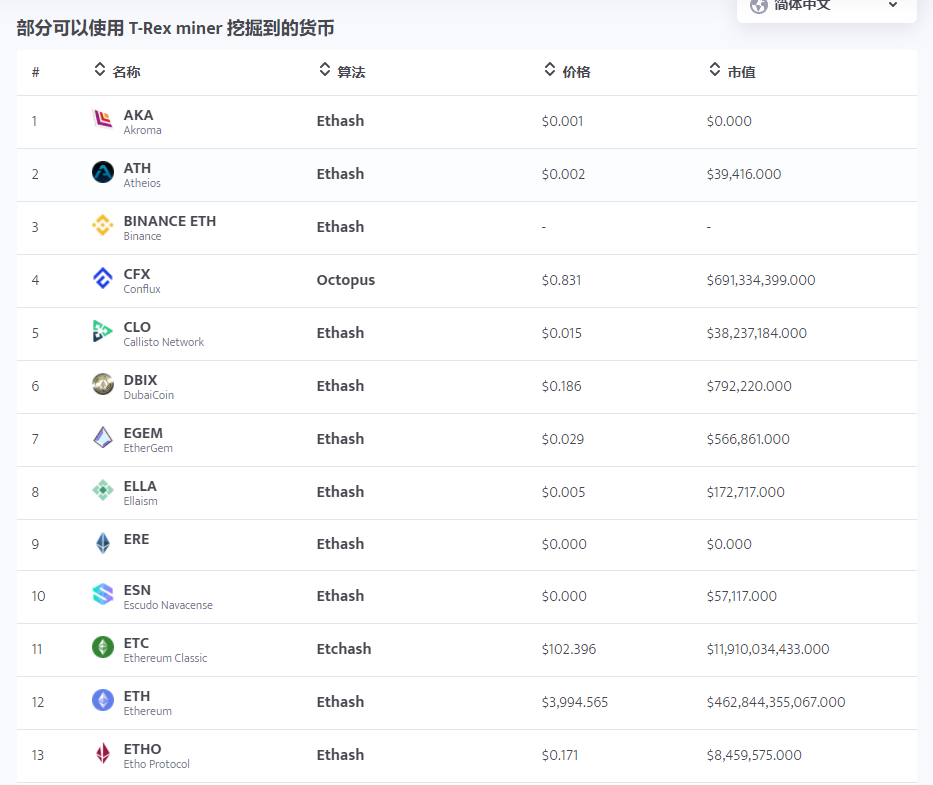
2. T-Rex
T-Rex, whose logo is a T-Rex dinosaur, is a very mainstream mining tool supporting dozens of cryptocurrencies, including familiar ones like Monero and Dogecoin.
T-Rex focuses on Nvidia GPU mining and supports more than a dozen mainstream algorithms. It’s considered one of the top Nvidia mining tools with low VRAM requirements.
It runs on both Windows and Linux operating systems.
The mining fee is only 1%. It provides a local web interface accessible via browser on the local network to view miner status and hashrate.
3. lolMiner
Project URL:
https://github.com/Lolliedieb/lolMiner-releases/releases
Compared to the first two, lolMiner is a heavyweight mining tool. If your GPU has 6GB or more VRAM, you can use this tool.
It supports both Nvidia and AMD GPUs with high mining efficiency. Supports over 16 algorithms and hundreds of coins.
4. NBMiner
Supports Nvidia and AMD GPU mining. Supports Ethereum, Bitcoin, RVN, GRIN, BEAM, CFX, ZIL, ERGO, AE, SERO, and many other altcoins. Supports Windows and Linux, backup pool configuration, and SSL connection to pools. Developer fee ranges from 1-3% depending on the algorithm. The software provides various parameters – check the official website for details.
https://github.com/NebuTech/NBMiner
5. GMiner
Most mining enthusiasts have used this tool.
GMiner was created by a team of Russian experts in high-performance computing and cryptography. The first version was released on September 21, 2018, and received excellent reviews. It’s said to be the most efficient Nvidia Ethereum mining software, with performance comparable to T-Rex.
Supports both Nvidia and AMD GPUs, as well as Windows and Linux.
In the latest v2.54, DAG generation speed has been improved by up to 2x.
Project URL:
https://github.com/develsoftware/GMinerRelease/releases
6. teamredminer
Supports AMD GPUs, said to be the most efficient AMD Ethereum mining software.
According to AMD GPU ETH mining benchmarks, teamredminer performs the best with low developer fees. Different GPU architectures have different ETH mining fees: Polaris GPUs (RX470/480/580/590) are 0.75%, other architectures are 1.0%.
7. PhoenixMiner
https://phoenixminer.org/
PhoenixMiner, also known as Phoenix Miner, is a well-known mining tool in the industry. The software is well-optimized with high hashrate and fast Bitcoin/Ethereum mining speeds, supporting multiple altcoins. Supports both AMD and Nvidia GPUs, including mixed mining rigs. Supports Windows and Linux. The developer fee is 0.65%, which is very low in the industry. It also supports dual algorithm mining with dual mining fees of 0.65% and 0.9%.
Next, let’s look at some specialized mining operating systems.
8. Hive OS
A dedicated mining OS with simple setup, making it easy to configure overclocking and various mining parameters. Widely used for Antminer S17, T17, and other ASIC miners, and can also be installed on regular PCs. The system mines stably without the crashes or interruptions sometimes seen on Windows.
9. NiceHash
We covered the detailed usage of this platform in previous episodes. It mainly focuses on Bitcoin mining. The platform rents your hashrate for mining and distributes rewards according to rules. The software integrates various common mining tools and also provides a dedicated NiceHash OS, similar to Hive OS, which can be installed on a USB drive or system, supporting both AMD and Nvidia GPUs.
10. minerstat
https://minerstat.com
Mining OS similar to the previous two mining systems. The website provides introductions to various mining tools with rich backend menus including cryptocurrency prices, miner configuration and management, mining analysis, hashrate calculations, and other useful features. Try it out based on your needs.