

I remember when I first graduated, our company was still renting hardware servers from Alibaba Cloud, until eventually these hardware servers could no longer be renewed and were replaced by the cloud products we’re now more familiar with.
VPS and cloud servers are both, in essence, products that virtualize many small independent servers from one or more standalone servers and then rent them out to many users. So although their performance is slightly worse compared to bare-metal hardware servers (when comparing the same specs), the price is very affordable, making them ideal for most regular users.
Take an ordinary dedicated server, for example 鈥?easily tens or even hundreds of gigabytes of RAM. For relatively simple scenarios (like personal VPNs, personal blogs), most of the time we simply don’t need such high specs, which easily leads to wasted resources. With VPS and cloud servers, each system is independent, you have relatively broad permissions, and there’s more room to tinker.
For instance, you can use a cloud server or VPS to build your own blog, set up a personal cloud drive (like a storage-focused machine), use it for VPN purposes, and so on. For individual users, renting an entire physical server is quite wasteful, which is why VPS and cloud servers are more suitable for most of us 鈥?we only need one virtual server carved out of the physical machine.
So, what’s the difference between a VPS and a cloud server?
I personally spent a few years working in the IDC industry and have dealt with both VPS and cloud server products. Here’s a simple breakdown of the differences between them.
Although both are virtualized products, they differ in many ways. Let’s go through them separately.
From a structural perspective:
A VPS is created by installing virtualization software 鈥?such as VMware, Hyper-V (a Microsoft product), KVM, OpenVZ, etc. 鈥?on one or more standalone servers, and then using that software in combination with virtualization management panels and billing software to automate management. When you purchase and pay for a plan on the provider’s frontend page, the system automatically provisions a VPS with the corresponding configuration on one of the host machines (if you buy multiple VPS at once, they might be provisioned across different host nodes). The operating system, of course, is deployed based on your selection by directly copying a pre-made system template.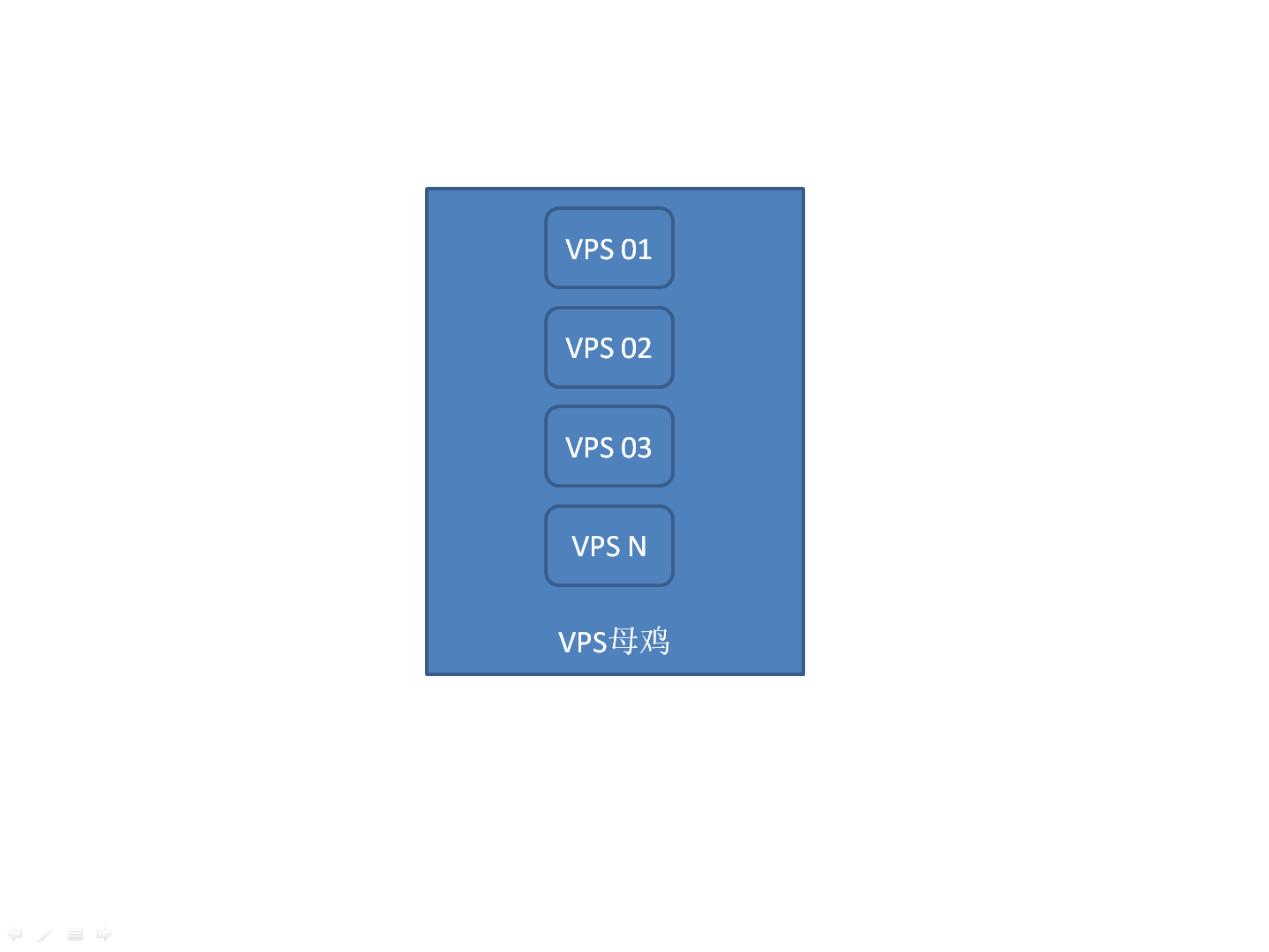
The server that houses your VPS is called the “host machine” (or parent node), and the VPS you purchase is known as a “guest VM” (or child instance).
Thus, a VPS host machine generally has relatively high specs 鈥?CPU cores, RAM, disk capacity, etc. Herein lies an issue: if the performance of the host machine your VPS resides on is strong and the number of VPS on it is small (e.g., only a few instances at the time of your purchase), then your VPS will run faster.
Another issue is that some virtualization technologies (such as OpenVZ) allow the total allocated resources of the provisioned VPS instances to exceed the physical resources of the host machine 鈥?something we commonly refer to as VPS overselling. For example, on a server with 128GB of RAM, after subtracting resources needed by the system itself, theoretically we might only be able to create around fifty 2GB VPS instances. Through certain virtualization techniques, some less reputable providers might cram 80 or even more VPS instances onto this one machine, causing the performance of those VPS instances to drop significantly.
So, where do the extra resources come from?
We know that no user’s VPS resource utilization hits 100% all the time. Some providers adopt a dynamic resource allocation approach, distributing remaining unused resources to new VPS instances to reduce costs 鈥?essentially, allocating resources on an as-used basis. However, the frequent allocation and reclamation of resources not only consumes host machine performance but also causes performance degradation in the VPS instances hosted on it. That’s also why such VPS are generally cheaper. Of course, reputable providers that care about host and guest stability do enforce relatively strict limits, keeping the number of instances within a reasonable range, or only overcommitting slightly, so the impact is negligible.
If a certain server ends up with too many VPS instances for some reason, technicians sometimes even need to manually migrate VPS instances to a more idle machine.
Therefore, the performance of the VPS you purchase greatly depends on the host machine’s performance and whether other neighboring VPS instances on the same host are abusing resources, especially during peak evening usage hours.
Furthermore, if the physical host running your VPS encounters network or other hardware issues, it may sometimes require downtime for maintenance, which will also affect your VPS server.
With cloud servers, on the other hand: the hardware resources from multiple servers can be pooled together in a clustered form for unified scheduling and allocation. For example, multiple servers form one or more clusters of varying sizes.
Whether it’s an open-source cloud management platform (like OpenStack) or a self-developed management system. The structures for networking, storage, etc., are also much more complex than those of a VPS. Of course, it’s the improved stability, flexibility, and cost reduction that make cloud servers the trend. When the hard drive or memory of one server fails, it can be replaced and maintained more quickly and conveniently. If the cluster’s resources become insufficient later on, more servers can simply be dynamically added.
In terms of scalability:
When we buy most VPS plans, we cannot customize hardware specifications the way we can with cloud servers. For instance, you can’t directly and dynamically select the number of CPUs, RAM size, or disk size. Instead, you can only choose from server plans pre-defined by the provider (e.g., 1G RAM, 1 core; 2G RAM, 1 core; 4G RAM, 2 cores). Upgrading later usually means moving to the next tier plan; generally, you cannot upgrade individual hardware components like the CPU or RAM independently 鈥?you have to upgrade the whole package.
With cloud servers, you can directly drag a slider to increase or decrease the configuration of a specific hardware component. If a particular resource becomes insufficient later (e.g., RAM, hard disk), upgrading it individually is also much more convenient.
Regarding payment methods:
Most VPS services, unlike cloud servers, cannot be billed hourly on a pay-as-you-go basis. They often only come with fixed monthly, quarterly, or annual payments.
Cloud servers are very flexible in this regard. Most vendors offer hourly billing, and when you stop using the server and simply terminate it, the charges stop. Of course, you can also choose more cost-effective monthly or yearly billing. Some even offer post-usage billing.
Even though cloud servers have many advantages, we still find that many small hosting providers only offer VPS, not cloud servers.
This is because VPS technology has been developing for many years and, compared to cloud servers