

1. Option One
Active Data Guard (Oracle 11g Data Guard)
Prior to Oracle 11g, database fast switchover and disaster recovery were typically achieved through a primary-standby relationship formed by two data mirror nodes, known as Data Guard. Active Data Guard is a new solution for Oracle 11g database management and disaster recovery. It requires no component installation or additional purchases; it only needs configuration to implement. In most cases, it can be used in Oracle RAC, Grid Infrastructure, OGG (Oracle GoldenGate), and ASM environments to maximize efficiency.
In a DG (Data Guard) environment, there are at least two databases (up to 30 standby databases). One is in an Open state providing external services, called the Primary Database. The second is in a recovery state, called the Standby Database. During operation, the Primary Database provides external services. User operations on the Primary Database are recorded in online redo logs and archive logs, which are then transmitted over the network to the Standby Database. These logs are replayed on the Standby Database, thereby achieving data synchronization between the Primary and Standby Databases.
The DG architecture can be divided into three functional parts:
1) Redo Send
2) Redo Receive
3) Redo Apply
Oracle Data Guard further optimizes the design of these processes, making log transmission and recovery more automated and intelligent, and provides a series of parameters and commands to simplify the DBA’s work.
If the Primary Database needs to be shut down due to foreseeable factors, such as software or hardware upgrades, the Standby Database can be switched to the Primary Database role to continue providing external services. This reduces service downtime and ensures no data loss. If an unexpected cause makes the Primary Database unavailable, the Standby Database can be forcibly switched to the Primary Database role to continue services. In this case, the degree of data loss is related to the configured data protection level. Therefore, Primary and Standby are just role concepts and are not fixed to a specific database.
It can achieve Oracle database disaster recovery and high availability, comprehensive data protection, effective utilization of system resources, automatic fault detection and resolution, a centralized and easy-to-use management mode, automated role transitions, and a more flexible balance mechanism between high availability and high performance (meaning database operations and management will become more automated).
Data Guard (Active Data Guard) provides three protection modes:
Maximum Protection Mode:
This mode offers the highest level of data protection capability: it requires that the primary database transaction cannot commit until the redo log is received by at least one physical standby database. If the primary database cannot find a suitable standby database to write to, it will automatically shut down to prevent the occurrence of unprotected data. The advantage is this mode guarantees no data loss on the standby database. The disadvantage is that the automatic shutdown of the primary database affects its availability, and transactions can only be committed after the standby database recovers. This places very high demands on the network and other objective conditions, significantly impacting the primary database’s performance. That means Data Guard can only open the database in read-only mode, but the process of synchronizing data using logs stops at that point. If the physical standby database is in the recovery process, the database cannot be opened for queries.
Maximum Performance Mode:
This is the default mode and ensures the highest availability of the primary database; it ensures the primary database operation is unaffected by the standby database. Primary database transactions commit normally, unaffected by any issues on the standby database. The advantage is avoiding the impact of the standby database on the primary database’s performance and availability. The disadvantage is that if the recovery data related to primary database committed transactions is not sent to the standby database, those transaction data will be lost. However, generally, disaster recovery can be performed on the physical standby by extracting database logs. Typically, we recommend using Maximum Performance mode to achieve the highest efficiency while ensuring data security.
Maximum Availability Mode:
This mode provides a data protection capability second only to “Maximum Protection Mode”: it requires that the primary database transaction cannot commit until the redo log is received by at least one physical standby database. If the primary database cannot find a suitable standby database to write to, it will not shut down but will temporarily downgrade to “Maximum Performance Mode” until the issue is resolved. The advantage is that this mode can guarantee no data loss on the standby database when no problems occur, making it a compromise approach.
2. Option Two: Oracle GoldenGate
Oracle GoldenGate is a non-intrusive, log-based structured data replication software. It captures data changes (incremental, modifications, and deletions) by parsing the source database’s online or archived logs, and then applies these changes to the target database, achieving synchronization and active-active capabilities between the source and target databases.
GoldenGate’s data replication also offers flexibility in data structure, such as replicating only specified tables and columns, performing simple calculations on specific data, and replicating between different structures where schemas and table names differ on each end. It is primarily used in scenarios like reporting or data warehousing. GoldenGate can serve as a comprehensive solution meeting enterprise needs across various heterogeneous environments, including disaster recovery and emergency response, real-time report queries, load balancing, building real-time data warehouses, and data consolidation, truly achieving the best return on investment from a single investment.
Oracle GoldenGate data replication only transmits actual data changes, requiring the lowest bandwidth among various technologies. On the source end, GoldenGate parses logs to capture data changes, which are about 1/4 of the log volume (statistical figure, specific ratio varies with actual customer data). TCP/IP network transmission efficiency is typically around 0.7. GoldenGate can provide data compression during transmission, with network transmission compression ratios generally around 1:8. The compression ratio tends to be larger when there is more character data, and lower for binary objects.
3. Option Three: Stream Replication
Stream is an extended application of Oracle’s message queuing (also called Oracle Advanced Queue) technology. Oracle’s message queuing addresses event management through a publish/subscribe model. Stream replication is just a data-sharing technology based on it, and it can also be used as a flexibly customizable high-availability solution. It can achieve data synchronization between two databases at the database, schema, or table level, and this synchronization can be bidirectional. Oracle Stream also improves availability through data redundancy, which is similar to Data Guard.
Oracle Advanced Replication and Stream Replication are two technologies similar in both name and function. However, the former is based on triggers, while the latter is based on Logminer technology.
How Stream Works
Stream is an extended application of Oracle Advanced Queue technology. The basic principle of this technology is to collect events, store them in queues, and then publish these events to different subscribers. From a DBA’s perspective, it captures the Redo logs generated by the Oracle database, transmits these logs over the network to multiple databases, and the other databases replicate the changes by applying these logs.
In a Stream environment, the starting point database for replication is called the Source Database, and the destination database is called the Target Database. A queue must be created on both databases: a send queue on the Source Database and a receive queue on the Target Database.
All database operations are recorded in the logs. After the Stream environment is configured, a Capture Process on the Source Database uses Logminer technology to extract DDL and DML statements from the logs. These statements are expressed in a special format called Logical Change Records (LCR). One LCR corresponds to one atomic row change, so a single DML statement on the source database may correspond to several LCR records. These LCRs are stored in the local send queue on the Source Database. Then, the Propagation Process sends these records over the network to the receive queue on the Target Database. On the Target Database, an Apply Process retrieves LCR records from the local receive queue and applies them locally to achieve data synchronization.
Difference Between Data Guard and Stream
Data Guard has two types: physical standby and logical standby. Both types have three functional modules: log transport, log reception, and log recovery. The first two modules are the same for both standby types, using either the LGWR or ARCn process to send logs and the RFS process to receive logs. The difference lies in the third module:
Physical Standby uses Media Recovery technology to recover directly at the data block level, thus enabling Physical Standby to achieve complete synchronization between two databases, with no data type restrictions.
Logical Standby actually restores records in the logs into SQL statements using Logminer technology, and then executes these statements through the Apply Engine to achieve data synchronization. Therefore, Logical Standby cannot guarantee complete data consistency. For example, Logical Standby does not support certain data types, which must be considered when choosing Logical Standby.
Stream uses the third module of Logical Standby. That is, on the Source Database side, the Capture process uses Logminer technology to restore log content into LCRs and then sends them to the Target Database. On the Target Database side, these LCRs are also executed through the Apply Engine. Therefore, Stream also has some usage restrictions.
#######################################################
Comparison of Data Guard (Active Data Guard), Oracle GoldenGate, and Stream Replication:
New Features of Oracle DataGuard 11g:
Physical standby database can be queried in real-time.
Speed up standby database backups.
Snapshot standby database.
Improved Redo Apply performance.
Support for more data types.
Faster failover execution.
New Features of Oracle GoldenGate:
Added integrated capture process, supports multi-threading, provides a bypass downstream mode, and does not affect production database performance.
Pre-built automatic conflict detection mechanism, providing an automatic resolution module to reduce deployment costs.
Supports Chinese names for database objects, enabling case sensitivity.
Supports OEM12c Plug-in.
AES128, AES192, and AES256 encryption.
Optimized Pump Trail mode to reduce network traffic.
Enhancements in platform support, features, etc.
General Pros and Cons of Data Guard and GoldenGate (image sourced from the internet):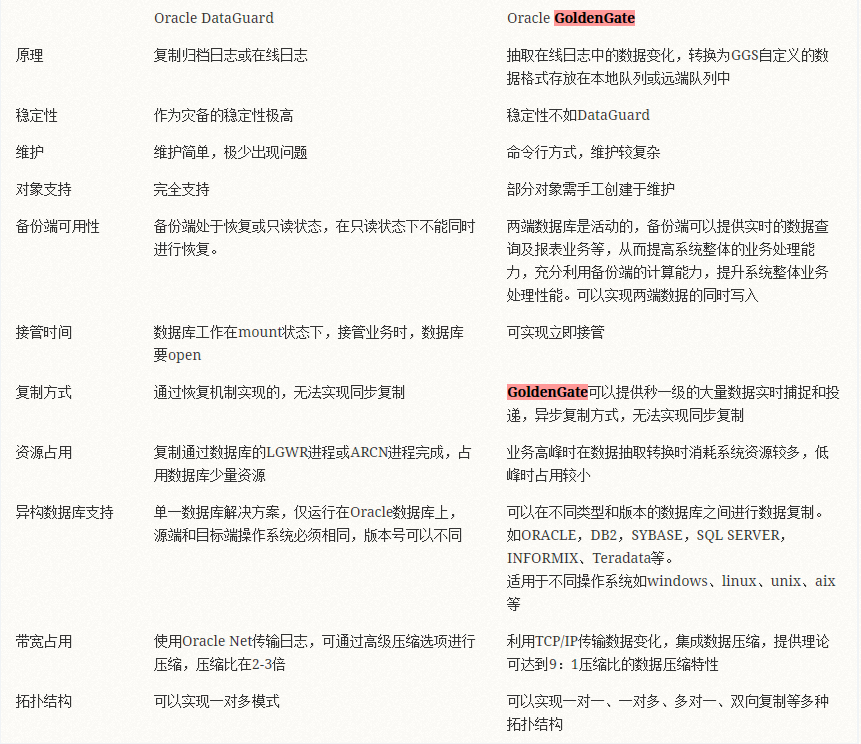
ADG (Active Data Guard) in 11g has made many new improvements, but its biggest feature remains its capability for synchronous replication, while OGG’s data replication is sub-second (slower than the second level) and can only be considered asynchronous.
GoldenGate is a product Oracle focuses on developing for data migration and synchronization, with support for heterogeneous environments being its biggest highlight. Compared with Data Guard, GoldenGate is a higher-level product strategically. This is evident from the fact that a GoldenGate purchase even includes the Data Guard license. Functionally, GoldenGate’s biggest advantage over Data Guard is certainly its support for heterogeneous environments. However, GoldenGate will not replace Data Guard. The reason is simple: Data Guard supports synchronous replication, which GoldenGate cannot achieve based on its principles. Therefore, both products will continue to develop. However, GoldenGate’s development is more important than Data Guard’s. In fact, Data Guard is already very mature, while GoldenGate has enormous development potential, at least in terms of configuration management where the pure command-line method will eventually be replaced, and there are many things that can be continuously improved.
Compared to Stream Replication, GoldenGate has too many advantages. Not to mention its support for heterogeneous platforms, first, its performance is very excellent. By parsing the log content to synchronize data, it is very efficient and does not depend on the database’s operation. Stream replication, on the other hand, needs to use the stream_pool_size memory area, relies on database performance, and generates many stream-related wait events. Compared to GoldenGate, the only advantage of Stream Replication is its simpler configuration. It can be said that for synchronizing small amounts of data, Stream Replication can be chosen because of its relatively simple configuration. For synchronizing large amounts of data, GoldenGate should be chosen because of its superior performance, proven reliability, and strong resilience under pressure. Of course, regardless of the data volume, GoldenGate’s performance far exceeds that of the Stream method.
Regarding initial loading during data migration, GoldenGate provides a dedicated tool called Initial Load. We have tested it, and it can achieve correct migration for most data. However, it is particularly important to note that all tables must have primary keys. Additionally, there are issues migrating long and lob data types, as well as nested tables, requiring other methods to resolve. There are also problems with sequences, which will be summarized in a subsequent migration case study. For initial loading, many options are available, such as RMAN, Data Pump, or GoldenGate’s own Initial Load tool. We need to understand their differences to meet various requirements:
1. RMAN is the fastest, but has cross-platform and version compatibility issues, and requires the database to be shut down during operation.
2. Data Pump is slower, can handle cross-platform and version differences, but also requires the database to be shut down during operation.
3. GoldenGate’s Initial Load is slow, works cross-platform and cross-version, does not require a database shutdown, and can be performed online.
Therefore, if your production database faces data migration issues with very limited downtime, you can choose GoldenGate’s Initial Load for the initial loading. Even if the loading time is very long, it does not affect the use of your production database, which should be acceptable. If your production database has sufficient downtime, then without hesitation, choose RMAN for the initial loading, provided the platform supports it.
Sometimes, there are many data migration and replication requirements, and under strict downtime constraints, we need a proven tool like this to implement them. Of course, there are similar tools from other vendors, but most of them are implemented by calling parallel Data Pump at the bottom layer.
Data Guard (including Active Data Guard) ==> Full database replication for disaster recovery, high availability, read-write separation. Good performance, high network requirements.
Streams ==銆?Supports unidirectional or bidirectional stream replication, multiple granularities: Table, Schema, DB. Free. More bugs, higher management difficulty, poor performance, high network requirements.
GoldenGate ==> Supports unidirectional or bidirectional synchronous replication, multiple granularities. Expensive licensing, moderate management difficulty, good performance, low network requirements.