

1. Optimize Your Queries for the Query Cache
Most MySQL servers have query caching enabled. It is one of the most effective ways to improve performance, and it is handled by MySQL's database engine. When many identical queries are executed multiple times, their results are placed into a cache so that subsequent identical queries access the cached results directly without operating on the tables.
The main issue here is that this is something easily overlooked by programmers, because some of our query statements can prevent MySQL from using the cache. Look at the examples below:
Copy code The code is as follows:
// Query cache not enabled
$r = mysql_query("SELECT username FROM user WHERE signup_date >= CURDATE()");
// Query cache enabled
$today = date("Y-m-d");
$r = mysql_query("SELECT username FROM user WHERE signup_date >= '$today'");
The difference between the two SQL statements above is CURDATE(). MySQL's query cache does not work for this function. So, functions like NOW() and RAND() or other similar SQL functions will not enable the query cache, because the return values of these functions are variable and volatile. Therefore, what you need is to replace MySQL functions with a variable to enable caching.
2. EXPLAIN Your SELECT Queries
Using the EXPLAIN keyword allows you to see how MySQL processes your SQL statements. This helps you analyze performance bottlenecks in your query statements or table structures.
The EXPLAIN result will also tell you how your index primary keys are being utilized, how your data tables are searched and sorted… and much more.
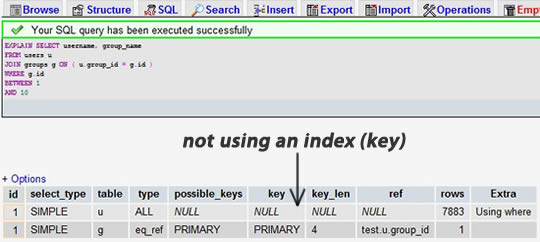
Pick one of your SELECT statements (the most complex one with multiple table joins is recommended) and add the keyword EXPLAIN in front of it. You can use phpmyadmin for this. Then, you will see a table. In the example below, we forgot to add an index on group_id and have a table join:
After we add an index to the group_id field: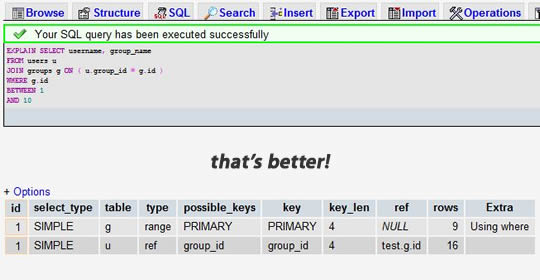
We can see that the previous result shows a search of 7883 rows, while the latter only searched 9 and 16 rows across the two tables. Checking the rows column lets us find potential performance issues.
3. Use LIMIT 1 When You Only Need One Row
When querying tables, sometimes you already know there will be only one result, but maybe because you need to fetch a cursor, or perhaps check the number of returned records.
In these cases, adding LIMIT 1 can increase performance. This way, the MySQL database engine will stop searching after finding one record instead of continuing to look for the next matching record.
The example below is just to check if there is a user from “China”. Obviously, the latter is more efficient than the former. (Note that the first uses Select *, the second uses Select 1)
Copy code The code is as follows:
// Inefficient:
$r = mysql_query("SELECT * FROM user WHERE country = 'China'");
if (mysql_num_rows($r) > 0) {
// …
}
// Efficient:
$r = mysql_query("SELECT 1 FROM user WHERE country = 'China' LIMIT 1");
if (mysql_num_rows($r) > 0) {
// …
}
4. Index Your Search Fields
Indexes are not necessarily just for primary keys or unique fields. If there is a field in your table that you frequently use for searches, then index it.
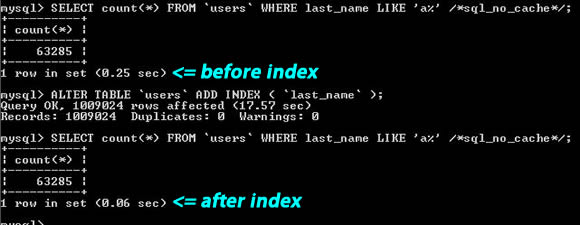
From the image above, you can see for the search string “last_name LIKE ‘a%'”, one has an index and the other does not, resulting in about a 4x performance difference.
Also, you should know what kinds of searches cannot use normal indexes. For example, when you need to search for a word in a large article, like: “WHERE post_content LIKE ‘%apple%'”, indexes might be meaningless. You might need to use MySQL full-text indexes or create your own index (e.g., using search keywords or Tags).
5. Use Comparable Column Types in Joins and Index Them
If your application has many JOIN queries, you should ensure that the fields used for joining in both tables are indexed. This way, MySQL will internally initiate mechanisms to optimize the JOIN SQL statements for you.
Moreover, these fields used for joining should be of the same type. For instance, if you join a DECIMAL field with an INT field, MySQL will not be able to use their indexes. For STRING types, they also need to have the same character set. (The character sets of two tables might be different)
Copy code The code is as follows:
// Find company in state
$r = mysql_query("SELECT company_name FROM users
LEFT JOIN companies ON (users.state = companies.state)
WHERE users.id = $user_id");
// Both state fields should be indexed, of comparable types, and the same character set.
6. Never Use ORDER BY RAND()
Want to shuffle returned data rows? Pick a random record? Honestly, I don't know who invented this usage, but many novices love using it. You just don't realize how terrible the performance problem is.
If you really want to shuffle returned data rows, you have N ways to achieve that. Using this only causes your database performance to degrade exponentially. The issue here is: MySQL has to execute the RAND() function (which is CPU-intensive) for every row, and then sort them. Even using LIMIT 1 doesn't help (because sorting is required).
The example below picks a random record
Copy code The code is as follows:
// Never do this:
$r = mysql_query("SELECT username FROM user ORDER BY RAND() LIMIT 1");
// This is much better:
$r = mysql_query("SELECT count(*) FROM user");
$d = mysql_fetch_row($r);
$rand = mt_rand(0,$d[0] – 1);
$r = mysql_query("SELECT username FROM user LIMIT $rand, 1");
7. Avoid SELECT *
The more data you read from the database, the slower the query becomes. And, if your database server and web server are two independent servers, this can also increase the load of network transmission.
So, you should develop a good habit of only fetching what you need.
Copy code The code is as follows:
// Not recommended
$r = mysql_query("SELECT * FROM user WHERE user_id = 1");
$d = mysql_fetch_assoc($r);
echo "Welcome {$d['username']}";
// Recommended
$r = mysql_query("SELECT username FROM user WHERE user_id = 1");
$d = mysql_fetch_assoc($r);
echo "Welcome {$d['username']}";
8. Always Set an ID for Each Table
We should set an ID as the primary key for every table in the database, and preferably an INT type (UNSIGNED recommended) with the AUTO_INCREMENT flag set.
Even if your users table has a primary key field like “email”, don't make it the primary key. Using a VARCHAR type as a primary key degrades performance. Additionally, in your program, you should use the table's ID to construct your data structures.
Also, under the MySQL data engine, some operations require the use of primary keys, where the performance and settings of primary keys become very important, such as for clustering and partitioning…
Here, there is only one exception, which is the “foreign key” of an “association table.” That is, the primary key of this table consists of the primary keys of several other tables. We call this situation “foreign key.” For example: a “student table” has student IDs, a “course table” has course IDs, then the “grade table” is the “association table,” linking the student table and course table. In the grade table, student ID and course ID are called “foreign keys” which together form the primary key.
9. Use ENUM Instead of VARCHAR
The ENUM type is very fast and compact. In reality, it stores TINYINT, but displays as a string externally. This makes it perfect for using fields as option lists.
If you have a field like “gender,” “country,” “ethnicity,” “status,” or “department,” and you know the values for these fields are limited and fixed, then you should use ENUM instead of VARCHAR.
MySQL also has a “suggestion” (see tip ten) telling you how to reorganize your table structure. When you have a VARCHAR field, this suggestion will tell you to change it to ENUM type. Using PROCEDURE ANALYSE() you can get related suggestions.
10. Get Suggestions from PROCEDURE ANALYSE()
PROCEDURE ANALYSE() lets MySQL analyze your fields and their actual data, providing you with useful suggestions. These suggestions are only useful if the table has actual data, because making major decisions requires data as a basis.
For example, if you created an INT field as your primary key, but there isn't much data, PROCEDURE ANALYSE() might suggest changing the field type to MEDIUMINT. Or if you used a VARCHAR field, you might get a suggestion to change it to ENUM because there isn't much data. These suggestions might not be accurate enough because the decision basis isn't sufficient.
In phpmyadmin, you can view these suggestions by clicking “Propose table structure” while viewing a table.
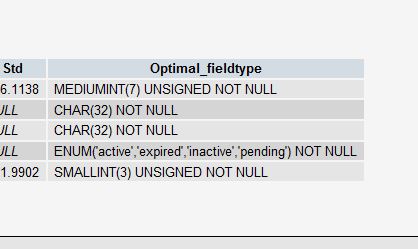
Keep in mind that these are just suggestions. They become more accurate as your table contains more data. Always remember that you are the one making the final decision.
11. Use NOT NULL Whenever Possible
Unless you have a very specific reason to use NULL values, you should always keep your fields NOT NULL. This might seem a bit controversial, read on.
First, ask yourself, what is the difference between “Empty” and “NULL” (if it's INT, that's 0 and NULL)? If you think there is no difference between them, then don't use NULL. (Did you know? In Oracle, NULL and Empty strings are the same!)
Don't assume NULL requires no space; it requires extra space, and your program logic becomes more complex when performing comparisons. Of course, this isn't to say you cannot use NULL. Real-world situations are complex, and there will still be cases where you need to use NULL values.
The following is from MySQL's own documentation:
“NULL columns require additional space in the row to record whether their values are NULL. For MyISAM tables, each NULL column takes one bit extra, rounded up to the nearest byte.”
12. Prepared Statements
Prepared Statements are similar to stored procedures, a collection of SQL statements running in the background. We can gain many benefits from using prepared statements, both in terms of performance and security.
Prepared Statements can check your bound variables, thus protecting your program from “SQL injection” attacks. Of course, you can also check these variables manually; however, manual checks are prone to errors and are often forgotten by programmers. When using frameworks or ORMs, this problem becomes less severe.
Regarding performance, when the same query is used multiple times, this can bring you significant performance advantages. You can define parameters for these Prepared Statements, and MySQL only needs to parse them once.
Moreover, the latest versions of MySQL transmit Prepared Statements in binary format, making network transmission very efficient.
Of course, there are some situations where we need to avoid using Prepared Statements because they do not support the query cache. However, it is said to be supported after version 5.1.
To use prepared statements in PHP, you can check the manual: the mysqli extension, or use database abstraction layers like PDO.
Copy code The code is as follows:
// Create prepared statement
if ($stmt = $mysqli->prepare("SELECT username FROM user WHERE state=?")) {
// Bind parameters
$stmt->bind_param("s", $state);
// Execute
$stmt->execute();
// Bind results
$stmt->bind_result($username);
// Fetch cursor
$stmt->fetch();
printf("%s is from %s/n", $username, $state);
$stmt->close();
}
13. Unbuffered Queries
Normally, when you execute a SQL statement in your script, your program pauses until the SQL statement returns, and then your program continues execution. You can use unbuffered queries to change this behavior.
There is a very good explanation about this in the PHP documentation for the mysql_unbuffered_query() function:
“mysql_unbuffered_query() sends the SQL query query to MySQL without automatically fetching and buffering the result rows as mysql_query() does. This saves a considerable amount of memory with SQL queries that produce large result sets, and you can start working on the result set immediately after the first row has been retrieved as you don't have to wait until the complete SQL query has been performed.”
This means that mysql_unbuffered_query() sends a SQL statement to MySQL without automatically fetching and caching the results like mysql_query() does. This saves a significant amount of memory, especially for queries producing large result sets, and you don't need to wait for all results to return—you can start working on the query result immediately when the first row of data is returned.
However, there are some limitations. Because you must either read all rows, or call mysql_free_result() to clear the results before performing the next query. Also, mysql_num_rows() or mysql_data_seek() will be unusable. So, you need to carefully consider whether to use unbuffered queries.
14. Store IP Addresses as UNSIGNED INT
Many programmers create a VARCHAR(15) field to store IP addresses in string form rather than integer form. If you store them as integers, it only takes 4 bytes, and you can have fixed-length fields. Moreover, this brings query advantages, especially when you need to use WHERE conditions like: IP between ip1 and ip2.
We must use UNSIGNED INT because IP addresses use the entire 32-bit unsigned integer.
For your queries, you can use INET_ATON() to convert a string IP to an integer, and INET_NTOA() to convert an integer back to a string IP. In PHP, there are corresponding functions ip2long() and long2ip().
1 $r = "UPDATE users SET ip = INET_ATON('{$_SERVER['REMOTE_ADDR']}') WHERE user_id = $user_id";
15. Fixed-Length Tables Are Faster
If all fields in a table are “fixed length,” the entire table is considered “static” or “fixed-length.” For example, a table without fields of the following types: VARCHAR, TEXT, BLOB. As long as you include one of these fields, the table is not a “fixed-length static table,” and MySQL engine will process it using another method.
Fixed-length tables improve performance because MySQL searches faster, as the fixed length makes it easy to calculate the offset of the next data item, so reading is naturally quicker. If fields are not fixed-length, then finding the next record each time requires the program to locate the primary key.
Furthermore, fixed-length tables are easier to cache and rebuild. However, the only side effect is that fixed-length fields waste some space, because a fixed-length field allocates all that space regardless of whether you use it.
Using “Vertical Partitioning” technology (see the next tip), you can split your table into two: one fixed-length, one variable-length.
16. Vertical Partitioning
“Vertical Partitioning” is a method of splitting a database table into several tables by columns, which reduces the complexity and number of fields in the table, thus achieving optimization. (In the past, working on a bank project, I saw a table with over 100 fields—truly terrifying.)
Example One: There is a field in the Users table for home address. This is an optional field, and compared to other fields, you don't need to frequently read or modify this field during database operations apart from personal information. So, why not put it in another table? This will give your table better performance. Think about it, most of the time, for the user table, only user ID, username, password, user role, etc., are frequently used. Smaller tables always mean better performance.
Example Two: You have a field called “last_login” which is updated every time a user logs in. However, each update causes the query cache for that table to be cleared. So, you can place this field in another table, so it doesn't affect your continuous reading of user ID, username, and user role, as the query cache will help increase performance significantly.
Also, you need to be careful that you won't frequently Join the tables formed by these separated fields; otherwise, performance will be worse than without partitioning, and it will drop exponentially.
17. Split Large DELETE or INSERT Statements
If you need to execute a large DELETE or INSERT query on a live site, you must be very careful to avoid your operation stopping the response of your entire website. Because these two operations lock tables, and once a table is locked, no other operations can proceed.
Apache will have many child processes or threads. So, it works quite efficiently, but our server also does not want too many child processes, threads, and database connections, as this consumes a great deal of server resources, especially memory.
If you lock your table for a period of time, say 30 seconds, then for a high-traffic site, the accumulated access processes/threads, database connections, and open file counts accumulated during these 30 seconds might not only crash your web service but could also instantly bring down your entire server.
Therefore, if you have a large operation, you must split it. Using LIMIT conditions is a good method. Here is an example:
Copy code The code is as follows:
while (1) {
// Only do 1000 at a time
mysql_query("DELETE FROM logs WHERE log_date <= '2009-11-01' LIMIT 1000");
if (mysql_affected_rows() == 0) {
// Nothing left to delete, exit!
break;
}
// Take a short break each time
usleep(50000);
}
18. Smaller Columns Are Faster
For most database engines, hard disk operation might be the biggest bottleneck. So, making your data compact helps tremendously in this situation because it reduces hard disk access.
Refer to MySQL's Storage Requirements documentation to check all data types.
If a table only has a few columns (like dictionary tables, configuration tables), then there is no reason to use INT as a primary key; using MEDIUMINT, SMALLINT, or even the smaller TINYINT is more economical. If you don't need to record time, using DATE is much better than DATETIME.
Of course, you also need to leave enough room for expansion, otherwise, if you have to deal with this later, you'll be in big trouble. See the Slashdot example (November 6, 2009) where a simple ALTER TABLE statement took over 3 hours because there were sixteen million rows of data.
19. Choose the Right Storage Engine
There are two main storage engines in MySQL: MyISAM and InnoDB, each with its pros and cons. A previous article on CoolShell, "MySQL: InnoDB or MyISAM?", discussed this matter.
MyISAM is suitable for applications that require a lot of queries, but it is not great for heavy write operations. Even just updating one field locks the entire table, and other processes, even read processes, cannot operate until the update is complete. Also, MyISAM is extremely fast for calculations like SELECT COUNT(*).
InnoDB's trend is to be a very complex storage engine. For some small applications, it may be slower than MyISAM. However, it supports “row locking,” so it excels when there are more write operations. It also supports more advanced applications, such as transactions.
Below is the MySQL manual
* target=”_blank”MyISAM Storage Engine
* InnoDB Storage Engine
20. Use an Object Relational Mapper
Using an ORM (Object Relational Mapper), you can achieve reliable performance gains. Everything an ORM can do can also be written manually. However, that requires a high-level expert.
The most important feature of ORMs is “Lazy Loading,” meaning the actual fetching is only done when values are needed. But you also need to be wary of the side effects of this mechanism, as it can degrade performance by creating many small queries.
ORM can also package your SQL statements into a transaction, which is much faster than executing them individually.
Currently, a personal favorite PHP ORM is: Doctrine.
21. Beware of “Persistent Connections”
The purpose of “Persistent Connections” is to reduce the number of times a MySQL connection is recreated. Once a connection is created, it stays in a connected state indefinitely, even after the database operation is finished. And, since our Apache begins to reuse its child processes—meaning the next HTTP request reuses the Apache child process and reuses the same MySQL connection.
* PHP Manual: mysql_pconnect()
In theory, this sounds very nice. But from personal experience (and that of most people), this feature creates more trouble than it's worth. Because you only have a limited number of connections, memory issues, file handle limits, etc.
Moreover, Apache runs in an extremely parallel environment, creating many, many child processes. That's why this “Persistent Connections” mechanism doesn't work well. Before deciding to use “Persistent Connections,” you need to carefully consider the architecture of your entire system.
http://bbs.php100.com/read-htm-tid-518410.html