

Server Side
rsyncd.conf
uid = nobody
gid = nobody
use chroot= no
max connections = 10
strict mode = yes // Whether to check file permissions
pid file=/var/run/rsyncd.pid // Daemon process path
lock file =/var/run/rsync.lock // Lock file for max connections
log file=/var/log/rsyncd.log // Log file
[data] // Module name, indicates the start of a module
path =/data/website1/images
comment= data file
ignore errors // Can ignore some unrelated I/O errors
read only =no // Whether read-only; no means users can upload files
write only =no // no means users can download files, yes means users cannot download
hosts allow = *
hosts deny =192.168.12.131
list =false
uid =root
gid =root
auth users = backup // Username for connecting to the module, unrelated to root
secrets file= /etc/server.pass // Username and password file for connecting to the module
server.pass
backup:data // Note: needs 600 permissions: chmod 600 /etc/server.pass
Enable rsync
rsync –daemon
server.pass file content:
backup:123456
Client Side
The client requires no setup, but to avoid entering a password during synchronization, you need to create a password file (Note: use the same user and password as in rsyncd.conf, path can be arbitrary, just specify it when synchronizing.)
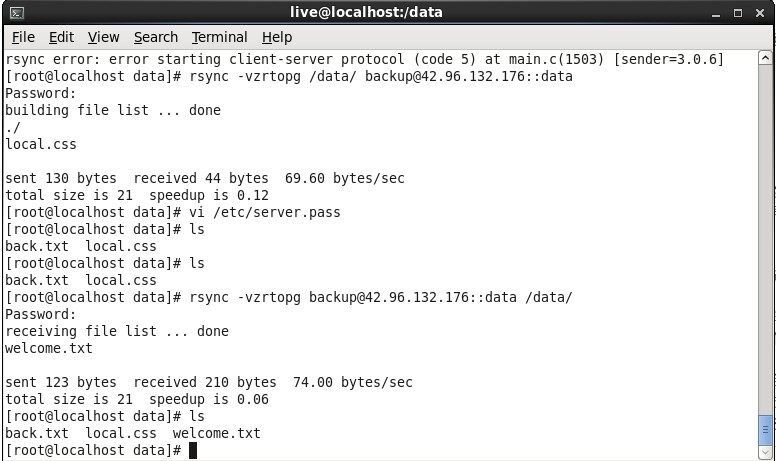
Execute synchronization:
Problems Encountered
When configuring rsync, the roles of client and server were unclear. Is it the client syncing data to the server, or the server’s data being synced to the client? My understanding was that content submitted by the client is synced to the server, but when I executed the sync command on the client, I found that the server’s data was synced to the client. The command I executed was as follows:rsync –vzrtopg –delete www@192.168.1.147(Connected Host)::backup /data/test/ –password-file=/etc/server.passMy desired approach should have been:rsync –vzrtopg –delete /data/test/ www@192.168.1.147::backup –password-file=/etc/server.pass
It’s obvious. The upload/download method of rsync is similar to scp. There is no strict client or server side; a machine can sync its local data to another, or sync data from a specified directory on another machine to itself. For convenience, consider the machine with the more complex configuration (needing a config file) as the server side。