

<<
Preface
Last year, driven by a strong interest in website architecture, I shared many classic cases of large-scale website architecture with everyone. However, most of them only covered the general idea without deep dives. Interested friends can visit the website architecture category on my blog for further study and discussion. This year, I plan to continue learning about website architecture and conduct more in-depth analysis and hands-on practice. Of course, I will share and exchange the learning results with you promptly. I hope my skills can reach the next level this year.
These past few days, I have been focusing on issues related to image storage in large websites. Through understanding and practice, I have gained deep insights. I think I can write a series of articles on the topic of image storage to summarize this learning experience.
In the first article, let’s start with standalone image servers. True love means becoming more independent, right? Come on!
Main Content
I. The Necessity of Deploying Standalone Image Servers
We know that whether for Apache or IIS, images are always the most resource-intensive element. If the image service and application service are placed on the same server, the application server can easily crash due to the high I/O load from images. Therefore, for some large-scale website projects, it is necessary to separate the image servers from the application servers. Deploying standalone image servers (or even a server cluster) is the most fundamental part of an image storage solution for large websites. Only with independent image servers can we perform more targeted performance optimizations. For example, from a hardware perspective, image servers can be equipped with high-end hard drives, swapping 7200 RPM drives for 15000 RPM ones, while the CPU can remain standard. From a software perspective, specialized file systems can be configured for image servers to handle I/O requests for images. For instance, Taobao’s TFS effectively solved the I/O nightmare caused by massive numbers of small image files. At the same time, we can also use nginx or squid to proxy image requests, and so on.
II. Using an Independent Domain Name
Note that this refers to an independent domain, not a subdomain. For example, Yahoo.com’s image server uses the domain yimg.com, rather than a subdomain like img.yahoo.com. Why is that? Personally, I think the main reasons are as follows:
1. Browsers have a limit on the number of concurrent connections under the same domain, usually between 2 and 6. The image below lists the concurrent connections for various browsers (sourced from the internet, not personally verified, for reference only).
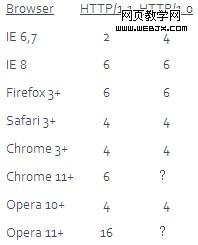
Thus, if we configure an independent domain for the image server, we can break through the browser’s connection limit when loading images on a page. In theory, adding an independent domain doubles the number of concurrent connections.
2. Due to cookies, it is detrimental to caching.
For example, if there is an image at http://upload.chinaz.com//, when we initiate a request to it, the cookies under the www.test.com domain will be sent along. Since most web caches only cache requests without cookies, this results in the image request missing the cache every time, forcing it to fetch the image from the origin server again, rendering image caching largely pointless. Therefore, it’s better to set up a separate independent domain for images. Of course, this approach isn’t just for images; CSS and JS files can also be handled with this logic.
3. Facilitates CDN synchronization.
I am not entirely clear on this point. My personal guess is that it’s related to the second point about cookies. I would appreciate it if experienced friends could leave a comment and share their insights, thank you.
III. How to Upload and Synchronize Images After Separating Image Servers
Of course, everything has two sides. While separating image servers indeed improves image access efficiency and greatly alleviates the I/O bottleneck caused by images on the server, image uploading and synchronization become major issues after separation. Below, I will discuss several solutions based on my personal ideas.
1. NFS Sharing Method
If you don’t want to synchronize all images to every image server, NFS sharing is the simplest and most practical method. NFS is a distributed client/server file system. The essence of NFS lies in sharing among users’ computers; users can connect to a shared computer and access files on it as if they were accessing a local hard drive.
The specific implementation idea is: the web server mounts directories exported by multiple image servers via NFS. The user first uploads images to the web server, and then the uploaded images are copied programmatically into this mount directory. This way, those several image servers can also access the newly uploaded images (note: it is only shared, not actually copied to the image servers). Then, bind independent domain names to those image servers, so the browser can access the images using separate domain names. This method basically has no delay caused by synchronization, but it depends on NFS; if NFS goes down, it will affect the web server. For a more intuitive expression, let me draw a picture. It’s quite rough, please bear with me.
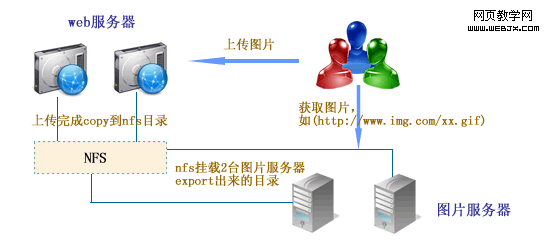
As for how to configure NFS, you can Google it, or read this article, which is about configuring NFS on Linux.
2. Using FTP Synchronization
Unlike NFS above, after the user uploads the images, they are synchronized to each image server using FTP. PHP, Java, and ASP.NET can all generally operate FTP. In this way, each image server saves a copy of the image, which also serves as a backup. However, the downside is that FTPing the images to the servers is relatively time-consuming, and if done asynchronously, there will be a delay. But generally, it’s acceptable for small image files.
Of course, besides the above two methods, there are others such as installing synchronization software and webservices, but I personally find the two mentioned above to be more reliable, so I will not introduce the others for now. If any friends have better suggestions, please leave a comment to share.
Alright, that’s all for the introduction to standalone image servers. Your additions are welcome. See you next time.