

<<
Whether you are building a blog or a professional portal, installing website visitor statistics is a must. Analyzing these stats helps you understand user data and gauge your website’s popularity. After all, any website we create is meant to attract as many users as possible — for a personal blog, it brings personal satisfaction, and for a commercial site, it subtly reveals its business value. In the early days when third-party analytics services were scarce, Maizi recalls using Ajian’s statistical source code. Later, most people switched to third-party tools provided by 51LA, CNZZ, and Baidu Analytics. For English websites, the more commonly used third-party tools are Google Analytics, StatCounter, and the like.

Most English analytics tools have certain limitations. Coincidentally, while browsing websites this morning, I came across this Piwik free open-source analytics program. After searching around, I found that it has received quite high praise online. As a free and open-source program, we can download it and install it on our own hosting (PHP+MySQL), then add our own sites to set up our own analytics. After testing it, Maizi finds it quite good — the IP database information is fairly accurate, and most importantly, the biggest advantage is that all the data information resides on your own client end.
So, Maizi is going to download a copy, install it, and check out the interface and effects. Previously, I used StatCounter for an English site, but its keyword data was only viewable for one day. If you needed to see data for a few days, you had to pay, which was rather frustrating.
Step 1: Download and Upload
Piwik Official Download Address: http://builds.piwik.org/latest.zip
After downloading and extracting the file, upload the piwik folder from the archive to the corresponding directory on your hosting or VPS. You can use a separate domain name or a sub-directory under an existing URL.
Step 2: Install the Program

There are 9 steps in total, much like installing a website CMS. And currently, it supports 48 languages, including Chinese, which makes it feel quite welcoming.
Step 3: Add a Site
At step 7, you will need to set up your first site. Of course, if you have many websites, you can add more later from the backend.
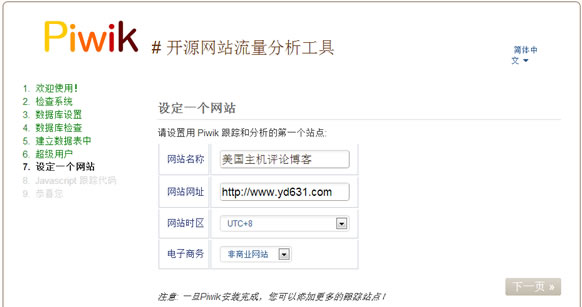
After the next step, you will get the tracking code. Just add it to your website — we should all know how to