How to Block Traffic From a Specific Country Using iptables
A client came under attack. Our network monitoring detected massive anomalous traffic persisting for 6 hours straight. We immediately contacted the client but received no response. We modified and restricted the client’s VPS to ensure that an attack on an individual VPS would not affect the entire server or other VPS users. We kept this VPS online (despite the ongoing attack). The attack continued for another 24 hours, and on Sunday it was still going on. We had reached our limit, but were still unable to reach the client. We asked another contact at the client’s website if they needed us to step in and help resolve the issue. After this contact agreed, we immediately threw ourselves into the fight against the DDoS (we dynamically scanned and blocked bad IPs, and now the client’s website is back up. The whole process was quite interesting; I’ll write another blog post about it when I have time). The first thing we did upon logging into the client’s VPS was to check the current connections and IPs. A flood of IPs from China was incessantly occupying port 80 鈥?a typical DDoS. So the first step was to cut off the attack source. Since the attack only targeted port 80, there were many ways to sever it: directly shutting down the web server, using a firewall/iptables to cut off port 80 or close all connections, taking the VPS network offline, changing the IP, and so on. Because the attack source was domestic (within China), VPSee decided to block all incoming access from within China. This way, it would look like the website was blocked by the Great Firewall rather than being attacked, helping to maintain the client’s website’s glorious image. So how do you block IPs from a specific country?
The method is easy. First, go to IPdeny and download the IP address list compiled by country code, for example, download cn.zone:
# wget http://www.ipdeny.com/ipblocks/data/countries/cn.zone
Once you have all the IP addresses for a country, blocking these IPs is simple. Just write a script that reads the cn.zone file line by line and adds them to iptables:
#!/bin/bash# Block traffic from a specific country# written by vpsee.comCOUNTRY="cn"IPTABLES=/sbin/iptablesEGREP=/bin/egrepif [ "$(id -u)" != "0" ]; then echo "you must be root" 1>&2 exit 1firesetrules() {$IPTABLES -F$IPTABLES -t nat -F$IPTABLES -t mangle -F$IPTABLES -X}resetrulesfor c in $COUNTRYdo country_file=$c.zone IPS=$($EGREP -v "^#|^$" $country_file) for ip in $IPS do echo "blocking $ip" $IPTABLES -A INPUT -s $ip -j DROP donedoneexit 0
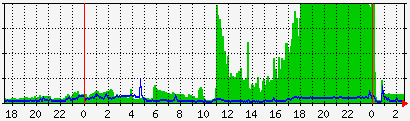
Both good and bad IPs get blocked. This approach is certainly not elegant, and blocking IPs doesn’t solve the problem of being attacked, but it is the first step toward a solution. Only after blocking the attack source do we have the bandwidth, time, and peace of mind to check the VPS for security issues. Here is a network traffic graph from our client under attack, showing all bandwidth consumed by attack traffic from 18:00 to 0:00. During this time, the client could not log into the VPS, and visitors could not access the website: